MI Creating Google Earth KMZ: Difference between revisions
Jump to navigation
Jump to search
Content deleted Content added
Chris Huxley (talk | contribs) Created page with "* Load the Google Earth Connection Utility using Tools >> Tool Manager... 300px<br> 400px<br>..." |
No edit summary |
||
| (4 intermediate revisions by 2 users not shown) | |||
| Line 1: | Line 1: | ||
<ol> |
|||
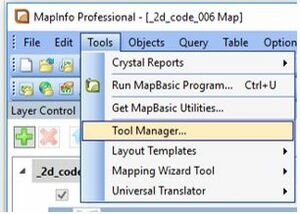
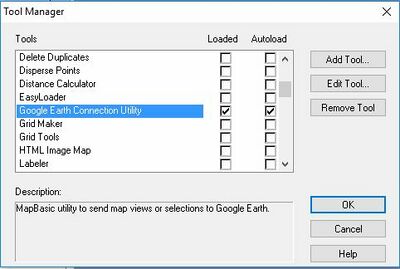
<li> Load the Google Earth Connection Utility using Tools >> Tool Manager... <br> |
|||
[[File:MapInfo_to_Google_Earth_000.JPG|300px]]<br> |
|||
[[File:MapInfo_to_Google_Earth_001.JPG|400px]]<br> |
[[File:MapInfo_to_Google_Earth_000.JPG|300px]][[File:MapInfo_to_Google_Earth_001.JPG|400px]]<br> |
||
<li> Open the MapInfo table containing the data you wish to export to Google Earth. <br> |
|||
<li> Select the object or objects you wish to export to Google Earth. <br> |
|||
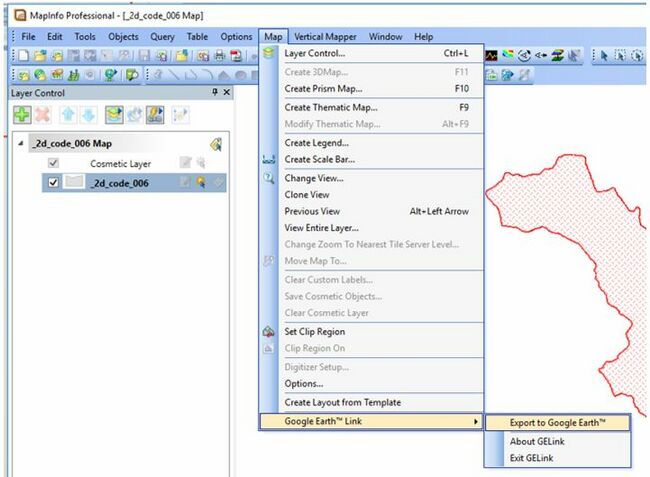
<li> Select "Export to Google Earth" via the Map Options.<br> |
|||
[[File:MapInfo_to_Google_Earth_002.JPG|650px]]<br> |
[[File:MapInfo_to_Google_Earth_002.JPG|650px]]<br> |
||
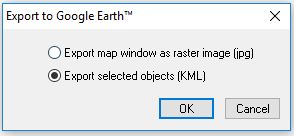
<li> Select "Export selected objects (KML)" <br> |
|||
[[File:MapInfo_to_Google_Earth_003.JPG|300px]]<br> |
[[File:MapInfo_to_Google_Earth_003.JPG|300px]]<br> |
||
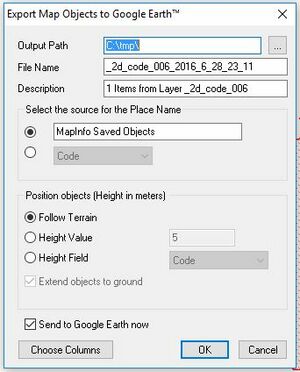
<li> Set the export options to the folder location and filename you desire. <br> |
|||
[[File:MapInfo_to_Google_Earth_005.JPG|300px]]<br> |
[[File:MapInfo_to_Google_Earth_005.JPG|300px]]<br> |
||
</ol> |
|||
{{Tips Navigation |
|||
|uplink=[[Google_Earth_Tips| Back to Google Earth Tips]] |
|||
}} |
|||
{{Tips Navigation |
|||
|uplink=[[MapInfo_Tips| Back to MapInfo Tips]] |
|||
}} |
|||
Latest revision as of 11:41, 8 January 2026
- Load the Google Earth Connection Utility using Tools >> Tool Manager...
- Open the MapInfo table containing the data you wish to export to Google Earth.
- Select the object or objects you wish to export to Google Earth.
- Select "Export to Google Earth" via the Map Options.
- Select "Export selected objects (KML)"
- Set the export options to the folder location and filename you desire.


| Up |
|---|
 Back to Google Earth Tips Back to Google Earth Tips
|
| Up |
|---|
| Back to MapInfo Tips
|