WIBU Licence Update Softlock Import: Difference between revisions
Chris Huxley (talk | contribs) Created page with "=Introduction= This page describes the process for importing a licence update file for a Wibu dongle. In order to perform the update, you will need a .WibuCmRaU file that wil..." |
Chris Huxley (talk | contribs) Tag: Manual revert |
||
| (6 intermediate revisions by 2 users not shown) | |||
| Line 12: | Line 12: | ||
=Method= |
=Method= |
||
<ol> |
<ol> |
||
<li> |
<li>Open the Code Meter Control Centre from the taskbar by double clicking on the following icon [[File:CM CM Stick Green.jpg|20px]]. This can also be opened from the Start Menu. Once opened the Control Centre should look like the below:</li> |
||
<li> Click on the '''Licence Update''' button.</li> |
<li> Select the license container item from the list on the left, then Click on the '''Licence Update''' button.</li> |
||
[[File:CodeMeter Update01.jpg|600px]] |
[[File:CodeMeter Update01.jpg|600px]] |
||
<li>At the welcome to the CmFAS Assistant screen, bit next to proceed.</li> |
<li>At the welcome to the CmFAS Assistant screen, bit next to proceed.</li> |
||
| Line 21: | Line 21: | ||
<li>Navigate to the .WibuCmRaU file send to you by TUFLOW staff and select this. Click commit to process the update.</li> |
<li>Navigate to the .WibuCmRaU file send to you by TUFLOW staff and select this. Click commit to process the update.</li> |
||
[[File:CodeMeter Update11.jpg|600px]] |
[[File:CodeMeter Update11.jpg|600px]] |
||
<li>After a few seconds, you should get a message to say that the licence update has been successful. |
<li>After a few seconds, you should get a message to say that the licence update has been successful. |
||
* If this update is associated with deleting a licence and sales@tuflow.com have requested a receipt from you, please click the create receipt "here" link before pressing "Finish". |
|||
* Otherwise, if this is a standard update and sales@tuflow.com have not requested a receipt, press "Finish". |
|||
* If you receive a pop-up message that states the licence update was not sucessful, please see the troubleshooting section below. |
|||
[[File:Codemeter_Licence_Update_Complete_MSG.png|800px]] |
|||
</ol> |
</ol> |
||
=Troubleshooting= |
=Troubleshooting= |
||
The following errors are based on emails we've received, if you receive a different message or are unable to import an update please see email support@tuflow.com. Please include screen images of any relevant error messages.<br> |
The following errors are based on emails we've received, if you receive a different message or are unable to import an update please see email [mailto:support@tuflow.com support@tuflow.com]. Please include screen images of any relevant error messages.<br> |
||
<br> |
<br> |
||
'''Error 229 - Update could not be imported. Contents of CmStick is newer than update'''<br> |
'''Error 229 - Update could not be imported. Contents of CmStick is newer than update'''<br> |
||
| Line 30: | Line 35: | ||
* The licence update has already been imported |
* The licence update has already been imported |
||
* An incorrect (old) update file was applied by mistake |
* An incorrect (old) update file was applied by mistake |
||
Summary: |
|||
Latest revision as of 10:40, 9 January 2026
Introduction
This page describes the process for importing a licence update file for a Wibu dongle. In order to perform the update, you will need a .WibuCmRaU file that will have been emailed to you by TUFLOW staff, this should be saved on your computer. If you have this file you can begin the process below!
Common Questions
I have TUFLOW simulations running, will it stop these?
No, we have found that the process below should work, even if simulations are currently running. If you are worried, simply hold off until your simulations have finished.
Do I need to update the licence on each computer that will use TUFLOW?
No, the update file modifies the dongle coding itself, once applied the changes will apply to all computer that use the dongle. If you try to apply an update file more than once an error will be generated.
If I update the Wibu licence for a new version of TUFLOW, will I still be able to use current / previous versions of TUFLOW?
Yes, if you update the licence for the 2015 maintenance period, you can still use previous versions of TUFLOW such as the 2013 TUFLOW release.
Method
- Open the Code Meter Control Centre from the taskbar by double clicking on the following icon
 . This can also be opened from the Start Menu. Once opened the Control Centre should look like the below:
 - Select the license container item from the list on the left, then Click on the Licence Update button.
- At the welcome to the CmFAS Assistant screen, bit next to proceed.
- When prompted to chose the desired action, select Import Licence Update and hit next.
- Navigate to the .WibuCmRaU file send to you by TUFLOW staff and select this. Click commit to process the update.
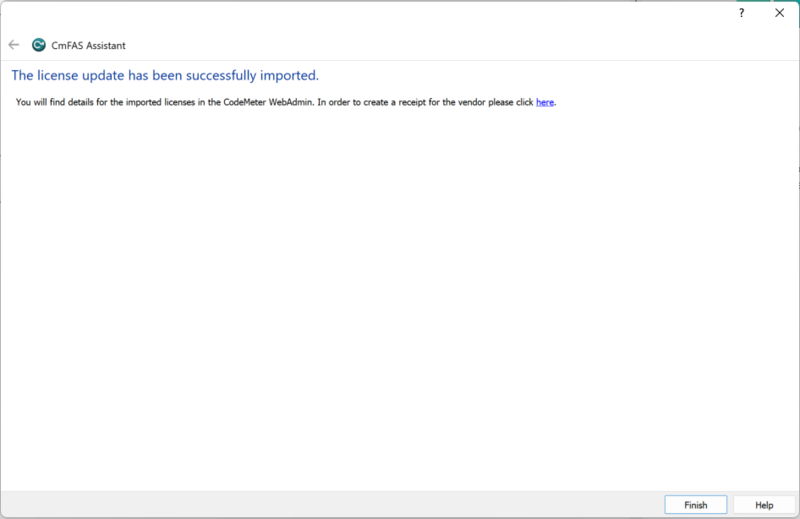
- After a few seconds, you should get a message to say that the licence update has been successful.
- If this update is associated with deleting a licence and sales@tuflow.com have requested a receipt from you, please click the create receipt "here" link before pressing "Finish".
- Otherwise, if this is a standard update and sales@tuflow.com have not requested a receipt, press "Finish".
- If you receive a pop-up message that states the licence update was not sucessful, please see the troubleshooting section below.


Troubleshooting
The following errors are based on emails we've received, if you receive a different message or are unable to import an update please see email support@tuflow.com. Please include screen images of any relevant error messages.
Error 229 - Update could not be imported. Contents of CmStick is newer than update
This indicates the contents of the dongle are newer than the update being applied. This could occur if:
- The licence update has already been imported
- An incorrect (old) update file was applied by mistake