GPU Setup: Difference between revisions
Jump to navigation
Jump to search
Content deleted Content added
No edit summary |
|||
| (2 intermediate revisions by one other user not shown) | |||
| Line 14: | Line 14: | ||
== Updating NVIDIA Drivers == |
== Updating NVIDIA Drivers == |
||
It is likely that the NVIDIA drivers will need to be updated to the latest version as the drivers shipped with the computers are usually outdated. |
It is likely that the NVIDIA drivers will need to be updated to the latest version as the drivers shipped with the computers are usually outdated. |
||
<ol> |
<ol> |
||
| ⚫ | |||
<li>Open the NVIDA Control Panel (by right clicking on the desktop and selecting NVIDIA Control Panel or NVIDIA Display). Once the control panel has loaded, select Help >> Updates from the menu items. If new drivers are available, please download and install these by following the prompts. <br> |
|||
<li>Enter your GPU details, and click Search: <br> |
|||
| ⚫ | |||
[[File: GPU Setup 004.PNG|500px]]<br> |
|||
| ⚫ | |||
<li>Download Updated Driver and run Executable:<br> |
|||
| ⚫ | |||
</ol> |
</ol> |
||
''NOTE: Even if not prompted by the system, a restart is recommended to ensure the new drivers are correctly detected prior to running any simulations.'' |
''NOTE: Even if not prompted by the system, a restart is recommended to ensure the new drivers are correctly detected prior to running any simulations.'' |
||
{{Tips Navigation |
|||
|uplink=[[Tutorial_Model_Archive| Back to Tutorial Model Archive]] |
|||
}} |
|||
Latest revision as of 12:07, 8 January 2026
This page introduces how to check whether your NVIDIA GPU card is CUDA enabled, and whether the latest NVIDIA drivers are installed.
CUDA Compatible Graphics
TUFLOW GPU requires an NVIDIA CUDA enabled GPU. To check if your computer has an NVIDA GPU and if it is CUDA enabled:
- Right click on the Windows desktop.
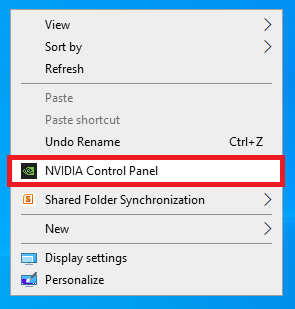
- If you see “NVIDIA Control Panel” or “NVIDIA Display” in the pop up dialogue, the computer has an NVIDIA GPU.
- Click on “NVIDIA Control Panel” or “NVIDIA Display” in the pop up dialogue.
- The GPU model should be displayed in the graphics card information.
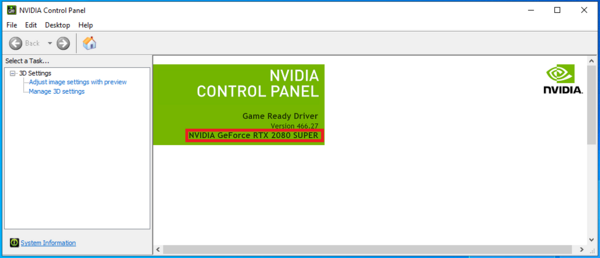
- Check to see if the graphics card is listed on the following website: https://developer.nvidia.com/cuda-gpus


Updating NVIDIA Drivers
It is likely that the NVIDIA drivers will need to be updated to the latest version as the drivers shipped with the computers are usually outdated.
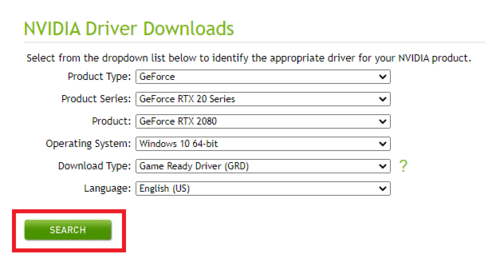
- Access the NVIDIA Driver Downloads (by following this link: https://www.nvidia.com/Download/index.aspx).
- Enter your GPU details, and click Search:
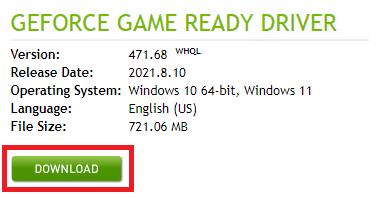
- Download Updated Driver and run Executable:


NOTE: Even if not prompted by the system, a restart is recommended to ensure the new drivers are correctly detected prior to running any simulations.
| Up |
|---|
 Back to Tutorial Model Archive Back to Tutorial Model Archive
|