Integrity Tool - Empty Geometry Check: Difference between revisions
Jump to navigation
Jump to search
Content deleted Content added
Tuflowduncan (talk | contribs) No edit summary |
Ellis Symons (talk | contribs) No edit summary |
||
| (5 intermediate revisions by 2 users not shown) | |||
| Line 1: | Line 1: | ||
The [[1D_Integrity_Tool_-_Empty_Geometry|Empty Geometry]] tool loops through the inputs file and identifies any features that have an empty or NULL geometry. Should any null geometries be encountered than there is an option to automatically delete those features. |
The '''<u>[[1D_Integrity_Tool_-_Empty_Geometry|Empty Geometry]]</u>''' tool loops through the inputs file and identifies any features that have an empty or NULL geometry. Should any null geometries be encountered than there is an option to automatically delete those features. |
||
<ol> |
<ol> |
||
<li> Navigate to the bottom of the 1D integrity tool and select the ‘Empty Geometry’ tab. Once selected click ‘Run’ to initiate the tool.<br> |
<li> Navigate to the bottom of the 1D integrity tool and select the '''‘Empty Geometry’''' tab. Once selected click '''‘Run’''' to initiate the tool.<br> |
||
[[File:Empty Geometry.png]]<br> |
[[File:Empty Geometry.png]]<br> |
||
| Line 21: | Line 21: | ||
The presence of these null geometries would cause an error when running TUFLOW. Rather than wait for TUFLOW to pre-process and generate the error, the 1D integrity tool allows the user to be more proactive in checking the geometry. |
The presence of these null geometries would cause an error when running TUFLOW. Rather than wait for TUFLOW to pre-process and generate the error, the 1D integrity tool allows the user to be more proactive in checking the geometry. |
||
<li> Go back to the 1D Integrity tool, ensure the ‘Empty Geometry’ tab is selected and again click ‘Run’. This time, in the resulting dialogue, select the option to ‘Confirm Delete’ to delete the two items. This will generate a new layer called '''1d_nwk_MI01_Pipes_001_L_EG1''' which does not contain the |
<li> Go back to the 1D Integrity tool, ensure the '''‘Empty Geometry’''' tab is selected and again click '''‘Run’'''. This time, in the resulting dialogue, select the option to '''‘Confirm Delete’''' to delete the two items. This will generate a new layer called '''1d_nwk_MI01_Pipes_001_L_EG1''' which does not contain the null geometries. |
||
A new dialogue will pop up as per the below.<br> |
A new dialogue will pop up as per the below.<br> |
||
| Line 34: | Line 34: | ||
</ol> |
</ol> |
||
Please return to the |
Please return to the '''<u>[[1D_Integrity_Tool_-_Tutorial#Using_the_1D_Integrity_Tool|1D Integrity tutorial page]]</u>''' to continue the tutorial. |
||
Latest revision as of 23:42, 8 April 2022
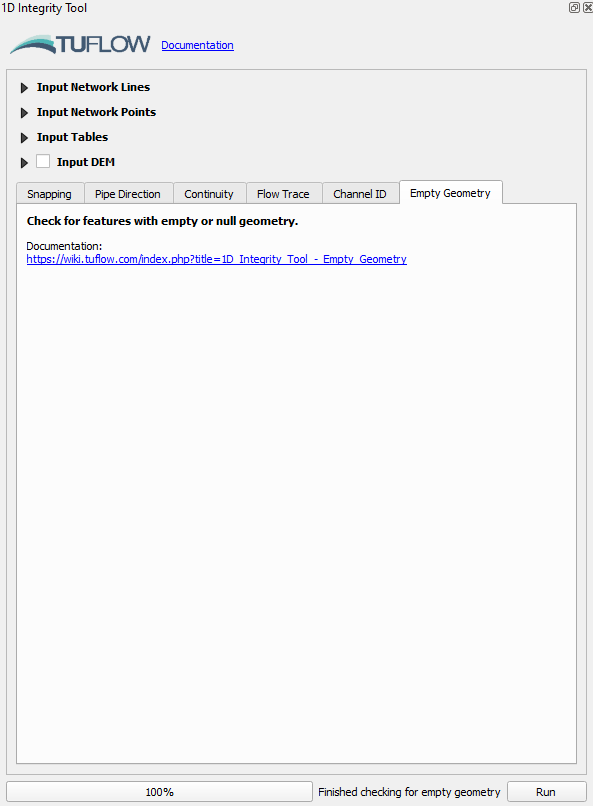
The Empty Geometry tool loops through the inputs file and identifies any features that have an empty or NULL geometry. Should any null geometries be encountered than there is an option to automatically delete those features.
- Navigate to the bottom of the 1D integrity tool and select the ‘Empty Geometry’ tab. Once selected click ‘Run’ to initiate the tool.
The tool should highlight two features which have null geometry, one with an empty ID and the other called SKSM_37.
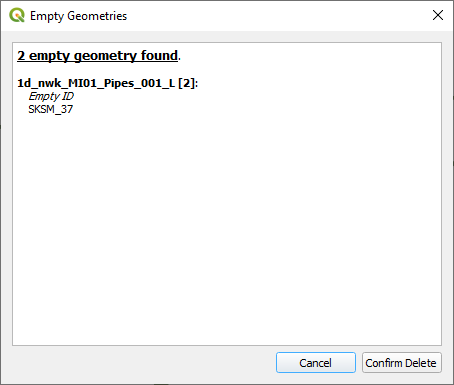
- At this point we’ll click cancel, we’ll come back to delete the items from the layer.
- Open the attribute table for the 1d_nwk_MI01_Pipes_001_L.shp file. Find the SKSM_37 feature, right click on it and select ‘Zoom to feature’. You should get an error reporting that the ‘Feature does not have a geometry’.
Do the same for the field which has a ‘null’ ID and you will receive a similar error message.

The presence of these null geometries would cause an error when running TUFLOW. Rather than wait for TUFLOW to pre-process and generate the error, the 1D integrity tool allows the user to be more proactive in checking the geometry. - Go back to the 1D Integrity tool, ensure the ‘Empty Geometry’ tab is selected and again click ‘Run’. This time, in the resulting dialogue, select the option to ‘Confirm Delete’ to delete the two items. This will generate a new layer called 1d_nwk_MI01_Pipes_001_L_EG1 which does not contain the null geometries.
A new dialogue will pop up as per the below.
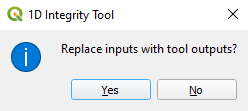
- Click Yes to update the Input Network Lines to the new layer.
- Review the attributes table for the 1d_nwk_MI01_Pipes_001_L_EG1 layer to ensure deletion of the two features identified in step 4. Note: Whenever the 1D Integrity makes changes to an input layer it will always output a new temporary layer with a unique suffix. It will never overwrite or edit the input layers directly. Each tool outputs a different suffix and serves as somewhat of a log to record which tools have been run and which order they were run in. The temporary layers only exist in memory and have not been written to the disk anywhere, this means that they will be lost if they are removed from the workspace or QGIS is closed.


Please return to the 1D Integrity tutorial page to continue the tutorial.