Flood Modeller to TUFLOW: Difference between revisions
Tuflowduncan (talk | contribs) |
|||
| (16 intermediate revisions by 4 users not shown) | |||
| Line 1: | Line 1: | ||
<font size = 18>Page Under Construction</font> |
|||
=Introduction= |
=Introduction= |
||
Often, there is a requirement to convert aspects of a Flood Modeller model to a TUFLOW |
Often, there is a requirement to convert aspects of a Flood Modeller model to a TUFLOW ESTRY model. It is possible to convert a Flood Modeller 1D model to a TUFLOW ESTRY format using either the fm_to_estry.exe or fm_to_estry.py utilities. The utilities are available for download from the <u>[https://gitlab.com/tuflow-user-group/tuflow/model-conversions/fm-to-estry TUFLOW Gitlab User Group]</u>. This Wiki page lists useful examples for using the fm_to_estry.exe and fm_to_estry.py utilities.<br><br>If you have any suggestions to be included in these pages, please email [mailto:support@tuflow.com support@tuflow.com]. |
||
=Flood Modeller to ESTRY conversion utility using the fm_to_estry.exe= |
=Flood Modeller to ESTRY conversion utility using the fm_to_estry.exe= |
||
The fm_to_estry.exe utility creates |
The fm_to_estry.exe utility creates the relevant TUFLOW ESTRY network layers from a Flood Modeller <b>.dat</b> file. The utility converts: |
||
* Flood Modeller units to |
* Flood Modeller units to ESTRY node/link inputs (1d_nwk) |
||
* Flood Modeller section data to |
* Flood Modeller section data to ESTRY cross-section GIS (1d_xs) and csv inputs |
||
* Flood Modeller structures to |
* Flood Modeller structures to ESTRY GIS and csv inputs |
||
A number of structure units are supported but <u>not all</u>. <b>A list of currently supported structures is shown below:</b> |
A number of structure units are supported but <u>not all</u>. <b>A list of currently supported structures is shown below:</b> |
||
*<b>River</b> |
*<b>River</b> |
||
| Line 31: | Line 29: | ||
*<b>Junction</b> |
*<b>Junction</b> |
||
*<b>QH Control</b> |
*<b>QH Control</b> |
||
If using the fm_to_estry.py Python script, it is possible to add support for additional structures. See below for more details. |
|||
<br>''Note :The utility does not currently support the conversion of either boundary condition data or logical control rules. '' |
<br>''Note :The utility does not currently support the conversion of either boundary condition data or logical control rules. '' |
||
=Utility Execution (.exe)= |
=Utility Execution (.exe)= |
||
In order to convert a Flood Modeller network to ESTRY using the fm_to_estry executable follow the instructions below. |
|||
<ol> |
<ol> |
||
<li>Download the |
<li>Download the compiled executable from the <u>[https://gitlab.com/tuflow-user-group/tuflow/model-conversions/fm-to-estry TUFLOW Gitlab User Group]</u> by visiting the <b>Compiled Library section</b> and unzip it to your preferred destination. |
||
<li>Open the file. Then, bring in the relevant files from the |
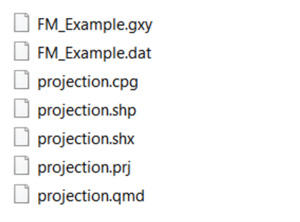
<li>Open the file. Then, bring in the relevant files from the Flood Modeller model that requires conversion, in this example the .<b>dat</b>, .<b>gxy</b> and projection files. The projection.<b>shp</b> file will help you to assign your model to the correct projection and can come from an existing TUFLOW model or shapefile in the correct projection. See figure below for the required files:<br>[[File:Fm2estry_1.png|300px|]] |
||
<li>Create a new .bat file (To do that right click in an empty area in the file. A dialogue will open. Choose New and then Text document. Rename your new Text document by including the <b>.bat extension</b> at the end. For Example: fm_to_estry_example.<b>bat</b>). |
<li>Create a new .bat file (To do that right click in an empty area in the file. A dialogue will open. Choose New and then Text document. Rename your new Text document by including the <b>.bat extension</b> at the end. For Example: fm_to_estry_example.<b>bat</b>). |
||
<li>Open your batch file and insert the text to convert the |
<li>Open your batch file and insert the text to convert the Flood Modeller model network to an ESTRY one. Some examples are shown in the following lines, note that if the batch file is held in a different directory to the Flood Modeller files, you will need to the full file path or relative path to reference the files. |
||
===Examples=== |
===Examples=== |
||
<ol> |
<ol> |
||
<li><pre>fm_to_estry.exe flood_modeller.gxy flood_modeller.dat -crs projection.shp</pre> |
<li><pre>fm_to_estry.exe flood_modeller.gxy flood_modeller.dat -crs projection.shp</pre> |
||
Converts a Flood Modeller model |
Converts a Flood Modeller model |
||
<li><pre>fm_to_estry.exe flood_modeller.gxy flood_modeller.dat -crs 32760</pre> |
<li><pre>fm_to_estry.exe flood_modeller.gxy flood_modeller.dat -crs "EPSG:32760"</pre> |
||
Uses an EPSG number for the projection |
Uses an EPSG number (32760) for the projection |
||
<li><pre>fm_to_estry.exe flood_modeller.gxy flood_modeller.dat -crs projection.shp -out .\output</pre> |
<li><pre>fm_to_estry.exe flood_modeller.gxy flood_modeller.dat -crs projection.shp -out .\output</pre> |
||
Custom Output Directory |
|||
<li><pre>fm_to_estry.exe flood_modeller.gxy flood_modeller.dat -crs projection.shp -logfile</pre> |
<li><pre>fm_to_estry.exe flood_modeller.gxy flood_modeller.dat -crs projection.shp -logfile</pre> |
||
Writes a Log File |
Writes a Log File |
||
| Line 57: | Line 58: | ||
<li>Save your preferences and close your batch file. |
<li>Save your preferences and close your batch file. |
||
<li>Double click the batch file. |
<li>Double click the batch file. |
||
<li>The above steps will return structures from <b>supported structures list</b> in .shp and .csv file formats to use them to further set up a 1D TUFLOW/ |
<li>The above steps will return structures from the <b>supported structures list</b> in <b>.shp</b> and <b>.csv</b> file formats to use them to further set up a 1D TUFLOW/ESTRY model. It is recommended that the connectivity is reviewed upstream to downstream to ensure full connectivity of the ESTRY network and generate a network which pass TUFLOW's pre-processing procedure prior to simulation. |
||
The figure below illustrates Flood Modeler 1D model conversion to TUFLOW |
The figure below illustrates Flood Modeler 1D model conversion to TUFLOW ESTRY. |
||
<br> [[File:Fm2estry_2.jpg|700px|]] |
<br> [[File:Fm2estry_2.jpg|700px|]] |
||
<br>[[File:Fm2estry_3.jpg|700px|]] |
<br>[[File:Fm2estry_3.jpg|700px|]] |
||
</ol> |
</ol> |
||
| ⚫ | |||
| ⚫ | Alternatively, rather than run the executable, it is possible to run as a Python script. To run the Python script, replace the fm_to_estry.<b>exe</b> above with <b>python fm_to_estry.py</b> and follow the 2-6 steps which are described in Utility Execution (.exe). To download the Python script file please visit: [https://gitlab.com/tuflow-user-group/tuflow/model-conversions/fm-to-estry TUFLOW Gitlab User Group] and click on the following icon: [[File:Fm2estry_4.jpg|50px|]] |
||
| ⚫ | |||
| ⚫ | Alternatively, rather than run the executable, it is possible to run as a Python |
||
| ⚫ | The benefit of this approach is that you can add your own support for structures not currently supported. More details are described in Section: <b>How to Add New Supported Units</b>, which can be found in the following page: [https://gitlab.com/tuflow-user-group/tuflow/model-conversions/fm-to-estry#:~:text=How%20to%20Add%20New%20Supported%20Units Gitlab |
||
| ⚫ | The benefit of this approach is that you can add your own support for structures not currently supported. More details are described in the Section: <b>How to Add New Supported Units</b>, which can be found in the following page: [https://gitlab.com/tuflow-user-group/tuflow/model-conversions/fm-to-estry#:~:text=How%20to%20Add%20New%20Supported%20Units TUFLOW Gitlab user group]. |
||
=Other Information= |
=Other Information= |
||
It is also possible to use the cross-sections from the |
It is also possible to use the cross-sections from the Flood Modeller <b>.dat</b> file directly within a TUFLOW/ESTRY simulation. This means that for some simpler models, particularly those without structures, that conversion of the Flood Modeller model to an ESTRY format is not required with the cross-section data being used in a TUFLOW 1D /ESTRY model directly from the <b>.dat</b> file. Please, see the [https://docs.tuflow.com/classic-hpc/manual/2023-03/ECFCommands-1.html#ecfXSDatabase <font color="blue"><tt>XS Database</tt></font> <font color="red"><tt>==</tt></font> command] in the [https://docs.tuflow.com/classic-hpc/manual/latest/ TUFLOW user manual] for more information. |
||
[https://downloads.tuflow.com/_archive/TUFLOW/Releases/2018-03/TUFLOW%20Manual.2018-03.pdf TUFLOW Official Website]. |
|||
=Summary= |
=Summary= |
||
When there is a requirement to convert a Flood Modeller 1D network, or part of a network, to TUFLOW |
When there is a requirement to convert a Flood Modeller 1D network, or part of a network, to TUFLOW ESTRY format this can be time consuming. A set of tools have been provided for you to assist this process. Currently, the tools are restricted to network geometry but if there is user-demand, this can be extended to boundary conditions, logical rules and the production of TUFLOW control files. There are two approaches, using either an executable or a Python tool, both of which undertake the same conversion. The advantage of the Python tool is that it is possible to add user-specified support for additional structures which are not supported currently. Once the Flood Modeller network has been converted to a set of ESTRY layers, these should be checked for connectivity and brought together in the ESTRY Control File to read into a TUFLOW-ESTRY simulation. |
||
<br> |
|||
{{Tips Navigation |
|||
|uplink=[[Main_Page| Back to Main Page]] |
|||
}} |
|||
Latest revision as of 16:23, 20 February 2025
Introduction
Often, there is a requirement to convert aspects of a Flood Modeller model to a TUFLOW ESTRY model. It is possible to convert a Flood Modeller 1D model to a TUFLOW ESTRY format using either the fm_to_estry.exe or fm_to_estry.py utilities. The utilities are available for download from the TUFLOW Gitlab User Group. This Wiki page lists useful examples for using the fm_to_estry.exe and fm_to_estry.py utilities.
If you have any suggestions to be included in these pages, please email support@tuflow.com.
Flood Modeller to ESTRY conversion utility using the fm_to_estry.exe
The fm_to_estry.exe utility creates the relevant TUFLOW ESTRY network layers from a Flood Modeller .dat file. The utility converts:
- Flood Modeller units to ESTRY node/link inputs (1d_nwk)
- Flood Modeller section data to ESTRY cross-section GIS (1d_xs) and csv inputs
- Flood Modeller structures to ESTRY GIS and csv inputs
A number of structure units are supported but not all. A list of currently supported structures is shown below:
- River
- Bridge
- Conduit
- Interpolates/Replicates
- Culverts
- Orifice
- Flood Relief
- Inverted Syphon
- Outfall
- Weirs
- Weir
- SCWeir
- RNWeir
- Spill
- NotWeir
- Labyrinth Weir
- Crump Weir
- Gated Weir
- Sluices
- Junction
- QH Control
If using the fm_to_estry.py Python script, it is possible to add support for additional structures. See below for more details.
Note :The utility does not currently support the conversion of either boundary condition data or logical control rules.
Utility Execution (.exe)
In order to convert a Flood Modeller network to ESTRY using the fm_to_estry executable follow the instructions below.
- Download the compiled executable from the TUFLOW Gitlab User Group by visiting the Compiled Library section and unzip it to your preferred destination.
- Open the file. Then, bring in the relevant files from the Flood Modeller model that requires conversion, in this example the .dat, .gxy and projection files. The projection.shp file will help you to assign your model to the correct projection and can come from an existing TUFLOW model or shapefile in the correct projection. See figure below for the required files:
- Create a new .bat file (To do that right click in an empty area in the file. A dialogue will open. Choose New and then Text document. Rename your new Text document by including the .bat extension at the end. For Example: fm_to_estry_example.bat).
- Open your batch file and insert the text to convert the Flood Modeller model network to an ESTRY one. Some examples are shown in the following lines, note that if the batch file is held in a different directory to the Flood Modeller files, you will need to the full file path or relative path to reference the files.
Examples
fm_to_estry.exe flood_modeller.gxy flood_modeller.dat -crs projection.shp
Converts a Flood Modeller model
fm_to_estry.exe flood_modeller.gxy flood_modeller.dat -crs "EPSG:32760"
Uses an EPSG number (32760) for the projection
fm_to_estry.exe flood_modeller.gxy flood_modeller.dat -crs projection.shp -out .\output
Custom Output Directory
fm_to_estry.exe flood_modeller.gxy flood_modeller.dat -crs projection.shp -logfile
Writes a Log File
fm_to_estry.exe flood_modeller.gxy flood_modeller.dat -crs projection.shp -raw
Writes GXY to GIS Prior to Conversion
fm_to_estry.exe flood_modeller.gxy flood_modeller.dat -crs projection.shp -mif
Writes to MIF Format
- Save your preferences and close your batch file.
- Double click the batch file.
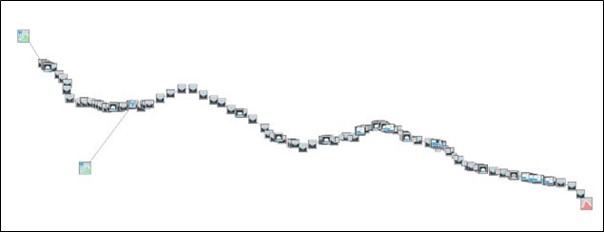
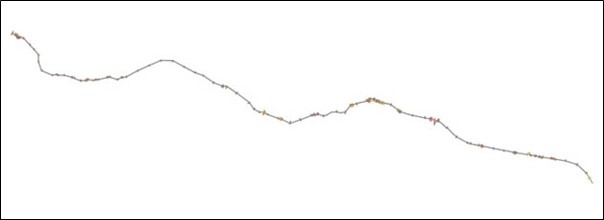
- The above steps will return structures from the supported structures list in .shp and .csv file formats to use them to further set up a 1D TUFLOW/ESTRY model. It is recommended that the connectivity is reviewed upstream to downstream to ensure full connectivity of the ESTRY network and generate a network which pass TUFLOW's pre-processing procedure prior to simulation.
The figure below illustrates Flood Modeler 1D model conversion to TUFLOW ESTRY.


Python Script Execution (.py)
Alternatively, rather than run the executable, it is possible to run as a Python script. To run the Python script, replace the fm_to_estry.exe above with python fm_to_estry.py and follow the 2-6 steps which are described in Utility Execution (.exe). To download the Python script file please visit: TUFLOW Gitlab User Group and click on the following icon: 
The benefit of this approach is that you can add your own support for structures not currently supported. More details are described in the Section: How to Add New Supported Units, which can be found in the following page: TUFLOW Gitlab user group.
Other Information
It is also possible to use the cross-sections from the Flood Modeller .dat file directly within a TUFLOW/ESTRY simulation. This means that for some simpler models, particularly those without structures, that conversion of the Flood Modeller model to an ESTRY format is not required with the cross-section data being used in a TUFLOW 1D /ESTRY model directly from the .dat file. Please, see the XS Database == command in the TUFLOW user manual for more information.
Summary
When there is a requirement to convert a Flood Modeller 1D network, or part of a network, to TUFLOW ESTRY format this can be time consuming. A set of tools have been provided for you to assist this process. Currently, the tools are restricted to network geometry but if there is user-demand, this can be extended to boundary conditions, logical rules and the production of TUFLOW control files. There are two approaches, using either an executable or a Python tool, both of which undertake the same conversion. The advantage of the Python tool is that it is possible to add user-specified support for additional structures which are not supported currently. Once the Flood Modeller network has been converted to a set of ESTRY layers, these should be checked for connectivity and brought together in the ESTRY Control File to read into a TUFLOW-ESTRY simulation.
| Up |
|---|
 Back to Main Page Back to Main Page
|