QGIS Installation with OSGeo4W: Difference between revisions
Jump to navigation
Jump to search
Content deleted Content added
Ellis Symons (talk | contribs) No edit summary |
Ellis Symons (talk | contribs) |
||
| (11 intermediate revisions by 4 users not shown) | |||
| Line 2: | Line 2: | ||
<ol> |
<ol> |
||
<li> Download OSGeo4W setup installer |
<li> Download OSGeo4W setup installer |
||
: |
:[https://qgis.org/en/site/forusers/download.html https://qgis.org/en/site/forusers/download.html]<br> |
||
: [[File: |
: [[File:Osgeo4w download network installer.png|alt=|873x873px]] |
||
<li> Run the downloaded EXE |
<li> Run the downloaded EXE |
||
<li> Select '''Advanced Install''' |
<li> Select '''Advanced Install''' |
||
| Line 17: | Line 17: | ||
<li> Select a download site. It is recommended to use with one with an SSL certificate (i.e. starts with https://) |
<li> Select a download site. It is recommended to use with one with an SSL certificate (i.e. starts with https://) |
||
: [[File: osgeo4w_installation_6.PNG]] |
: [[File: osgeo4w_installation_6.PNG]] |
||
<li> Use the search bar to search for "QGIS". Expand the '''Desktop''' dropdown and find "qgis: QGIS Desktop" under the '''package''' column. Left-click the "skip" text and the text will change to the latest version number. Once the |
<li> Use the search bar to search for "QGIS". Expand the '''Desktop''' dropdown and find "qgis: QGIS Desktop" under the '''package''' column. Left-click the "skip" text and the text will change to the latest version number. Once the version number is showing, this will be the version installed when you proceed. If you left-click again, the version number may change again to the previous version. If you keep left-clicking it will cycle back to "skip". (Note: you could also choose the "qgis-ltr: QGIS Desktop (long term release)" instead, and this would install the long term release version). |
||
: [[File: osgeo4w_installation_7.PNG]] |
: [[File: osgeo4w_installation_7.PNG]] |
||
<li> The installation also requires manually choosing several Python libraries. Use the search bar again and search for "scipy". Expand the '''Libs''' dropdown and find "python3-scipy". Left-click the "skip" text once to choose the latest scipy library version. |
<li> The installation also requires manually choosing several Python libraries. Use the search bar again and search for "scipy". Expand the '''Libs''' dropdown and find "python3-scipy". Left-click the "skip" text once to choose the latest scipy library version. |
||
: [[File: osgeo4w_installation_8.PNG]] |
: [[File: osgeo4w_installation_8.PNG]] |
||
<li> The following python libraries should be added: |
|||
<li> Repeat the above step for the following Python Libraries: |
|||
* scipy |
|||
| ⚫ | |||
| ⚫ | |||
* pandas |
|||
* pyarrow |
|||
* fiona |
* fiona |
||
* geopandas |
* geopandas |
||
* rtree |
|||
* shapely |
* shapely |
||
* colorama |
|||
| ⚫ | |||
| ⚫ | |||
* pandas (this may return 2 options - make sure to select "python3-pandas") |
|||
<li> Click '''Next''' |
<li> Click '''Next''' |
||
<li> Continue to work through the steps of the installation process - the installer will ask you to also install a number of dependencies (make sure to click yes to these) and prompt for license agreements |
<li> Continue to work through the steps of the installation process - the installer will ask you to also install a number of dependencies (make sure to click yes to these) and prompt for license agreements |
||
| Line 68: | Line 72: | ||
<br> |
<br> |
||
<br> |
<br> |
||
=Installing Python Dependencies (works for any installation method)= |
|||
It's also possible to install Python dependencies in your QGIS installation without having installed QGIS via OSGeo4W. This is done via the OSGeo4W shell, which is installed regardless of installation method. |
|||
<ol> |
|||
<li> Open start menu and search for <b>OSGeo4W Shell</b> |
|||
<li> Type "setup" and press return |
|||
<li> Follow the [[#Installation_Steps|Installation Steps]] above starting at <b>Step 3</b>. Note, you may want to select "keep" as the default method, otherwise OSGeo4W may try and update all your packages.<br> |
|||
[[File:Osgeo_default_keep.png]] |
|||
</ol> |
|||
{{Tips Navigation |
{{Tips Navigation |
||
|uplink=[[QGIS_Tips| Back to QGIS Tips page]] |
|uplink=[[QGIS_Tips| Back to QGIS Tips page]] |
||
Latest revision as of 02:37, 3 April 2026
Installation Steps
- Download OSGeo4W setup installer
- Run the downloaded EXE
- Select Advanced Install
- Select Install from Internet
- Select a directory and other installation options (Note some options may require admininstrator rights)
- Click Next
- Select Direct Connection (Note some firewall systems will require proxy settings)
- Select a download site. It is recommended to use with one with an SSL certificate (i.e. starts with https://)
- Use the search bar to search for "QGIS". Expand the Desktop dropdown and find "qgis: QGIS Desktop" under the package column. Left-click the "skip" text and the text will change to the latest version number. Once the version number is showing, this will be the version installed when you proceed. If you left-click again, the version number may change again to the previous version. If you keep left-clicking it will cycle back to "skip". (Note: you could also choose the "qgis-ltr: QGIS Desktop (long term release)" instead, and this would install the long term release version).
- The installation also requires manually choosing several Python libraries. Use the search bar again and search for "scipy". Expand the Libs dropdown and find "python3-scipy". Left-click the "skip" text once to choose the latest scipy library version.
- The following python libraries should be added:
- scipy
- matplotlib
- netcdf4
- pandas
- pyarrow
- fiona
- geopandas
- rtree
- shapely
- colorama
- Click Next
- Continue to work through the steps of the installation process - the installer will ask you to also install a number of dependencies (make sure to click yes to these) and prompt for license agreements
- Once installed, QGIS should be installed in the location specified in an earlier step


Upgrading Steps
- As part of the installation, OSGeo4W should install a program called "setup" which you can search in the Windows start bar. You can also run the downloaded OSGeo4W installer again (they are the same).
- Once running the setup, simply continue clicking Next. The setup should remember all your previous settings and automatically choose the latest version of the installed libraries at the Packages Selection stage of the installation
Upgrading Silently
It's possible to upgrade silently from the Windows CMD prompt or from a batch file.
From CMD
- Search "osgeo4w" in the Windows start bar and choose OSGeo4W Shell
- Type the following command and press enter
setup -q -g
- "-q" : quiet installation flag
- "-g" : upgrade installed packages flag
From BAT
- In the OSGeo4W installation folder under the "bin" folder find the following batch file "o4w_env.bat" (e.g. "C:\OSGeo4W\bin\o4w_env.bat").
- In your batch file call the "o4w_env.bat" file
- On the next line, type "setup -q -g"
- "-q" : quiet installation flag
- "-g" : upgrade installed packages flag
- Your final batch file should look like the below with the path to "o4w_env.bat" customised to match your installation
call C:\OSGeo4W\bin\o4w_env.bat
setup -q -g
- Run the batch file
Installing Python Dependencies (works for any installation method)
It's also possible to install Python dependencies in your QGIS installation without having installed QGIS via OSGeo4W. This is done via the OSGeo4W shell, which is installed regardless of installation method.
- Open start menu and search for OSGeo4W Shell
- Type "setup" and press return
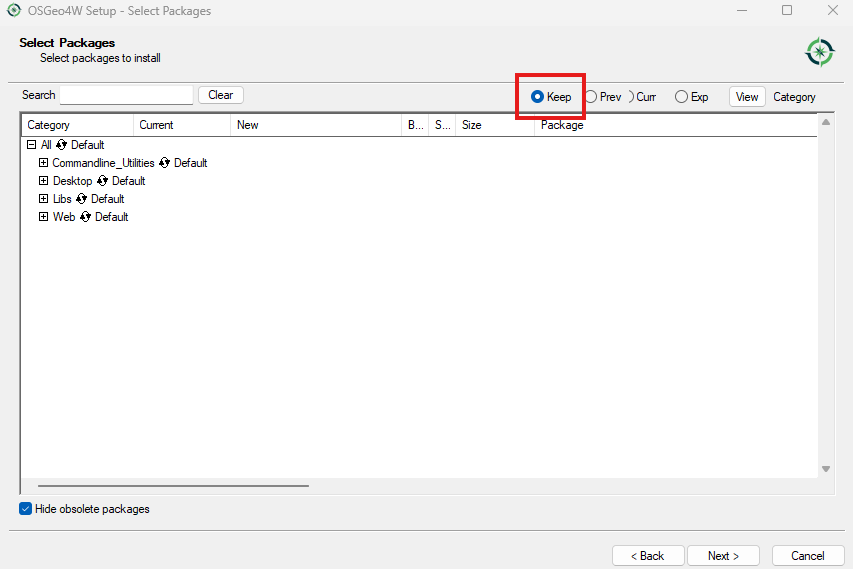
- Follow the Installation Steps above starting at Step 3. Note, you may want to select "keep" as the default method, otherwise OSGeo4W may try and update all your packages.

| Up |
|---|
 Back to QGIS Tips page Back to QGIS Tips page
|