NotepadPlusPlus Run TUFLOW: Difference between revisions
Jump to navigation
Jump to search
Content deleted Content added
No edit summary |
Chris Huxley (talk | contribs) No edit summary |
||
| (8 intermediate revisions by the same user not shown) | |||
| Line 12: | Line 12: | ||
[[File:Notepad_RunTUFLOW2.png]] |
[[File:Notepad_RunTUFLOW2.png]] |
||
</ol> |
</ol> |
||
<br> |
|||
'''Troubleshooting'''<br> |
|||
| ⚫ | |||
If you receive a "ShellExecute ERROR", further configuration is necessary.<br> |
|||
[[File:shell_execute_error.png|400px]]<br> |
|||
<ol> |
|||
<li> In Windows Explorer navigate to the folder location where you have saved the TUFLOW executable. |
|||
<li> Double left mouse click the TUFLOW executable. When the following protection pop-up appears, select "More info" <br> |
|||
[[File:Windows_Protection.png|400px]]<br> |
|||
<li> Select "Run anyway". This will open a DOS window and run the TUFLOW executable.<br> |
|||
[[File:Windows_Run_Anyway.png|400px]]<br> |
|||
<li> Close the TUFLOW DOS window. |
|||
<li> Restart Notepad++. The TUFLOW Run Option should now function correctly. |
|||
</ol> |
|||
<br> |
|||
'''TIP:''' The shortcuts can be found and edited in the shortcuts.xml file stored on your machine. The easiest way to find this is to search for it, on my computer it is located here: |
'''TIP:''' The shortcuts can be found and edited in the shortcuts.xml file stored on your machine. The easiest way to find this is to search for it, on my computer it is located here: |
||
C:\Users\username\AppData\Roaming\Notepad++\ |
C:\Users\username\AppData\Roaming\Notepad++\ |
||
| Line 34: | Line 45: | ||
</UserDefinedCommands> |
</UserDefinedCommands> |
||
</code> |
</code> |
||
{{Tips Navigation |
|||
| ⚫ | |||
}} <br> |
|||
Latest revision as of 16:56, 26 September 2025
To run TUFLOW from Notepad++ we need to create a new Run option.
- Select the Run >>> Run menu items.
- In the Run dialogue select the three dots (...), navigate to and select the desired executable. If there are spaces in the name this path should be enclosed in quotes.
- In the command line after the TUFLOW path enter "space" (without the quotes) and "$(FULL_CURRENT_PATH)" (with the quotes).
The line should be of the form as bellow where the executable path matches the location on your computer:
- "C:\TUFLOW\Releases\2020-10-AA\TUFLOW_iSP_w64.exe" "$(FULL_CURRENT_PATH)"
- This tells notepad to pass the currently open file to TUFLOW as the input file.
- Select Save and give the item a sensible name e.g. TUFLOW 2020-10-AA-iSP.
- To run TUFLOW with the currently open TCF file, simply select the item from the Run menu (or set a shortcut if desired).


Troubleshooting
If you receive a "ShellExecute ERROR", further configuration is necessary.

- In Windows Explorer navigate to the folder location where you have saved the TUFLOW executable.
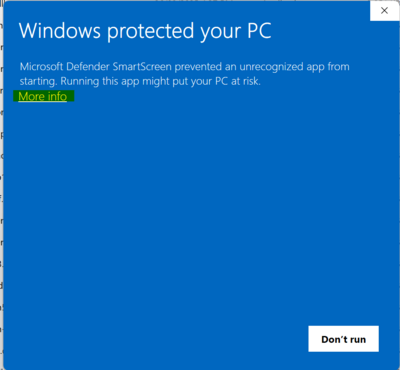
- Double left mouse click the TUFLOW executable. When the following protection pop-up appears, select "More info"
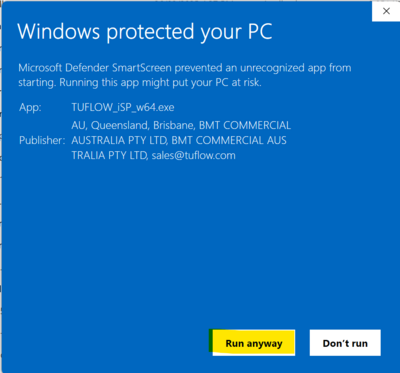
- Select "Run anyway". This will open a DOS window and run the TUFLOW executable.
- Close the TUFLOW DOS window.
- Restart Notepad++. The TUFLOW Run Option should now function correctly.


TIP: The shortcuts can be found and edited in the shortcuts.xml file stored on your machine. The easiest way to find this is to search for it, on my computer it is located here:
C:\Users\username\AppData\Roaming\Notepad++\
This file includes all of the commands for the shortcuts in your "Run" menu. In this case the final entry is the TUFLOW entry.
   <UserDefinedCommands>
       <Command name="Launch in Firefox" Ctrl="yes" Alt="yes" Shift="yes" Key="88">firefox "$(FULL_CURRENT_PATH)"</Command>
       <Command name="Get php help" Ctrl="no" Alt="yes" Shift="no" Key="112">https://www.php.net/%20$(CURRENT_WORD)</Command>
       <Command name="Google Search" Ctrl="no" Alt="yes" Shift="no" Key="113">https://www.google.com/search?q=$(CURRENT_WORD)</Command>
       <Command name="Wikipedia Search" Ctrl="no" Alt="yes" Shift="no" Key="114">https://en.wikipedia.org/wiki/Special:Search?search=$(CURRENT_WORD)</Command>
       <Command name="Open file" Ctrl="no" Alt="yes" Shift="no" Key="116">$(NPP_DIRECTORY)\notepad++.exe $(CURRENT_WORD)</Command>
       <Command name="Open file (relative)" Ctrl="no" Alt="yes" Shift="no" Key="32">$(NPP_DIRECTORY)\notepad++.exe $(CURRENT_DIRECTORY)/$(CURRENT_WORD)</Command>
       <Command name="Open in another instance" Ctrl="no" Alt="yes" Shift="no" Key="117">$(NPP_DIRECTORY)\notepad++.exe $(CURRENT_WORD) -nosession -multiInst</Command>
       <Command name="Open containing folder" Ctrl="no" Alt="no" Shift="no" Key="0">explorer $(CURRENT_DIRECTORY)</Command>
       <Command name="Open current dir cmd" Ctrl="no" Alt="no" Shift="no" Key="0">cmd /K cd $(CURRENT_DIRECTORY)</Command>
       <Command name="Send via Outlook" Ctrl="yes" Alt="yes" Shift="yes" Key="79">outlook /a "$(FULL_CURRENT_PATH)"</Command>
       <Command name="TUFLOW 2011-09-w64-iSP" Ctrl="no" Alt="no" Shift="no" Key="0">"C:\TUFLOW\Releases\2011-09\w64\TUFLOW_iSP_w64.exe" "$(FULL_CURRENT_PATH)"</Command>
   </UserDefinedCommands>
| Up |
|---|
 Back to Notepad ++ tips. Back to Notepad ++ tips.
|