Console Window GPU Usage: Difference between revisions
Created page with "Nvidia-smi (also NVSMI) provides monitoring and management capabilities for each of NVIDIA's Tesla, Quadro, GRID and GeForce GPU device from Fermi and higher architecture fami..." |
|||
| (2 intermediate revisions by the same user not shown) | |||
| Line 13: | Line 13: | ||
== What to do if GPU utilisation = 0% when running TUFLOW HPC (when using the GPU Module) == |
== What to do if GPU utilisation = 0% when running TUFLOW HPC (when using the GPU Module) == |
||
A common cause of 0% utilisation is if the calculations have accidentally been paused by activating 'Quick Edit' mode in the console. Quick edit mode was introduced in Windows 10 (in Windows not TUFLOW) and is initiated if the curser clicks somewhere on the console window while a TUFLOW simulation is running. Quick Edit mode can be deactivated to avoid this issue. |
A common cause of 0% utilisation is if the calculations have accidentally been paused by activating 'Quick Edit' mode in the console. Quick edit mode was introduced in Windows 10 (in Windows not TUFLOW) and is initiated if the curser clicks somewhere on the console window while a TUFLOW simulation is running. Quick Edit mode can be deactivated to avoid this issue. |
||
* |
* <u>[[Console_Window_Simulation_Paused | Disabling quick edit mode]]</u> |
||
Other troubleshooting tips: |
Other troubleshooting tips: |
||
| Line 19: | Line 19: | ||
* Check TUFLOW is running on a GPU device by checking the console title includes the <b>GPU Devices</b> text. If this text is not included, then the command "<tt><font color="blue">Hardware </font><font color="red">==</font> GPU</tt>" was most likely not found in the TCF |
* Check TUFLOW is running on a GPU device by checking the console title includes the <b>GPU Devices</b> text. If this text is not included, then the command "<tt><font color="blue">Hardware </font><font color="red">==</font> GPU</tt>" was most likely not found in the TCF |
||
: [[File: DOS_GPU_Usage_GPU_Device_count_01a.png]] |
: [[File: DOS_GPU_Usage_GPU_Device_count_01a.png]] |
||
== How to reliably select the correct GPU on systems with multiple GPUs == |
|||
The following issues might be encountered: |
|||
* The order of GPUs in Task Manager does not match the order of GPUs for TUFLOW. |
|||
* The order of GPUs in the `nvidia-smi` tool does not match the order of GPUs for TUFLOW. |
|||
* Non-NVIDIA GPUs or GPUs not intended for use interfere with GPU selection. |
|||
See <u>[[configure_CUDA_device_selection | specifying the exact CUDA-capable GPUs]]</u> for CUDA-enabled applications like TUFLOW. |
|||
Latest revision as of 14:17, 18 June 2025
Nvidia-smi (also NVSMI) provides monitoring and management capabilities for each of NVIDIA's Tesla, Quadro, GRID and GeForce GPU device from Fermi and higher architecture families. The following steps can be used to access nVidia-smi and review real-time GPU usage statistics for TUFLOW simulations:
Accessing nvidia-smi to review GPU Usage
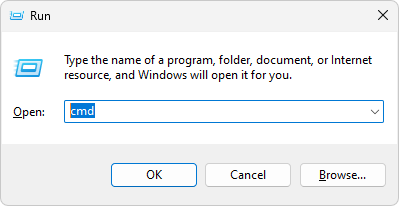
- Launch the Command Prompt from the Run window (press Win+R on your keyboard to open "run" then type cmd).
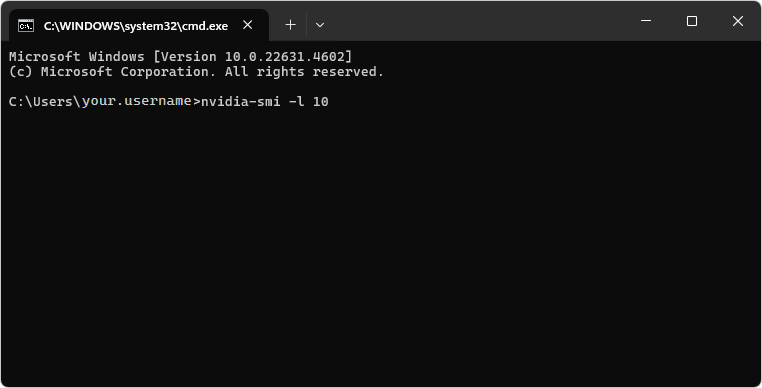
- Type nvidia-smi -l 10 in the console window and press enter. This will instruct nvidia-smi to refresh every 10 seconds.
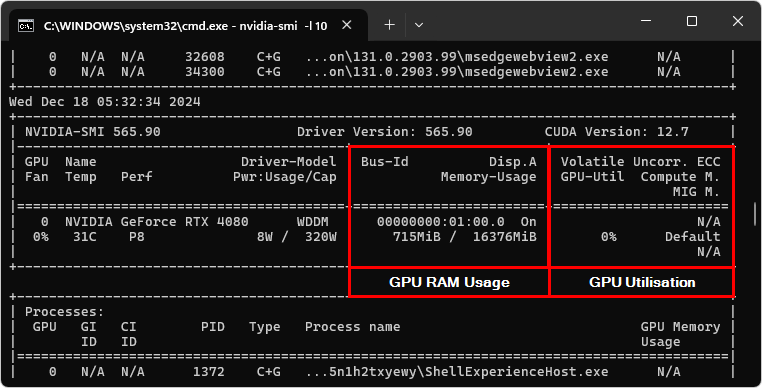
- Review the nvidia-smi usage summary.


What to do if GPU utilisation = 0% when running TUFLOW HPC (when using the GPU Module)
A common cause of 0% utilisation is if the calculations have accidentally been paused by activating 'Quick Edit' mode in the console. Quick edit mode was introduced in Windows 10 (in Windows not TUFLOW) and is initiated if the curser clicks somewhere on the console window while a TUFLOW simulation is running. Quick Edit mode can be deactivated to avoid this issue.
Other troubleshooting tips:
- Ensure the simulation has entered the calculation loop and is not currently in the initialisation phase (which is performed on the CPU and not GPU)
- Check TUFLOW is running on a GPU device by checking the console title includes the GPU Devices text. If this text is not included, then the command "Hardware == GPU" was most likely not found in the TCF

How to reliably select the correct GPU on systems with multiple GPUs
The following issues might be encountered:
- The order of GPUs in Task Manager does not match the order of GPUs for TUFLOW.
- The order of GPUs in the `nvidia-smi` tool does not match the order of GPUs for TUFLOW.
- Non-NVIDIA GPUs or GPUs not intended for use interfere with GPU selection.
See specifying the exact CUDA-capable GPUs for CUDA-enabled applications like TUFLOW.