Arc Export Raster to asc: Difference between revisions
Jump to navigation
Jump to search
Content deleted Content added
Chris Huxley (talk | contribs) No edit summary |
Chris Huxley (talk | contribs) |
||
| Line 7: | Line 7: | ||
<li>Open the raster layer that you wish to convert.</li> |
<li>Open the raster layer that you wish to convert.</li> |
||
<li>In the Arc Toolbox menu, select '''Conversion Tools >> From Raster >> Raster to ASCII'''</li> |
<li>In the Arc Toolbox menu, select '''Conversion Tools >> From Raster >> Raster to ASCII'''</li> |
||
[[File:Arc raster to asc.jpg]] |
<br>[[File:Arc raster to asc.jpg]] |
||
<li>In the dialogue, select the desired input raster and set the output filename. Note, there is no set extension for this file type, both .asc and .txt are widely used. |
<li>In the dialogue, select the desired input raster and set the output filename. Note, there is no set extension for this file type, both .asc and .txt are widely used. |
||
| ⚫ | |||
| ⚫ | |||
<li>The DEM file is ready for reading into TUFLOW.</li> |
<li>The DEM file is ready for reading into TUFLOW.</li> |
||
</ol> |
</ol> |
||
=Tips= |
=Tips= |
||
To convert between the .asc and .flt format the TUFLOW utility "asc_to_asc" can be used. |
To convert between the .asc and .flt format the TUFLOW utility "asc_to_asc" can be used. |
||
Latest revision as of 06:10, 31 January 2015
Introduction
TUFLOW can directly read elevation data from a Digital Elevation Model (DEM). The format recognised by TUFLOW is ESRI ASCII Grid (.asc), this is an open text format that is recognised by a wide range of software including ArcGIS, MapInfo and Quantum GIS. The instructions below outline the process for exporting from a raster layer in ArcMap to a ESRI ASCII grid.
TUFLOW can also read .asc format data for setting a number of model parameters including, initial water level (Read GRID IWL == ), Soil Type (Read Grid Soil == ), roughness (Read Grid CnM == ), storage reduction factor (Read Grid SRF == ).
Method
- Open the raster layer that you wish to convert.
- In the Arc Toolbox menu, select Conversion Tools >> From Raster >> Raster to ASCII
- In the dialogue, select the desired input raster and set the output filename. Note, there is no set extension for this file type, both .asc and .txt are widely used.
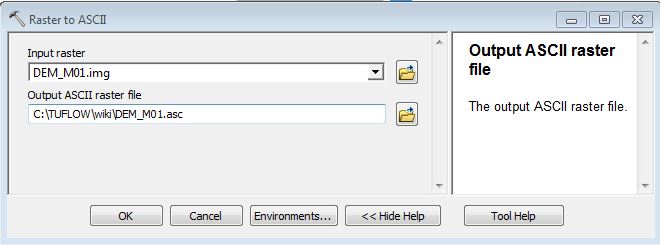
- The DEM file is ready for reading into TUFLOW.


Tips
To convert between the .asc and .flt format the TUFLOW utility "asc_to_asc" can be used.
| Up |
|---|
 Back to ArcGIS Back to ArcGIS
|