TUFLOW 2D2D BC Advice: Difference between revisions
Chris Huxley (talk | contribs) No edit summary |
Chris Huxley (talk | contribs) No edit summary |
||
| Line 1: | Line 1: | ||
This section provides best practise advice for configuring TUFLOW 2D/2D boundaries. <br> |
This section provides best practise advice for configuring TUFLOW 2D/2D boundaries. <br> |
||
Multiple domain models are defined in TUFLOW using 2D |
Multiple domain models are defined in TUFLOW using 2D domain blocks within the TCF file. Each domain block is defined using <br> <font color="blue"><tt> Start 2D Domain </tt></font> <font color="red"><tt>== </tt></font> <tt> <name> </tt><br> and <br> <font color="blue"><tt> End 2D Domain </tt></font> commands. Each domain includes unique geometry control file, boundary condition file, initial water level and time step commands. All other commands (such as the boundary condition database, material file references, Estry control file and simulation time commands) are defined outside the above mentioned 2D Domain blocks. An example TCF file is shown below. Line 8 to 13 represents the first 2D domain. Line 15 to 20 contain the second 2D domain block. <br> |
||
[[File: 2D2D_Guidance_000.JPG |450px]]<br> |
[[File: 2D2D_Guidance_000.JPG |450px]]<br> |
||
Revision as of 21:58, 11 October 2016
This section provides best practise advice for configuring TUFLOW 2D/2D boundaries.
Multiple domain models are defined in TUFLOW using 2D domain blocks within the TCF file. Each domain block is defined using
Start 2D Domain == <name>
and
End 2D Domain commands. Each domain includes unique geometry control file, boundary condition file, initial water level and time step commands. All other commands (such as the boundary condition database, material file references, Estry control file and simulation time commands) are defined outside the above mentioned 2D Domain blocks. An example TCF file is shown below. Line 8 to 13 represents the first 2D domain. Line 15 to 20 contain the second 2D domain block.

Some best practise advice for configuring a 2D /2D boundary is listed below:
- When one domain is nested within another, remember to deactivate the active cells in the parent domain (mesh) where the domains overlap. This is done in the parent domain TGC file.
The INVERT option can be used with Read GIS CODE or Read GIS Code BC to deactivate the active cells using the same GIS polygon that is used to define the active cells in the child domain. If INVERT is specified (eg. Read GIS Code Invert or Read GIS Code BC Invert), the active/inactive status of any Code polygon is reversed (i.e. a Code of 1 becomes 0, and a Code of -1 or 0 becomes 1). This means that the same layer can be used by both TGC files when linking 2D domains.
Correct deactivation of active cells in areas of overlap can be reviewed via the grd_check file, shown below.
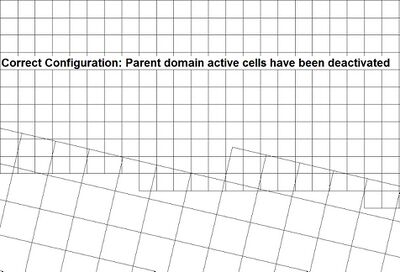
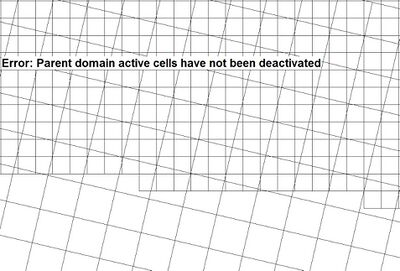
Correct Configuration Incorrect Configuration
- Multiple 2D domain models use a 2d_bc line to define the location of 2D/2D boundary cells. The type attribute associated with the line must be set to "2D" to transfer flow between the neighbouring domains.
- The file containing the GIS layer must be read into the TBC files of both 2D domains. For example, the command below would be read into both TBC files listed in the TCF file:
Read GIS BC == mi\2d_bc_2D_Link_001_L.mif
- The 2d_bc “2D” link line should be snapped to the polygon defining the active/inactive areas.
- Flow is transferred between both domains via a series of hidden 1D nodes. The location of the hidden 1D nodes requires consideration. TUFLOW creates these at each vertex along the 2d_bc "2D" link line and also at a regular interval, as defined by the “d” attribute. The hidden 1D nodes act as storage that convey the water from one 2D domain to the other. The water levels along the 2d_bc 2D link line are linearly interpolated using the water levels in the hidden 1D nodes. If in reality the water level profile is not close to linear between vertices, strange flow patterns may occur which can lead to model instability. As such, appropriate resolution of the hidden 1D nodes is an important feature of multiple 2D domain models.
The TCF command Reveal 1D Nodes == ON can be used to view the hidden 1D nodes. The hidden nodes will be written to the nwk_N_check layer. The 2D link can also be reviewed using the 2d_to_2d_check layer. Both are shown below.
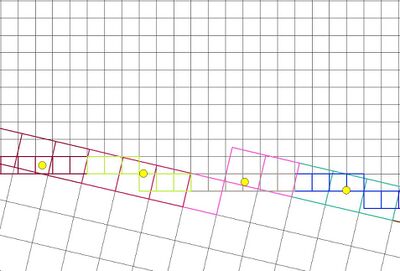
Some 2d_bc “2D” link line definition advice is provided below:
2D BC Line Orientation
- The 2d_bc “2D” link line should be orientated perpendicular to the flow direction in areas of moderate to high velocity (>1m/s), such as across a river or creek.
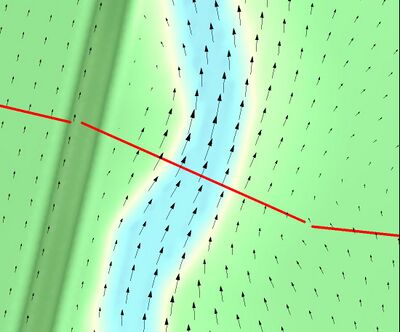
- The 2d_bc “2D” link line can be orientated in any direction within floodplain areas with low velocity (<1m/s). The 2d_bc “2D” link line “d” attribute should be used in this situation. This is discussed in the following section.
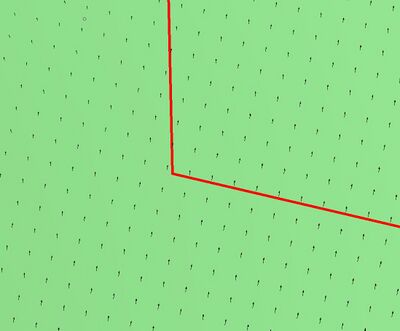
Line Vertex Location
2d_bc “2D” link line vertices are best located on ridges or embankments, including features that become inundated and drowned out during a simulation. 2d_bc “2D” link line “d” attribute can be used to insert additional hidden 1D nodes between the manually specified vertices location.
- In regions of low velocity (<1m/s), the “d” value should be no less than three times the distance of the larger cell resolution associated with the 2D/2D boundary. For example, if the model adopts a 2.5m and 5m resolution, the “d” attribute should be set no smaller than 15m.
- In regions of moderate to high velocity (>1m/s),larger or no “d” value is common used. Not specifying a “d” value will create a hidden 1D node at each vertex along the 2d_bc “2D” link line.
2d_bc “2D” link line “a” attribute defines the storage allocation to each of the hidden 1D nodes. The default value is 2. Increasing the value may improve stability, though but may unacceptably attenuate results. Sensitivity testing has identified the following recommended maximum values:
- Low velocity area (<1m/s): “a” <=3
- Moderate to high velocity area (>1m/s): “a” <=6
Consider using separate 2D boundary condition lines where there are unique flow paths separated by areas of dry land.
- The 2d_bc “2D” link line should be orientated perpendicular to the flow direction in areas of moderate to high velocity (>1m/s), such as across a river or creek.
- The file containing the GIS layer must be read into the TBC files of both 2D domains. For example, the command below would be read into both TBC files listed in the TCF file:


