Codemeter Enable Logging: Difference between revisions
Jump to navigation
Jump to search
Content deleted Content added
| Line 24: | Line 24: | ||
<li>Navigate to "Computer\HKEY_LOCAL_MACHINE\SOFTWARE\WIBU-SYSTEMS\CodeMeter\Server\CurrentVersion". Double click the variable "LogLicenseTracking", or right click and "Modify". In the pop-up window, change the the Value data to "1"</li> |
<li>Navigate to "Computer\HKEY_LOCAL_MACHINE\SOFTWARE\WIBU-SYSTEMS\CodeMeter\Server\CurrentVersion". Double click the variable "LogLicenseTracking", or right click and "Modify". In the pop-up window, change the the Value data to "1"</li> |
||
[[File: |
[[File:Codemeter_Enable_Logging_04.png|600px]] |
||
<br> |
<br> |
||
<li>By default, Codemeter will create .log files in "C:\ProgramData\CodeMeter\Logs". A log file record all the access history between a network server and clients. It also records error messages if an access is denied.</li> |
<li>By default, Codemeter will create .log files in "C:\ProgramData\CodeMeter\Logs". A log file record all the access history between a network server and clients. It also records error messages if an access is denied.</li> |
||
Revision as of 14:26, 9 April 2018
This page is under construction!!!
Introduction
This page contains instructions for enabling "Logging" and "License Tracking" in Codemeter Control Centre. These functionalities can be used to check and monitor the licence allocation by Codemeter.
Turn On Logging
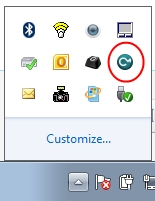
- Open the CodeMeter Control Centre. This can be done via the icon on the taskbar:
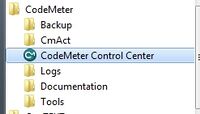
Or via the start menu:
- Go to "File" and check "Logging".
- By default, Codemeter will create .log files in "C:\ProgramData\CodeMeter\Logs". A log file record all the access history between a network server and clients. It also records error messages if an access is denied.
- Type "regedit" in windows search bar and start up Registry Editor:
- Navigate to "Computer\HKEY_LOCAL_MACHINE\SOFTWARE\WIBU-SYSTEMS\CodeMeter\Server\CurrentVersion". Double click the variable "LogLicenseTracking", or right click and "Modify". In the pop-up window, change the the Value data to "1"
- By default, Codemeter will create .log files in "C:\ProgramData\CodeMeter\Logs". A log file record all the access history between a network server and clients. It also records error messages if an access is denied.


Turn On Licence Tracking for a Network Server

