ARR DATAHUB CANNOT BE ACCESSED: Difference between revisions
Jump to navigation
Jump to search
Content deleted Content added
Ellis Symons (talk | contribs) No edit summary |
Ellis Symons (talk | contribs) No edit summary |
||
| Line 7: | Line 7: | ||
<li> Tick on the 'Select All' box |
<li> Tick on the 'Select All' box |
||
<li> Click '''Submit''' |
<li> Click '''Submit''' |
||
<li> Navigate to the bottom of the page and click '''Download TXT''' |
|||
<li> Create a new .txt file called 'ARR_Web_Data_<catchment name>.txt' - ''The catchment name should be consistent with the name used in the QGIS tool. It will also be listed in the log.txt after name='' |
|||
Revision as of 14:59, 30 October 2018
Steps
- Run 'Extract ARR2016 for TUFLOW' tool in QGIS until error - This will let the tool download the data from BOM as well as perform the pre-calculations such as extract the catchment area and centroid from the input catchments
- Open 'log.txt' and extract the longitudinal and latitude values
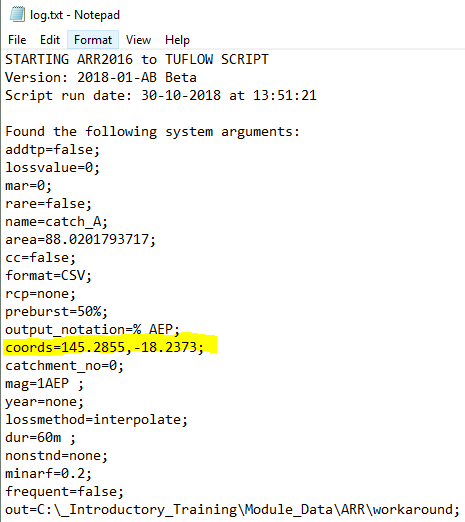
- Using an internet browser, navigate to the ARR datahub
- Input the coordinates of your catchment
- Tick on the 'Select All' box
- Click Submit
- Navigate to the bottom of the page and click Download TXT
- Create a new .txt file called 'ARR_Web_Data_<catchment name>.txt' - The catchment name should be consistent with the name used in the QGIS tool. It will also be listed in the log.txt after name=
