ARR DATAHUB CANNOT BE ACCESSED: Difference between revisions
Jump to navigation
Jump to search
Content deleted Content added
Ellis Symons (talk | contribs) No edit summary |
Ellis Symons (talk | contribs) No edit summary |
||
| Line 5: | Line 5: | ||
<li> Using an internet browser, navigate to the [http://data.arr-software.org/ ARR datahub] |
<li> Using an internet browser, navigate to the [http://data.arr-software.org/ ARR datahub] |
||
<li> Input the coordinates of your catchment |
<li> Input the coordinates of your catchment |
||
<li> Tick on the 'Select All' box<br>[[File:ARR_datahub_input.PNG | |
<li> Tick on the 'Select All' box<br>[[File:ARR_datahub_input.PNG | 550px]] |
||
<li> Click '''Submit''' |
<li> Click '''Submit''' |
||
<li> Navigate to the bottom of the page and click '''Download TXT'''<br>[[File:ARR_datahub_downloadtxt.PNG]] |
<li> Navigate to the bottom of the page and click '''Download TXT'''<br>[[File:ARR_datahub_downloadtxt.PNG | 350px]] |
||
<li> Create a new .txt file called 'ARR_Web_Data_<catchment name>.txt' and save it in the '''data''' folder alongside the existing file 'BOM_raw_web_<catchment name>.html - ''The catchment name should be consistent with the name used in the QGIS tool. It will be the same as the BOM raw output and also be listed in the log.txt after name=''<br>[[File:ARR_Web_data.PNG]] |
<li> Create a new .txt file called 'ARR_Web_Data_<catchment name>.txt' and save it in the '''data''' folder alongside the existing file 'BOM_raw_web_<catchment name>.html - ''The catchment name should be consistent with the name used in the QGIS tool. It will be the same as the BOM raw output and also be listed in the log.txt after name=''<br>[[File:ARR_Web_data.PNG]] |
||
<li> Copy the text from the '''Download TXT'' to the newly created 'ARR_web_data' text file |
<li> Copy the text from the '''Download TXT'' to the newly created 'ARR_web_data' text file |
||
Revision as of 15:23, 30 October 2018
Steps
- Run 'Extract ARR2016 for TUFLOW' tool in QGIS until error - This will let the tool download the data from BOM as well as perform the pre-calculations such as extract the catchment area and centroid from the input catchments
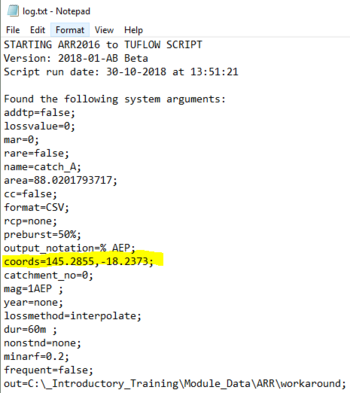
- Open 'log.txt' located in the tool output folder and extract the longitudinal and latitude values
- Using an internet browser, navigate to the ARR datahub
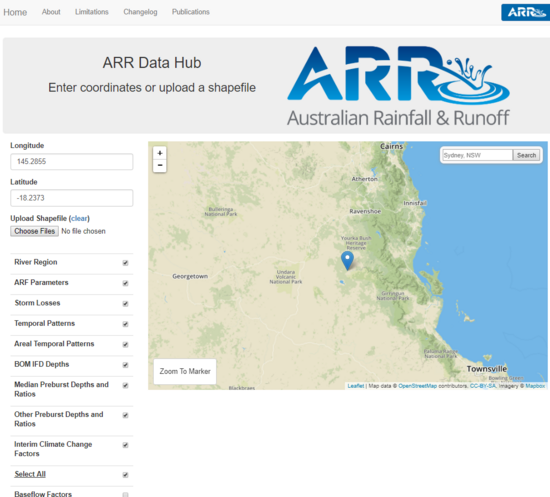
- Input the coordinates of your catchment
- Tick on the 'Select All' box
- Click Submit
- Navigate to the bottom of the page and click Download TXT
- Create a new .txt file called 'ARR_Web_Data_<catchment name>.txt' and save it in the data folder alongside the existing file 'BOM_raw_web_<catchment name>.html - The catchment name should be consistent with the name used in the QGIS tool. It will be the same as the BOM raw output and also be listed in the log.txt after name=

- Copy the text from the 'Download TXT to the newly created 'ARR_web_data' text file


