Integrity Tool - Snapping Check: Difference between revisions
Tuflowduncan (talk | contribs) No edit summary |
Tuflowduncan (talk | contribs) No edit summary |
||
| Line 3: | Line 3: | ||
Snapping is probably the source of 95% of TUFLOW pre-processing errors so it is highly recommended that the snapping is check prior to being added a network to TUFLOW. |
Snapping is probably the source of 95% of TUFLOW pre-processing errors so it is highly recommended that the snapping is check prior to being added a network to TUFLOW. |
||
<ol> |
<ol> |
||
<li> Ensure that '''1d_nwk_MI01_Pipes_001_L_EG1_ID1''' is referenced in the 1D network Line Layers and select the Snapping tab. |
<li> Ensure that '''1d_nwk_MI01_Pipes_001_L_EG1_ID1''' is referenced in the 1D network Line Layers and select the '''Snapping''' tab. |
||
<li> Select the option to ‘Use an exclusion radius when checking for snapping’ and set the exclusion radius to ‘1’. Run the tool. The ‘Exclusion Radius’ will not flag snapping errors for lines if the nearest line end is outside the exclusion radius.<br> |
<li> Select the option to '''‘Use an exclusion radius when checking for snapping’''' and set the exclusion radius to '''‘1’'''. Run the tool. The ‘Exclusion Radius’ will not flag snapping errors for lines if the nearest line end is outside the exclusion radius.<br> |
||
[[File:Snapping tool.png]]<br> |
[[File:Snapping tool.png]]<br> |
||
| Line 12: | Line 12: | ||
<li> Add the '''1d_nwk_MI01_Pits_001_P.shp''' file to the ‘Input Network Points’ section of the 1D integrity tool. This will enable us to ensure points and lines are both snapped together. |
<li> Add the '''1d_nwk_MI01_Pits_001_P.shp''' file to the ‘Input Network Points’ section of the 1D integrity tool. This will enable us to ensure points and lines are both snapped together. |
||
<li> Rerun the snapping tools but on this occasion select the option to ‘Auto-Snap’. Set the ‘Search Radius’ to 1m.<br> |
<li> Rerun the snapping tools but on this occasion select the option to '''‘Auto-Snap’'''. Set the '''‘Search Radius’''' to 1m.<br> |
||
[[File:Snap options.png]]<br> |
[[File:Snap options.png]]<br> |
||
| Line 22: | Line 22: | ||
</ol> |
</ol> |
||
Please return to the 1D Integrity tutorial [[1D_Integrity_Tool_-_Tutorial# |
Please return to the 1D Integrity tutorial [[1D_Integrity_Tool_-_Tutorial#Using_the_1D_Integrity_Tool|page]] to continue the tutorial. |
||
Revision as of 23:22, 8 April 2022
The Snapping Tool checks that all input 1D network lines (channels) and 1D network points are correctly snapped. For lines, it will check that both the upstream and downstream end of the line is snapped to the upstream or downstream end of another line. For points, it will check that each point is snapped to either an upstream or downstream end of a line. This tool also has an option to automate snapping correction and will find the closest connection within the radius and snap them together for both lines and points. Snapping is probably the source of 95% of TUFLOW pre-processing errors so it is highly recommended that the snapping is check prior to being added a network to TUFLOW.
- Ensure that 1d_nwk_MI01_Pipes_001_L_EG1_ID1 is referenced in the 1D network Line Layers and select the Snapping tab.
- Select the option to ‘Use an exclusion radius when checking for snapping’ and set the exclusion radius to ‘1’. Run the tool. The ‘Exclusion Radius’ will not flag snapping errors for lines if the nearest line end is outside the exclusion radius.
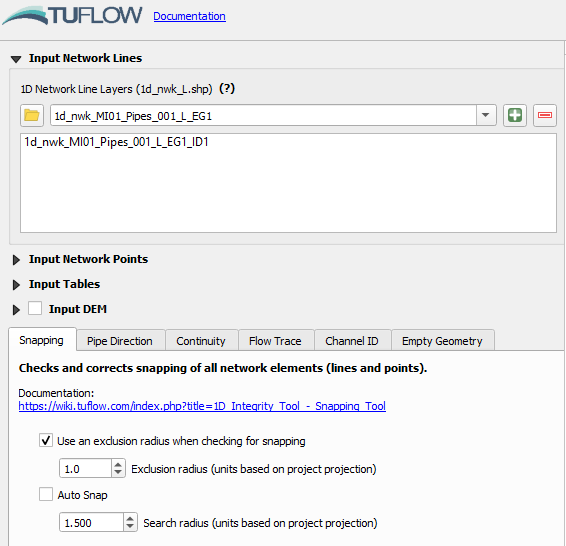
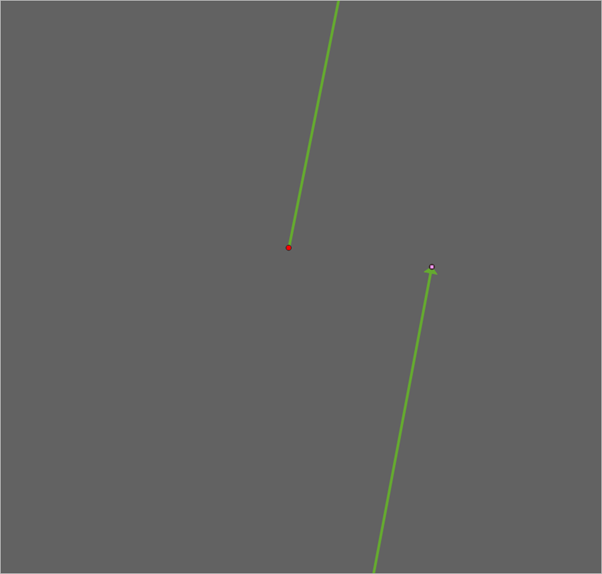
An output layer will again be generated, highlighting a number of locations where the snapping check has failed. Zoom in to either of the highlighted locations and you will see some pipes which are not correctly snapped.
- Add the 1d_nwk_MI01_Pits_001_P.shp file to the ‘Input Network Points’ section of the 1D integrity tool. This will enable us to ensure points and lines are both snapped together.
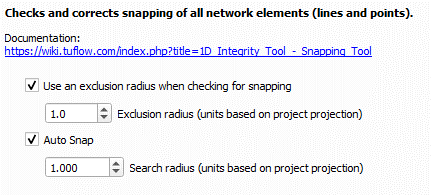
- Rerun the snapping tools but on this occasion select the option to ‘Auto-Snap’. Set the ‘Search Radius’ to 1m.
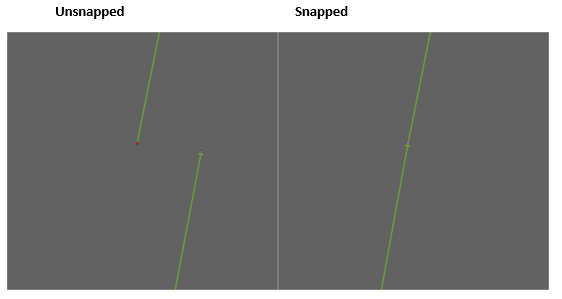
This will generate two new layers called 1d_nwk_pipe_integrity_L_workshop_EG1_ID1_SN1 and 1d_nwk_pit_integrity_L_workshop_SN1 which are correctly snapped as shown below. - Locate the pipes identified in step 2. You should now see that they are snapped together which will ensure continuity and avoid errors when running the TUFLOW simulation.


Please return to the 1D Integrity tutorial page to continue the tutorial.