Tutorial M01 Boundary Conditions QGIS: Difference between revisions
Jump to navigation
Jump to search
Content deleted Content added
Created page with "= Introduction = QGIS is used to create the boundary condition layers. Three different types of boundaries are introduced: <br> :*2d_bc: flow vs time - used as external upstr..." |
|||
| Line 34: | Line 34: | ||
<ol> |
<ol> |
||
<li>Zoom into the creek at the south-western edge of the code polygon. |
<li>Zoom into the creek at the south-western edge of the code polygon. |
||
<li>Right click the |
<li>Right click the '2d_bc_M01_001_L' file in the Layers panel and toggle on editing. |
||
<li>Select 'Add Line Feature'. |
<li>Select 'Add Line Feature'. |
||
<li>Create a line joining the four vertices as shown below. With the snapping option on, the cursor snaps to the existing vertices on the |
<li>Create a line joining the four vertices as shown below. With the snapping option on, the cursor snaps to the existing vertices on the '2d_code_M01_001_R' layer. |
||
<li>When selecting the final vertex, use the right mouse button to terminate the line, an attributes dialog appears. In the attributes, specify the boundary as flow vs time (QT) boundary with the name 'FC01'. |
<li>When selecting the final vertex, use the right mouse button to terminate the line, an attributes dialog appears. In the attributes, specify the boundary as flow vs time (QT) boundary with the name 'FC01'. |
||
:*Type = QT |
:*Type = QT |
||
| Line 47: | Line 47: | ||
<ol> |
<ol> |
||
<li>Zoom into the creek at the north edge of the code polygon. |
<li>Zoom into the creek at the north edge of the code polygon. |
||
<li>Add another line in the |
<li>Add another line in the '2d_bc_M01_001_L' layer connecting the four vertices shown below. <br> |
||
<li>In the attributes, specify head vs flow (HQ), stage-discharge boundary, and water surface slope via the 'b' attribute of '0.01'. |
<li>In the attributes, specify head vs flow (HQ), stage-discharge boundary, and water surface slope via the 'b' attribute of '0.01'. |
||
:*Type = HQ |
:*Type = HQ |
||
Revision as of 09:05, 14 April 2023
Introduction
QGIS is used to create the boundary condition layers. Three different types of boundaries are introduced:
- 2d_bc: flow vs time - used as external upstream boundary;
- 2d_bc: head vs flow (stage-discharge) - used as downstream boundary; and
- 2d_sa: flow vs time - used as internal boundary.
TUFLOW shapefile naming convention:
- Points are stored in a filename_P.shp.
- Lines are stored in a filename_L.shp.
- Regions or polygons are stores in a filename_R.shp.
Method
Flow vs Time and Head vs Flow Boundaries (2d_bc)
The 2d_bc boundaries are external boundaries applied as lines. They are snapped to the edge of the active model area, the code polygon, and digitised perpendicular to the flow. Digitising the boundary on an angle to the flow could cause instabilities and oscillations.
Create the 2d_bc layer using the TUFLOW plugin:
- Click on the ‘Import Empty File’ symbol from the TUFLOW plugin toolbar.
- Select '2d_bc' from the Empty Type list.
- In the Run ID box write 'M01_001'.
- Tick the 'Lines' Geometry Type and hit 'OK'. The 2d_bc_M01_001_L.shp appears in the QGIS Layers panel.
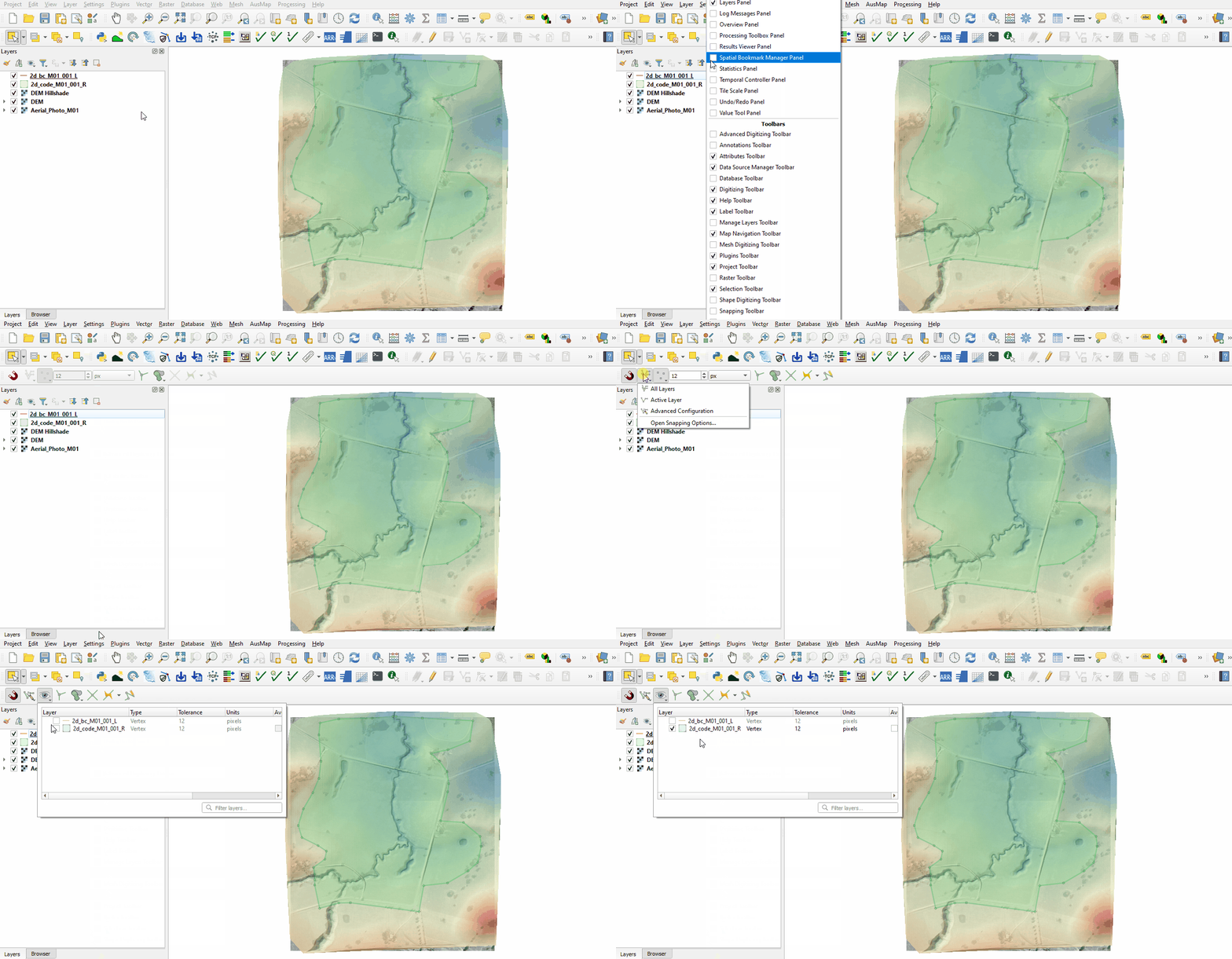
Enable snapping:
- Right click anywhere in the Toolbar panel and tick on the Snapping Toolbar.
- Select the magnet icon 'Enable Snapping' and 'All Layers > Advanced Configuration', an eye icon appears.
- Select the eye icon 'Edit Advanced Configuration' and tick the '2d_code_M01_001_R'.

Digitise the upstream boundary:
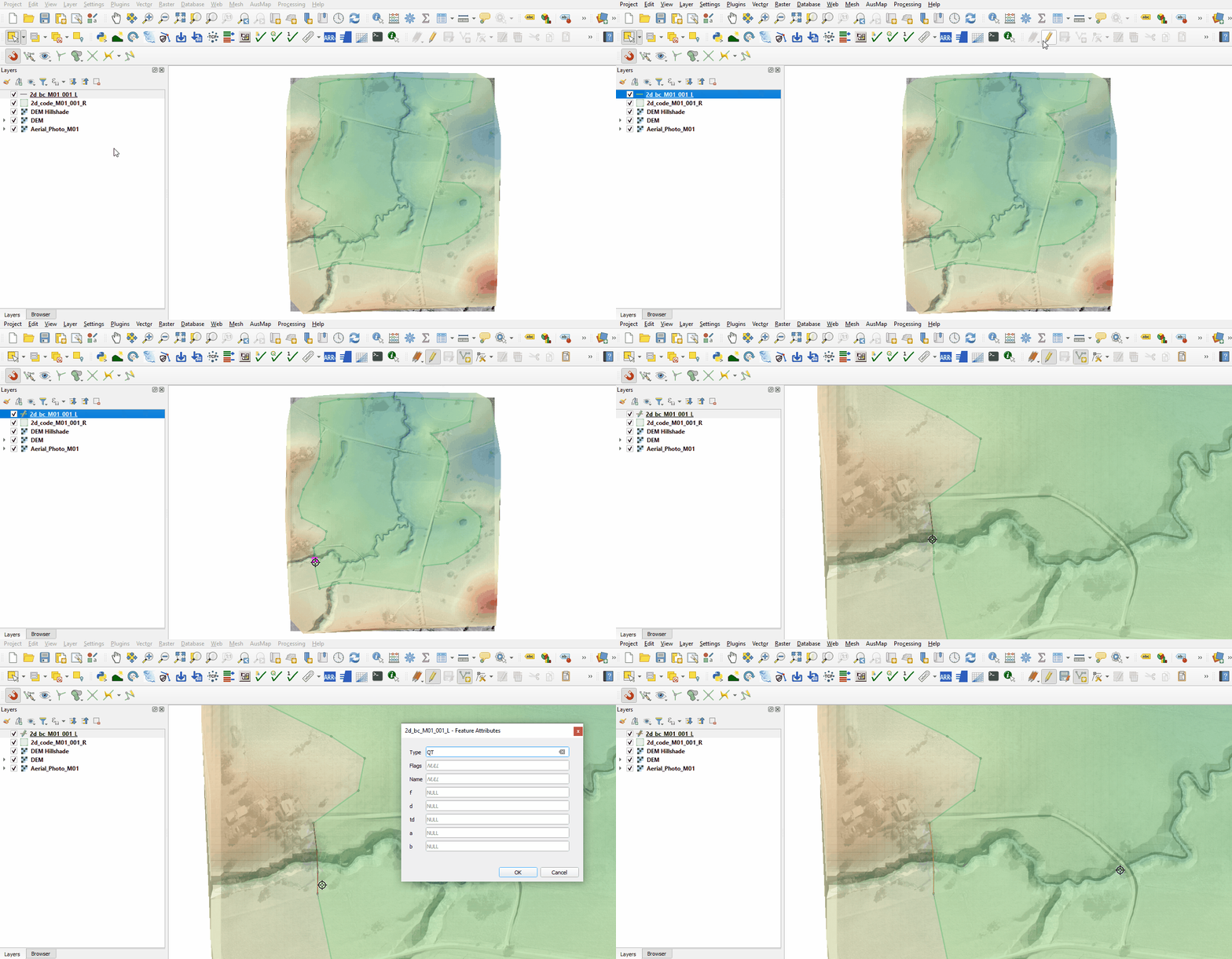
- Zoom into the creek at the south-western edge of the code polygon.
- Right click the '2d_bc_M01_001_L' file in the Layers panel and toggle on editing.
- Select 'Add Line Feature'.
- Create a line joining the four vertices as shown below. With the snapping option on, the cursor snaps to the existing vertices on the '2d_code_M01_001_R' layer.
- When selecting the final vertex, use the right mouse button to terminate the line, an attributes dialog appears. In the attributes, specify the boundary as flow vs time (QT) boundary with the name 'FC01'.
- Type = QT
- Name = FC01

Digitise the downstream boundary:
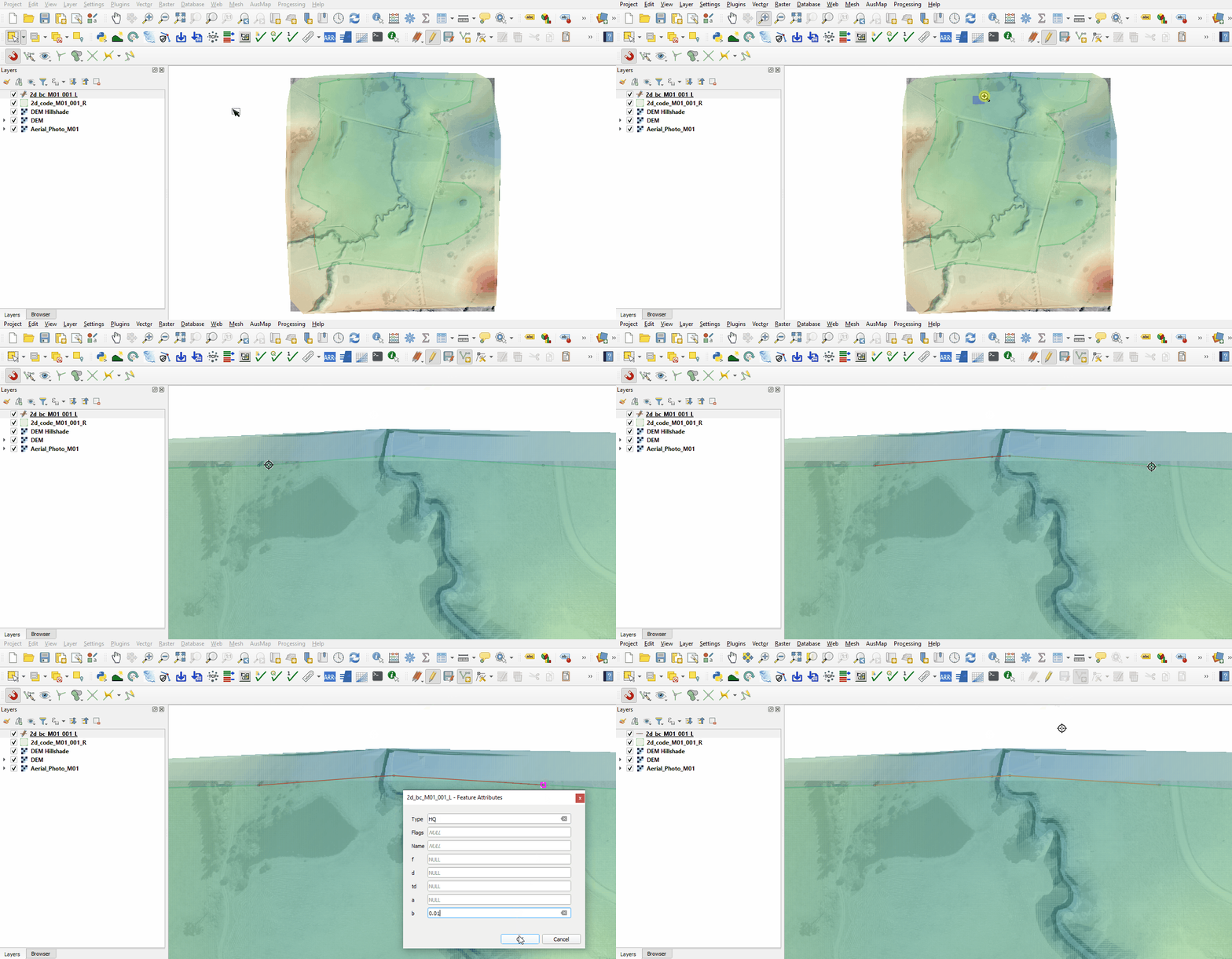
- Zoom into the creek at the north edge of the code polygon.
- Add another line in the '2d_bc_M01_001_L' layer connecting the four vertices shown below.
- In the attributes, specify head vs flow (HQ), stage-discharge boundary, and water surface slope via the 'b' attribute of '0.01'.
- Type = HQ
- b = 0.01
- Toggle the editing off to save the edits.

Source Area Boundary (2d_sa)
The 2d_sa boundaries are internal boundaries digitised as polygons applying flow or rainfall directly onto the 2D domain.
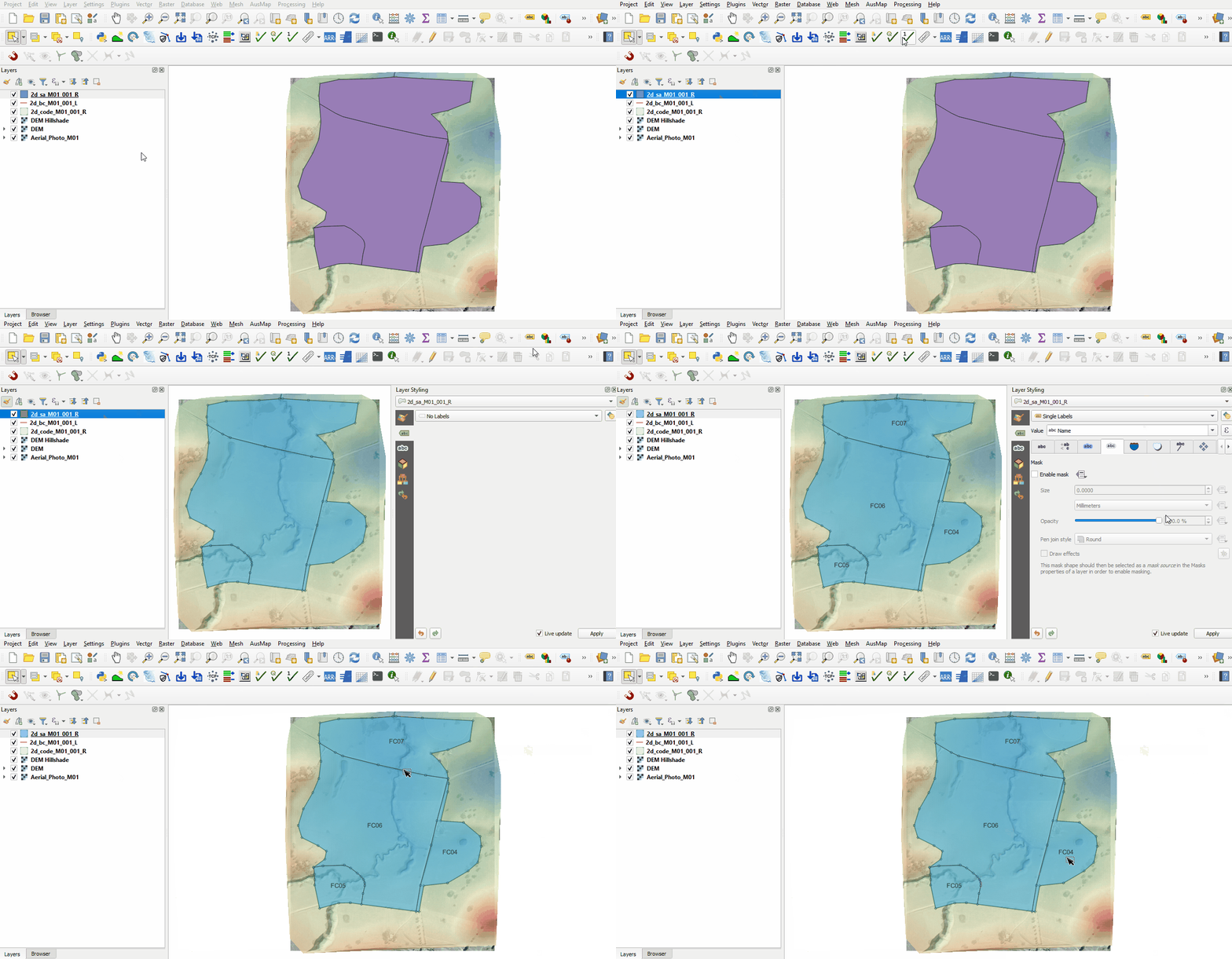
The source area layer is provided:
- Copy and paste all files named '2d_sa_M01_001_R' from the Module_01\Tutorial_Data to the Module_01\TUFLOW\model\gis folder.
- Open the shapefile in QGIS and select ‘Apply TUFLOW Styles to Current Layer'.
- Select 'Label' from the TUFLOW plugin toolbar to see the names of each polygon.

Conclusion
- The 2d_bc layer was created containing an upstream flow boundary and a downstream stage-discharge boundary.
- The 2d_sa layer was created to define the internal source area boundary.
| Up |
|---|
 Back to Module 1 Main Page Back to Module 1 Main Page
|