Tutorial M10 004 GIS Inputs QGIS: Difference between revisions
Jump to navigation
Jump to search
Content deleted Content added
| Line 10: | Line 10: | ||
<li>In the Run ID box write 'M10_dambreak_004'. |
<li>In the Run ID box write 'M10_dambreak_004'. |
||
<li>Tick the 'Regions' Geometry Type and hit 'OK'. The 2d_sa file appears in the Layers panel. <br> |
<li>Tick the 'Regions' Geometry Type and hit 'OK'. The 2d_sa file appears in the Layers panel. <br> |
||
<li>Right click on the |
<li>Right click on the '''2d_sa_M10_dambreak_004_R''' and toggle on Editing. |
||
<li>Select 'Add Polygon Feature'. |
<li>Select 'Add Polygon Feature'. |
||
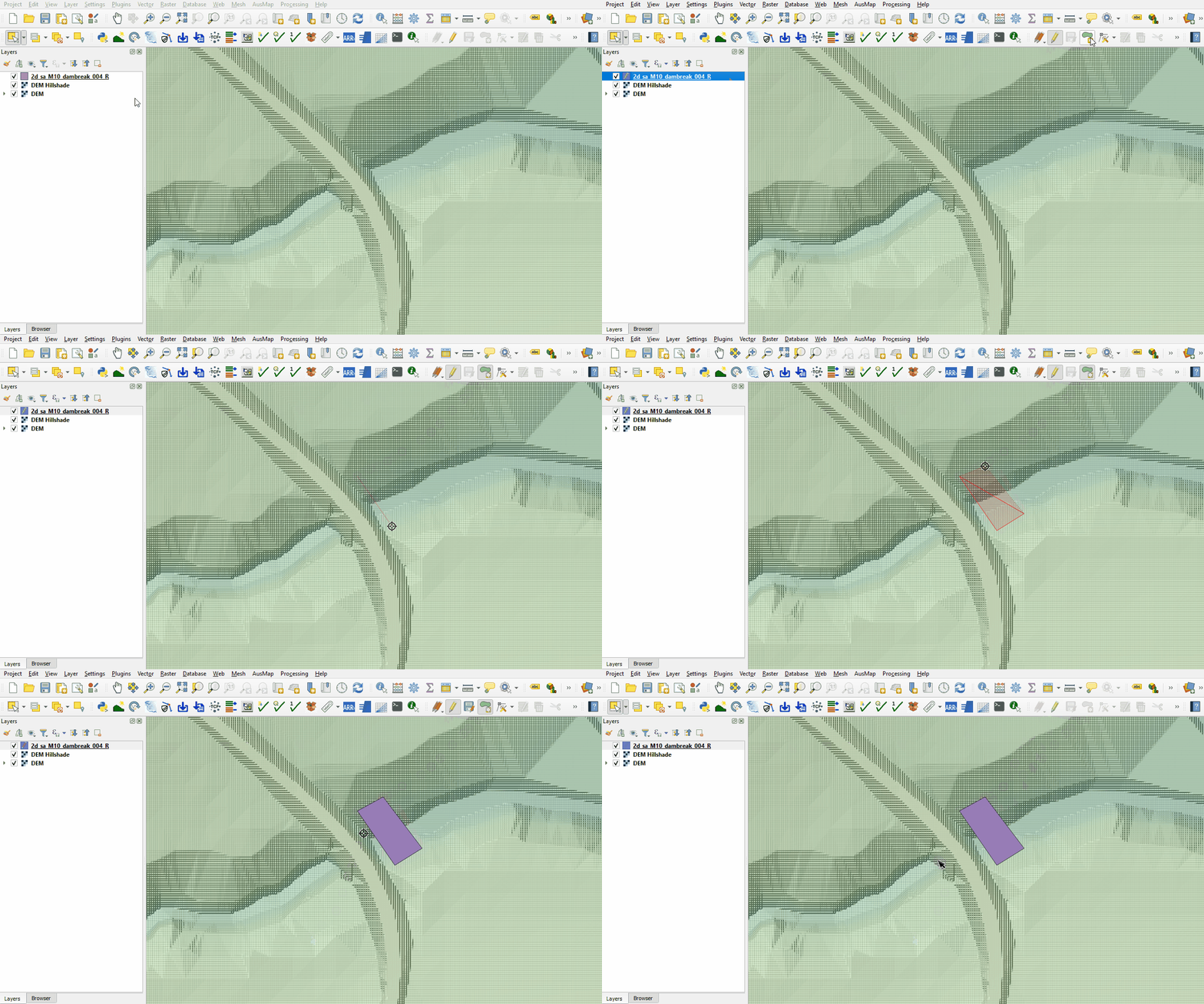
<li>Digitise a polygon downstream of the dam wall within the creek channel. <br> |
<li>Digitise a polygon downstream of the dam wall within the creek channel. <br> |
||
Revision as of 11:57, 27 April 2023
Introduction
QGIS is used to create, import and view input data.
Method
Create a 2d_sa polygon downstream of the dam wall:
- Click on the ‘Import Empty File’ symbol from the TUFLOW Plugin toolbar.
- Select '2d_sa' from the Empty Type list.
- In the Run ID box write 'M10_dambreak_004'.
- Tick the 'Regions' Geometry Type and hit 'OK'. The 2d_sa file appears in the Layers panel.
- Right click on the 2d_sa_M10_dambreak_004_R and toggle on Editing.
- Select 'Add Polygon Feature'.
- Digitise a polygon downstream of the dam wall within the creek channel.
- An attributes dialog displays, enter the following attributes:
- Name: dambreak
- Click 'OK' and turn off editing to save the edits.

Conclusion
- A polygon was digitised for input dambreak hydrograph.
| Up |
|---|
 Back to Module 10 Main Page Back to Module 10 Main Page
|