WIBU Software Licence Update Request: Difference between revisions
Jump to navigation
Jump to search
Content deleted Content added
No edit summary |
No edit summary |
||
| Line 7: | Line 7: | ||
<li> With the empty licence container selected click the “Licence Update” option, as per the image below.<br> |
<li> With the empty licence container selected click the “Licence Update” option, as per the image below.<br> |
||
<br> |
<br> |
||
[[File: |
[[File:Software_licence_001c.png]]<br> |
||
<br> |
<br> |
||
<li> Select “Next” at the next dialogue.<br> |
<li> Select “Next” at the next dialogue.<br> |
||
<br> |
<br> |
||
[[File: |
[[File:Software_licence_002c.png]]<br> |
||
<br> |
<br> |
||
<li> Select “Create Licence Request”.<br> |
<li> Select “Create Licence Request”.<br> |
||
<br> |
<br> |
||
[[File: |
[[File:Software_licence_003c.png]]<br> |
||
<br> |
<br> |
||
<li> Save the licence request file to your computer.<br> |
<li> Save the licence request file to your computer.<br> |
||
<br> |
<br> |
||
[[File: |
[[File:Software_licence_004c.png]]<br> |
||
<br> |
<br> |
||
<li> Email the licence request file (.WibuCmRaC) file to <u>[mailto:sales@tuflow.com sales@tuflow.com]</u>. |
<li> Email the licence request file (.WibuCmRaC) file to <u>[mailto:sales@tuflow.com sales@tuflow.com]</u>. |
||
Revision as of 09:57, 5 August 2024
Software licences are an alternative option to hardware USB licences. Please select the license host carefully as the software based dongle will be bound to it. If over time you decide you want to move to another computer we will need to re-issue you with a new software license (which will incur a small administration fee).
- Email sales@tuflow.com to request a software licence. You will be sent an empty licence container file (*.wibucmlif).
- Install Codemeter Control Centre.
- Open Codemeter Control Centre (from the start menu) and drag and drop the provided .wibucmlif onto it. This will import an empty licence container onto the computer (it will show with a grey icon in the licence tab).
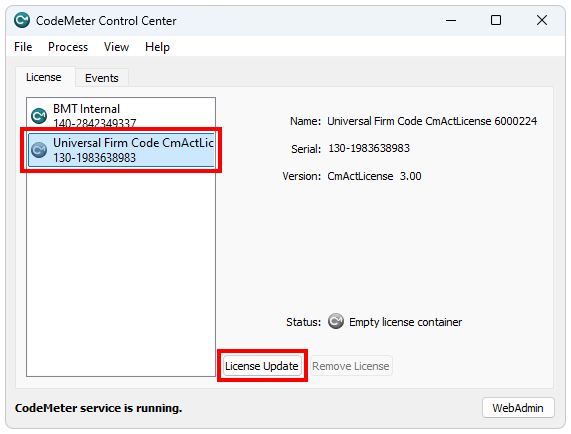
- With the empty licence container selected click the “Licence Update” option, as per the image below.
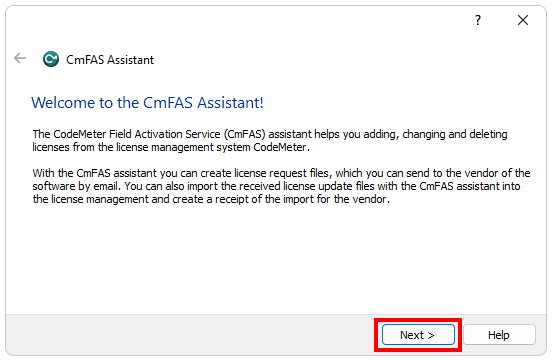
- Select “Next” at the next dialogue.
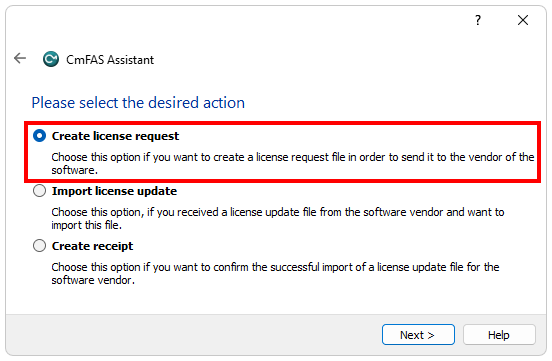
- Select “Create Licence Request”.
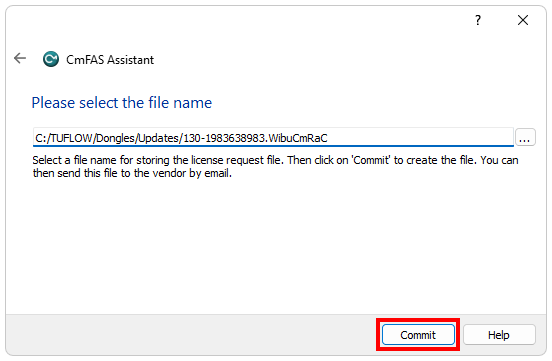
- Save the licence request file to your computer.
- Email the licence request file (.WibuCmRaC) file to sales@tuflow.com.


| Up |
|---|
 Return to WIBU Licensing Main Page Return to WIBU Licensing Main Page
|