Codemeter Enable Logging: Difference between revisions
Jump to navigation
Jump to search
Content deleted Content added
Created page with "=This page is under construction!!!= =Introduction= This page contains instructions for configuring a network TUFLOW licence. It requires that you have the CodeMeter Runtime..." |
|||
| Line 1: | Line 1: | ||
=This page is under construction!!!= |
=This page is under construction!!!= |
||
=Introduction= |
=Introduction= |
||
This page contains instructions for |
This page contains instructions for enabling "Logging" in Codemeter Control Centre. "Logging" is a very useful functionality to monitor the licence allocation by Codemeter.<br> |
||
=Method= |
=Method= |
||
<ol> |
<ol> |
||
Revision as of 11:51, 9 April 2018
This page is under construction!!!
Introduction
This page contains instructions for enabling "Logging" in Codemeter Control Centre. "Logging" is a very useful functionality to monitor the licence allocation by Codemeter.
Method
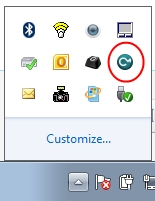
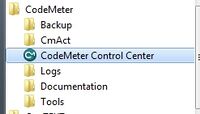
- Open the CodeMeter Control Centre. This can be done via the icon on the taskbar:
Or via the start menu:
- Open the WebAdmin via the button in the lower right.
- Navigate to the Configuration >> Server >> Server Access tab and enable the Network Server checkbox and hit Apply.
- The network licence should now be available. This can be tested on the server by double clicking on a TUFLOW executable.


This can also be access by pointing an internet browser to: [http://localhost:22350/]
The following CodeMeter webpage will appear.

