FM Tute M02 ARC Define Roughness: Difference between revisions
Jump to navigation
Jump to search
Content deleted Content added
Tuflowduncan (talk | contribs) Created page with "=Introduction= This page describes the method for using ArcGIS to create the GIS based material types (land use areas) for the proposed development. Once these layers have be..." |
Tuflowduncan (talk | contribs) |
||
| Line 4: | Line 4: | ||
=Method= |
=Method= |
||
<ol> |
|||
<li>Copy the contents of the <b>FMT_tutorial\Module_data\Module_02\Materials</b> into the <b>TUFLOW\model\gis folder</b>. This folder contains the following two layers: |
|||
*<b>2d_mat_FMT_M02_DEV_001_R.shp</b>, and |
*<b>2d_mat_FMT_M02_DEV_001_R.shp</b>, and |
||
*<b>2d_mat_ FMT_M02_DEV_Buildings_001_R.shp </b>. |
*<b>2d_mat_ FMT_M02_DEV_Buildings_001_R.shp </b>. |
||
<li>Open both layers in ArcGIS. The 2d_mat_ FMT_M02_DEV_001_R layer contains polygons defining grassed areas and roads within the proposed development. The <b>2d_mat_ FMT_M02_DEV_Buildings_001_R.shp</b> layer contains polygons defining the buildings within the proposed development. |
|||
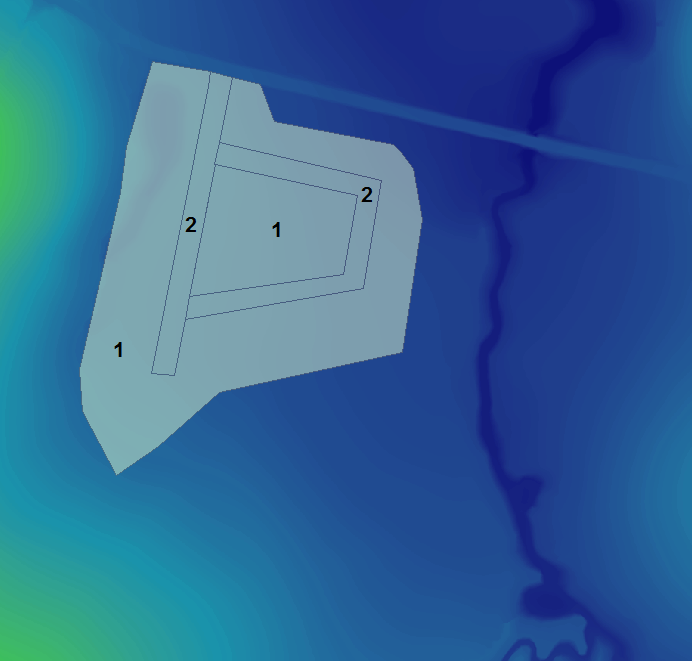
<li>The materials attribute for a number of polygons representing proposed roads in the <b>2d_mat_ FMT_M02_DEV_001_R.shp</b> layer have not been assigned and will need to be populated. Assign a Material ID of 2 to these polygons as shown in the figure below. Leave the remaining larger polygon with a Material ID of 1.<br> |
|||
<br> |
|||
[[File:M07 mat roads ARC.png]]<br> |
|||
<br> |
|||
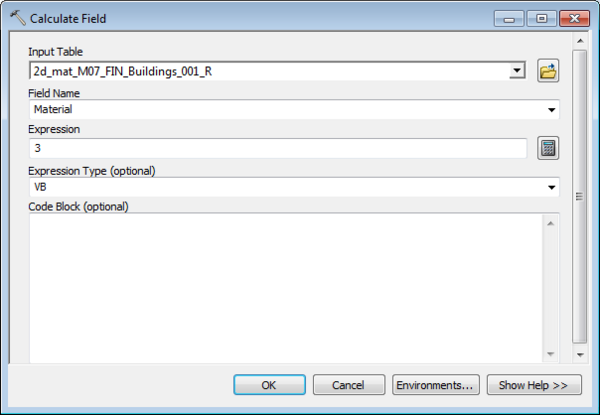
All polygons within the 2d_mat_ FMT_M02_DEV_Buildings_001_R layer represent the buildings of the proposed development and will have the same Material ID of 3. To update the 'Material' field from 0 to 3, open the 'Calculate Field' toolset and populate the dialogue box as shown in the figure below.<br> |
|||
<br> |
|||
[[File:M07 mat update ARC.png|600px]]<br> |
|||
<br> |
|||
<li>Open the Materials.csv file within the <b>TUFLOW\model\</b> folder to observe the Manning’s n values that will be assigned to each Material ID. |
|||
=Conclusions= |
|||
Two 2d_mat GIS layers have been created to define land use categories representing the proposed development. Please return to the main page of the [[Flood_Modeller_Tutorial_Module02#Define Pipe Network|Flood Modeller Module 2 Tutorial]] |
|||
Revision as of 23:56, 3 January 2019
Introduction
This page describes the method for using ArcGIS to create the GIS based material types (land use areas) for the proposed development. Once these layers have been setup, surface roughness or bed-resistance values (e.g. Manning’s n) are assigned to each of these land use areas via the materials.csv file present in the model folder.
Method
- Copy the contents of the FMT_tutorial\Module_data\Module_02\Materials into the TUFLOW\model\gis folder. This folder contains the following two layers:
- 2d_mat_FMT_M02_DEV_001_R.shp, and
- 2d_mat_ FMT_M02_DEV_Buildings_001_R.shp .
- Open both layers in ArcGIS. The 2d_mat_ FMT_M02_DEV_001_R layer contains polygons defining grassed areas and roads within the proposed development. The 2d_mat_ FMT_M02_DEV_Buildings_001_R.shp layer contains polygons defining the buildings within the proposed development.
- The materials attribute for a number of polygons representing proposed roads in the 2d_mat_ FMT_M02_DEV_001_R.shp layer have not been assigned and will need to be populated. Assign a Material ID of 2 to these polygons as shown in the figure below. Leave the remaining larger polygon with a Material ID of 1.
All polygons within the 2d_mat_ FMT_M02_DEV_Buildings_001_R layer represent the buildings of the proposed development and will have the same Material ID of 3. To update the 'Material' field from 0 to 3, open the 'Calculate Field' toolset and populate the dialogue box as shown in the figure below.
- Open the Materials.csv file within the TUFLOW\model\ folder to observe the Manning’s n values that will be assigned to each Material ID.
Conclusions
Two 2d_mat GIS layers have been created to define land use categories representing the proposed development. Please return to the main page of the Flood Modeller Module 2 Tutorial

