FM Tute M02 ARC Boundary Conditions: Difference between revisions
Jump to navigation
Jump to search
Content deleted Content added
Tuflowduncan (talk | contribs) Created page with "<ol> =Introduction= This page details the method for using ArcGIS to create the GIS based boundary layer. The layer will be populated with the name of each inflow boundary whi..." |
Tuflowduncan (talk | contribs) |
||
| Line 8: | Line 8: | ||
[[File:M07 SA polygons ARC.png|700px]] |
[[File:M07 SA polygons ARC.png|700px]] |
||
<br> |
<br> |
||
<li>Save the layer ''' |
<li>Save the layer '''2d_sa_FMT_M02_001_R'''. <br> |
||
<br> |
<br> |
||
<u>'''Boundary Condition Database'''</u> |
<u>'''Boundary Condition Database'''</u> |
||
<li>Copy the file '''100yr2hr_loc.csv''' from '''Module_data\ |
<li>Copy the file '''100yr2hr_loc.csv''' from '''Module_data\Module_02\Inflow''' and place it into the '''TUFLOW\model\bc_dbase''' folder. This file contains the four hydrographs that will be used. |
||
<li>Open up the |
<li>Open up the boundary condition database . This is located within the '''TUFLOW\model\bc_dbase folder''' and is called '''bc_dbase_FMT_M01.csv'''. |
||
<li>We need to add four additional rows to the file which reference the four additional inflows that have been created in the layer ''' |
<li>We need to add four additional rows to the file which reference the four additional inflows that have been created in the layer '''2d_sa_FMT_M02_001_R'''. The revised bc_dbase should look like the figure below:<br> |
||
<br> |
<br> |
||
[[File:M07 bcdbase.png]]<br> |
[[File:M07 bcdbase.png]]<br> |
||
| Line 20: | Line 20: | ||
[[File:100yr2hr loc.PNG|800px]] |
[[File:100yr2hr loc.PNG|800px]] |
||
<br> |
<br> |
||
<li>Save the bc_dbase as ''' |
<li>Save the bc_dbase as '''bc_dbase_FMT_M02.csv'''. It is now ready to be used within the model. |
||
=Conclusion= |
=Conclusion= |
||
Revision as of 02:34, 4 January 2019
- Copy the layer 2d_sa_FMT_M02_001_R.shp within the Module_data\Module_02\Inflow folder into the TUFLOW\model\gis folder.
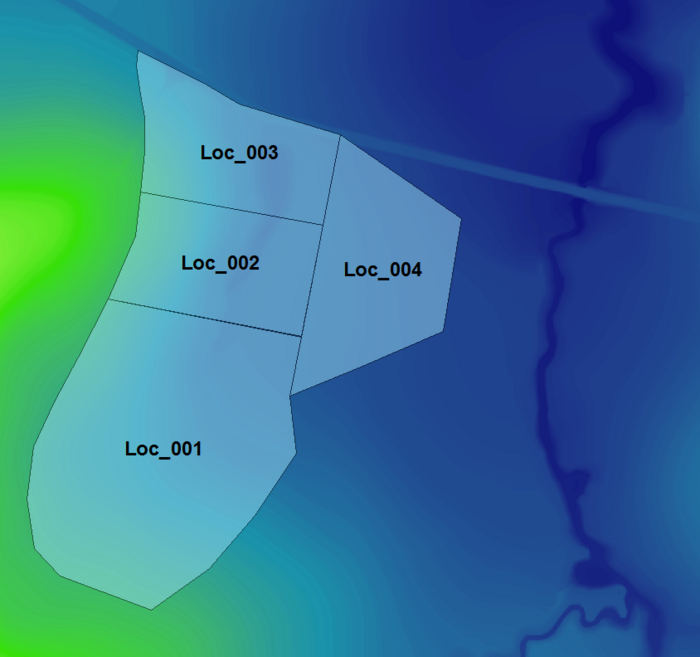
- Open the layer in ArcGIS. Four polygons have been digitised over the location of the proposed development. Each polygon represents a sub-catchment to which different inflow boundaries will be associated. Make the layer 2d_sa_FMT_M02_001_R editable and within the attribute table populate the first and only field of each polygon with the name of the inflow boundary as shown in the figure below. The next steps of this module will link these boundary names with an inflow using the bc_dbase located in TUFLOW\bc_dbase
- Save the layer 2d_sa_FMT_M02_001_R.
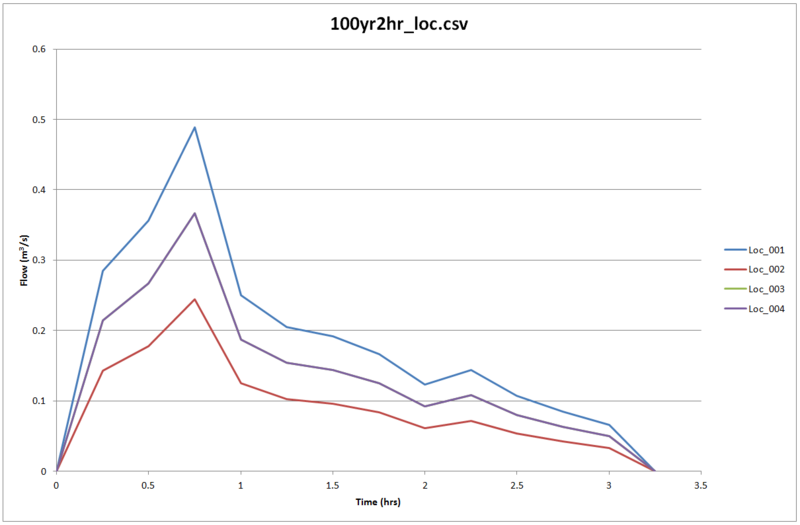
Boundary Condition Database - Copy the file 100yr2hr_loc.csv from Module_data\Module_02\Inflow and place it into the TUFLOW\model\bc_dbase folder. This file contains the four hydrographs that will be used.
- Open up the boundary condition database . This is located within the TUFLOW\model\bc_dbase folder and is called bc_dbase_FMT_M01.csv.
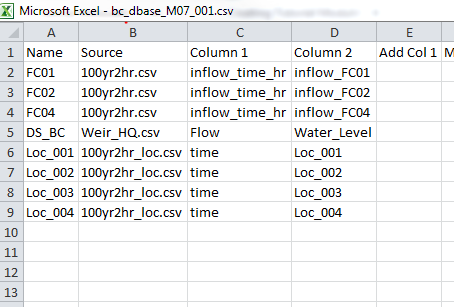
- We need to add four additional rows to the file which reference the four additional inflows that have been created in the layer 2d_sa_FMT_M02_001_R. The revised bc_dbase should look like the figure below:
The hydrographs applied to each of the 2d_sa polygons are contained within the source file 100yr2hr_loc.csv.
- Save the bc_dbase as bc_dbase_FMT_M02.csv. It is now ready to be used within the model.
Conclusion
A GIS layer has been created containing four polygons in a 2d_sa layer over the location of the proposed development. The existing boundary conditions database (bc_dbase) has been modified to link these four GIS objects to hydrographs within an external csv file. Please return to the main page of the [Flood Modeller module 2 tutorial].
Introduction
This page details the method for using ArcGIS to create the GIS based boundary layer. The layer will be populated with the name of each inflow boundary which will be linked to the boundary database (created in Module 1) in the following steps of this module. The created boundary will be applied as a source-area boundary in a 2d_sa layer.


