Integrity Tool - Pipe Direction: Difference between revisions
Jump to navigation
Jump to search
Content deleted Content added
Tuflowduncan (talk | contribs) No edit summary |
Tuflowduncan (talk | contribs) No edit summary |
||
| Line 1: | Line 1: | ||
The [[1D_Integrity_Tool_-_Pipe_Direction|Pipe Direction]] integrity tool will check the pipe direction and will correct based on the selected options. |
The [[1D_Integrity_Tool_-_Pipe_Direction|Pipe Direction]] integrity tool will check the pipe direction and will correct based on the selected options. |
||
<ol> |
<ol> |
||
<li> Ensure that '''1d_nwk_pipe_integrity_L_workshop_EG1_ID1_SN1''' layer is referenced in the 1D network Line Layers and select the Pipe Direction tab. |
<li> Ensure that '''1d_nwk_pipe_integrity_L_workshop_EG1_ID1_SN1''' layer is referenced in the 1D network Line Layers and select the '''Pipe Direction''' tab. |
||
<li> Choose the ‘Based on pipe direction continuity’ option. This will perform a check based on the incoming and outgoing pipe directions. Run the tool.<br> |
<li> Choose the '''‘Based on pipe direction continuity’''' option. This will perform a check based on the incoming and outgoing pipe directions. Run the tool.<br> |
||
[[File:Pipe direction.png]]<br> |
[[File:Pipe direction.png]]<br> |
||
| Line 26: | Line 26: | ||
</ol> |
</ol> |
||
Please return to the |
Please return to the [[1D_Integrity_Tool_-_Tutorial#1D_Integrity_Tool|1D Integrity tutorial page]] to continue the tutorial. |
||
Revision as of 23:23, 8 April 2022
The Pipe Direction integrity tool will check the pipe direction and will correct based on the selected options.
- Ensure that 1d_nwk_pipe_integrity_L_workshop_EG1_ID1_SN1 layer is referenced in the 1D network Line Layers and select the Pipe Direction tab.
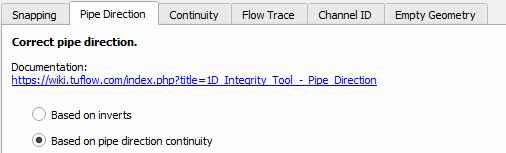
- Choose the ‘Based on pipe direction continuity’ option. This will perform a check based on the incoming and outgoing pipe directions. Run the tool.
This will again generate an output layer with the following information:

- Zoom to the location of the output location (pipe5).
- Select the 1d_nwk_MI01_Pipes_001_L_EG1_ID1_SN1 layer and use the ‘Apply TUFLOW Styles to Current Layer’ tool,
 , so that we can see the pipe direction.
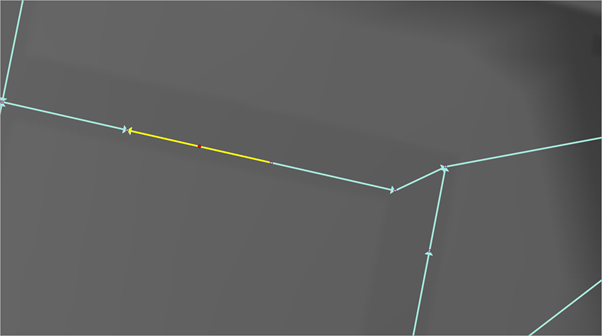
You should see that pipe direction is not consistent with the upstream or downstream pipe. This won’t cause an error within TUFLOW but will lead to negative flows reported.
, so that we can see the pipe direction.
You should see that pipe direction is not consistent with the upstream or downstream pipe. This won’t cause an error within TUFLOW but will lead to negative flows reported.
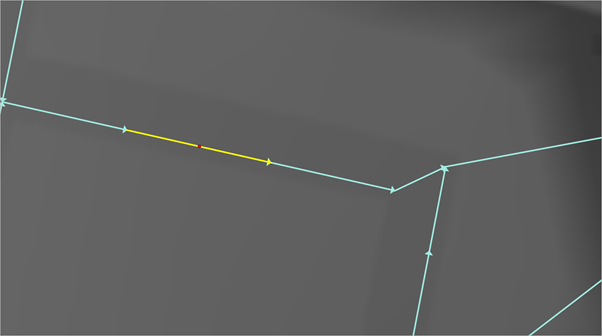
As well as the output layer, a 1d_nwk_MI01_Pipes_001_L_EG1_ID1_SN1_PD1 layer is generated which has the corrected pipe direction. - Redo step 4 but this time with the 1d_nwk_MI01_Pipes_001_L_EG1_ID1_SN1_PD1 layer selected. You will now be able to see that the pipe direction has been corrected.


Please return to the 1D Integrity tutorial page to continue the tutorial.