Tutorial M05 Results QGIS: Difference between revisions
Jump to navigation
Jump to search
Content deleted Content added
| Line 10: | Line 10: | ||
<li>When prompted to 'Open Result GIS Layer', click 'Yes'. This loads in all of the 1D and 2D results. |
<li>When prompted to 'Open Result GIS Layer', click 'Yes'. This loads in all of the 1D and 2D results. |
||
<li>Two additional files appear in the Layers panel: |
<li>Two additional files appear in the Layers panel: |
||
*M05_5m_001_PLOT_L |
*'''M05_5m_001_PLOT_L''' |
||
*M05_5m_001_PLOT_P |
*'''M05_5m_001_PLOT_P''' |
||
<li>Select the |
<li>Select the '''M05_5m_001_PLOT_L''' file in the Layers panel and using the 'Select Features' tool highlight one of the 1d_nwk lines (to highlight multiple hold down shift). |
||
<li>Select one of the Time Series datasets shown with the [[File:results_2.png | 15px]] icon and the 'Time Series' tab gets updated. <br> |
<li>Select one of the Time Series datasets shown with the [[File:results_2.png | 15px]] icon and the 'Time Series' tab gets updated. <br> |
||
<br> |
<br> |
||
Revision as of 11:36, 27 April 2023
Introduction
QGIS is used to view the 1D time series results with the TUFLOW Viewer. For viewing of the 2D map results, see Module 1.
Method
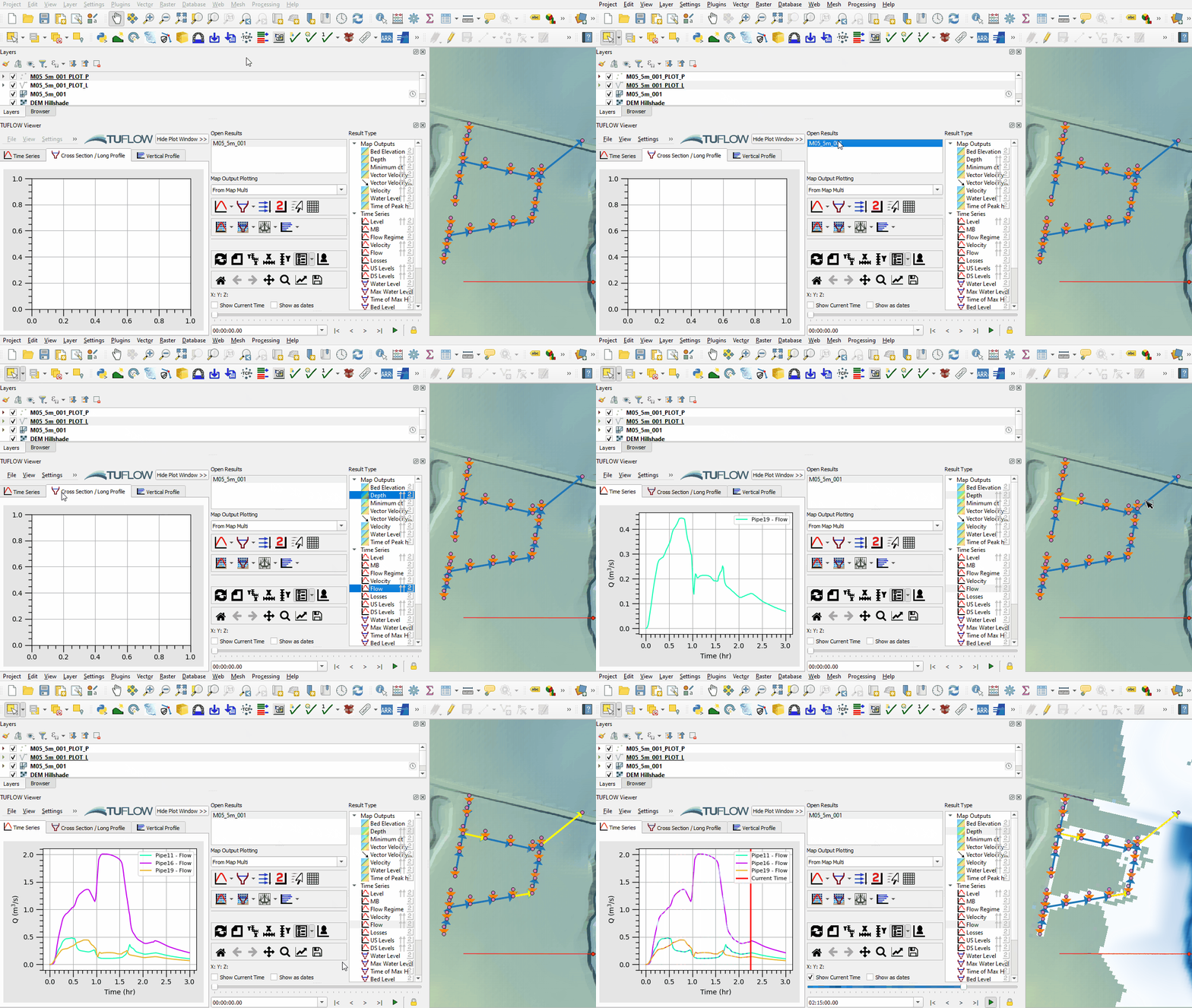
Plot Time Series results through the pipe network:
- Open the TUFLOW Viewer.
- Select File > Load Results. Navigate to the M05_5m_001.tcf in the Module_05\TUFLOW\runs folder and open it.
- When prompted to 'Open Result GIS Layer', click 'Yes'. This loads in all of the 1D and 2D results.
- Two additional files appear in the Layers panel:
- M05_5m_001_PLOT_L
- M05_5m_001_PLOT_P
- Select the M05_5m_001_PLOT_L file in the Layers panel and using the 'Select Features' tool highlight one of the 1d_nwk lines (to highlight multiple hold down shift).
- Select one of the Time Series datasets shown with the
 icon and the 'Time Series' tab gets updated.


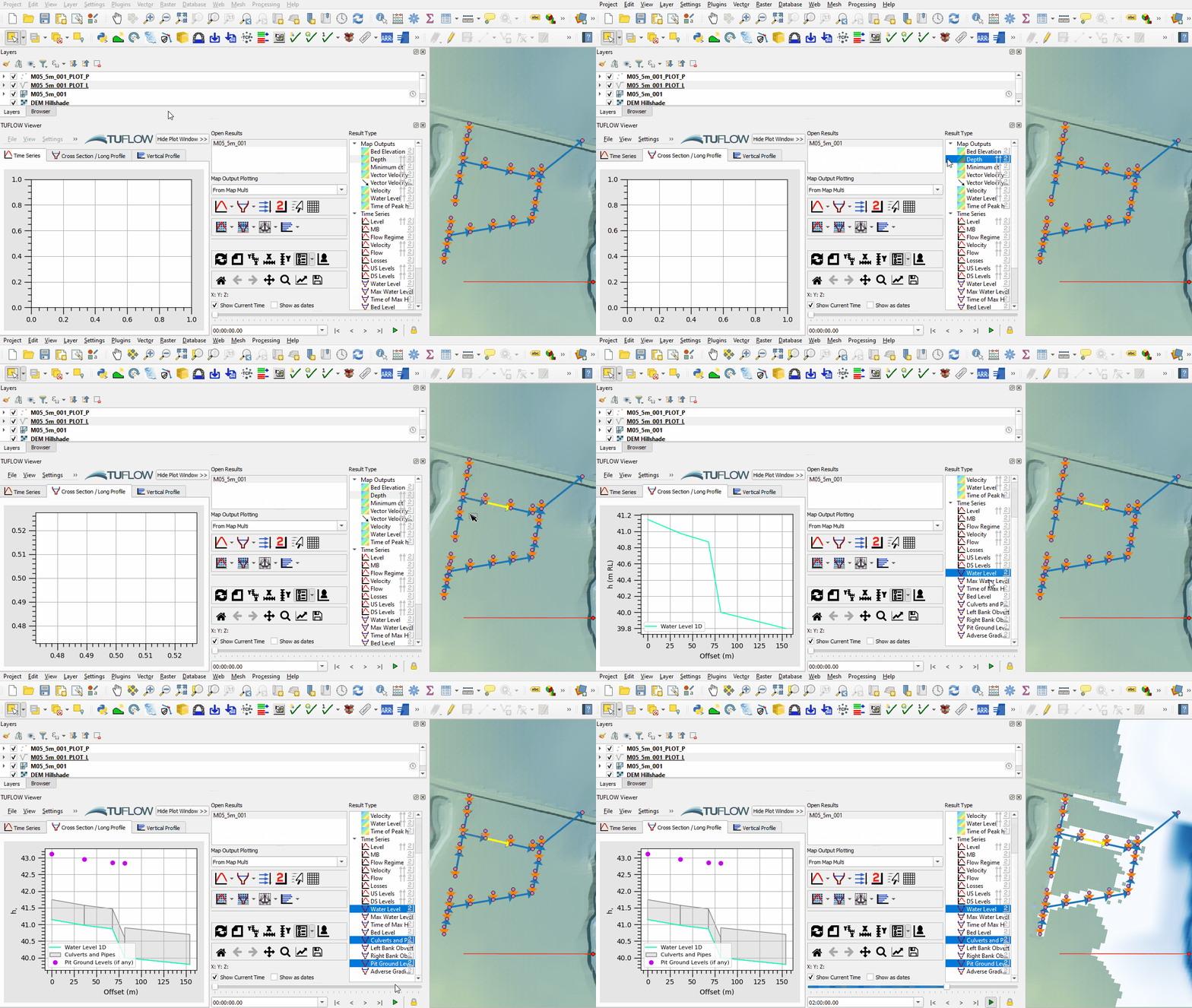
Plot longitudinal profiles from the Time Series datasets:
- The available long profile result types have a long profile icon
 and display in the 'Cross Section / Long Profile' tab.


Conclusion
- Both the 1D and 2D results were viewed confirming the the pipe network was getting flows through the pit 1D/2D links and the water was discharging from the downstream pipe to the 2D domain.
- For further functionality, see TUFLOW Viewer.
| Up |
|---|
 Back to Module 5 Main Page Back to Module 5 Main Page
|