TUFLOW SWMM Tutorial M04: Difference between revisions
Chris Huxley (talk | contribs) |
Chris Huxley (talk | contribs) |
||
| Line 1: | Line 1: | ||
= Introduction = |
= Introduction = |
||
This tutorial, Module 4 of the TUFLOW SWMM tutorial dataset will demonstrate TUFLOW's in-bulit event management functionality. This powerful functionality runs multiple event combinations (e.g. magnitude, duration, temporal patterns, climate change) using a single set of control files, rather than creating a new set of control files for every simulation. For example, without implementing event management |
This tutorial, Module 4 of the TUFLOW SWMM tutorial dataset will demonstrate TUFLOW's in-bulit event management functionality. This powerful functionality runs multiple event combinations (e.g. magnitude, duration, temporal patterns, climate change) using a single set of control files, rather than creating a new set of control files for every simulation. For example, without implementing event management a project requiring simulation of the following event combinations would require 144 TCF and bc_dbase files: |
||
* 6 x Event Magnitude (AEP): 01p, 02p, 05p, 10p, 20p, 50p |
|||
[[File:M09 EventManagement 01a.png]]<br> |
|||
* 8 x Event Duration (hour): 1h, 2h, 3h, 6h, 9h, 12h, 18h, 24h |
|||
| ⚫ | |||
* 3 x Climate Change Horizon: current climate, 2050, 2100 |
|||
Using predefined naming conventions, with TUFLOW's event management functionality, all the events can be executed from a single TCF and bc_dbase file! This feature of TUFLOW makes the management of the model files easier, ensures consistency between the simulations and improves project quality control by reducing the likelihood of human error associated with incorrect file referencing. <br> |
|||
| ⚫ | TUFLOW SWMM Tutorial Module 4 builds from the model created in <u>[[TUFLOW_SWMM_Tutorial_M03|TUFLOW SWMM Tutorial Module 3]]</u>. The completed TUFLOW SWMM Module 3 model is provided in the '''''TUFLOW_SWMM_Module_04\TUFLOW''''' folder of the download dataset as the starting point for this tutorial. If you are not already familiar with TUFLOW SWMM linking, we recommend first completing Module 1, 2 and 3 before this tutorial. <br> |
||
= Simulation Control Files = |
= Simulation Control Files = |
||
Revision as of 13:30, 18 January 2024
Introduction
This tutorial, Module 4 of the TUFLOW SWMM tutorial dataset will demonstrate TUFLOW's in-bulit event management functionality. This powerful functionality runs multiple event combinations (e.g. magnitude, duration, temporal patterns, climate change) using a single set of control files, rather than creating a new set of control files for every simulation. For example, without implementing event management a project requiring simulation of the following event combinations would require 144 TCF and bc_dbase files:
- 6 x Event Magnitude (AEP): 01p, 02p, 05p, 10p, 20p, 50p
- 8 x Event Duration (hour): 1h, 2h, 3h, 6h, 9h, 12h, 18h, 24h
- 3 x Climate Change Horizon: current climate, 2050, 2100
Using predefined naming conventions, with TUFLOW's event management functionality, all the events can be executed from a single TCF and bc_dbase file! This feature of TUFLOW makes the management of the model files easier, ensures consistency between the simulations and improves project quality control by reducing the likelihood of human error associated with incorrect file referencing.
TUFLOW SWMM Tutorial Module 4 builds from the model created in TUFLOW SWMM Tutorial Module 3. The completed TUFLOW SWMM Module 3 model is provided in the TUFLOW_SWMM_Module_04\TUFLOW folder of the download dataset as the starting point for this tutorial. If you are not already familiar with TUFLOW SWMM linking, we recommend first completing Module 1, 2 and 3 before this tutorial.
Simulation Control Files
TUFLOW Event File (TEF)
- Navigate to the TUFLOW_SWMM_Module_04\Tutorial_Data folder. Copy the TS04_Event_File.tef to the TUFLOW_SWMM_Module_04\TUFLOW\runs folder.
- Open the TEF in a text editor. There are three event magnitudes and two event durations listed:
- Event Magnitudes: 5% AEP, 2% AEP and 1% AEP
- Event Durations: 1hr and 2hr
- The event specific commands are contained between the Define Event and End Define commands.
- The BC Event Source command is linked to the bc_dbase file. In the below examples, any occurrence of '~AEP~' in the bc_dbase is replaced with '05p' and any occurrence of '~DUR~' in the bc_dbase is replaced with '1hr'.
! EVENT MAGNITUDES
Define Event == 05p- BC Event Source == ~AEP~ | 05p
! EVENT DURATIONS
Define Event == 1hr- BC Event Source == ~DUR~ | 1hr
Note: The 'AEP' and 'DUR' are user defined variables. The 'AEP' refers to an event magnitude (Annual Exceedance Probability) and 'DUR' refers to an event duration.
- TUFLOW reads all of the defined events in the TEF and selects the ones specified in the batch file.
TUFLOW Boundary Condition Database (bc_dbase)
Update the bc_dbase with event magnitude and event duration placeholders:
- Navigate to the TUFLOW_SWMM_Module_04\Tutorial_Data folder. Copy and paste the following files to the TUFLOW_SWMM_Module_04\TUFLOW\bc_dbase folder. These files contains the inflows for each event magnitude and duration.
- 05p1hr.csv
- 05p2hr.csv
- 02p1hr.csv
- 02p2hr.csv
- 01p1hr.csv
- 01p2hr.csv
- Save a copy of the bc_dbase.csv as bc_dbase_TS04_001.csv.
- Open the file and make the following updates to the 'Source' column:
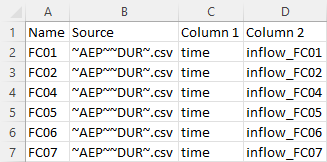
- Save the bc_dbase.

TUFLOW Control File (TCF)
- Save a copy of TS03_5m_001.tcf as TS04_5m_~e1~_~e2~_001.tcf in the TUFLOW_SWMM_Module_04\TUFLOW\runs folder.
- Open the file TS04_5m_~e1~_~e2~_001.tcf in a text editor.
- Update the reference to the bc_dbase:
BC Database == ..\bc_dbase\bc_dbase_TS04_001.csv ! Reference the Boundary Conditions Database
- Add the following command to reference the TEF at the end of the TCF:
! EVENTS
Event File == TS04_Event_File.tef ! Reference the TUFLOW Event File
- Save the TCF.
Running the Simulation
- Save a copy of _run_TS03_HPC.bat as _run_TS04_HPC.bat in the TUFLOW_SWMM_Module_04\TUFLOW\runs folder.
- Update the batch file to reference the TS04_5m_~e1~_~e2~_001.tcf and include event switches (-e1, -e2) defining event magnitude and event duration:
set exe="..\..\..\exe\2023-03-AA\TUFLOW_iSP_w64.exe"
set run=start "TUFLOW" /wait %exe% -b
%run% -e1 05p -e2 1hr TS04_5m_~e1~_~e2~_001.tcf
%run% -e1 05p -e2 2hr TS04_5m_~e1~_~e2~_001.tcf
%run% -e1 02p -e2 1hr TS04_5m_~e1~_~e2~_001.tcf
%run% -e1 02p -e2 2hr TS04_5m_~e1~_~e2~_001.tcf
%run% -e1 01p -e2 1hr TS04_5m_~e1~_~e2~_001.tcf
%run% -e1 01p -e2 2hr TS04_5m_~e1~_~e2~_001.tcf
- Save the batch file and double click it in file explorer to run the simulation.
Troubleshooting
Did your TUFLOW SWMM model fail to run successfully? If so, here is a link to a troubleshooting guide: TUFLOW SWMM Troubleshooting.
Check Files
While the model is running, review the added features are specified correctly:
- Open the M09_5m_05p_1hr_001.tlf from the Module_09\TUFLOW\runs\log folder in a text editor.
- The name of the events replaced the placeholders in the TCF name.
- Confirm the specified events and event sources:
Results
Conclusion
- Multiple events were set up in the TUFLOW Event File (TEF) with define event blocks.
- TUFLOW Log Files (TLF) were reviewed.
- Multiple event results were inspected using the TUFLOW Viewer.
Looping Batch File (Optional)
Looping batch file is a powerful tool running large number of simulations with the least amount of batch file text:
- Save a copy of _run_M09_HPC.bat as _run_M09_HPC_loop.bat in the Module_09\TUFLOW\runs folder.
- Add the following commands. Indentation is important in batch files, insert tabs to match the below spacing:
echo off
set exe="..\..\..\exe\2023-03-AA\TUFLOW_iSP_w64.exe"
set run=start "TUFLOW" /wait %exe% -b
set AEP=05p 02p 01p
set DUR=1hr 2hr
for %%a in (%AEP%) do (
- for %%b in (%DUR%) do (
- echo Running %%a %%b
%run% -e1 %%a -e2 %%b M09_5m_~e1~_~e2~_001.tcf
Note: The 'AEP' and 'DUR' are user defined batch file variables. The 'AEP' refers to an event magnitude (Annual Exceedance Probability) and 'DUR' refers to an event duration.
- Save the batch file and double click it in file explorer to run the simulation.
| Up |
|---|
 Back to TUFLOW SWMM Tutorial Introduction Main Page Back to TUFLOW SWMM Tutorial Introduction Main Page
|