QGIS TUFLOW Load Layers From TCF: Difference between revisions
Jump to navigation
Jump to search
Content deleted Content added
Ellis Symons (talk | contribs) No edit summary |
Ellis Symons (talk | contribs) No edit summary |
||
| (9 intermediate revisions by the same user not shown) | |||
| Line 12: | Line 12: | ||
: ''<b>Note: Since v3.3, this tool will work if the TUFLOW model is using GPKG input layers (vector or raster) or GeoTIFF raster layers.</b>'' |
: ''<b>Note: Since v3.3, this tool will work if the TUFLOW model is using GPKG input layers (vector or raster) or GeoTIFF raster layers.</b>'' |
||
: ''<b>Note: Since v3. |
: ''<b>Note: Since v3.5, the user is given the option to load raster layers normally, don't load rasters, or load them but toggle the visibity off.</b>'' |
||
: [[File: load_raster_question_dialog.PNG | 350px]] |
: [[File: load_raster_question_dialog.PNG | 350px]] |
||
: ''<b>Note: Since v3.5.2, if the user is using QGIS v3.22 or later the options are now included in the scenario selection dialog box and the option to import layers as 'grouped' or 'ungrouped' are also offered. If there are no scenarios to choose from, a dialog box will still appear with the new options.</b>'' |
|||
: [[File: Load_Layers_From_TCF_additional_options_scenario_dialog.PNG | 350px]]<br> |
|||
: [[File: Load_Layers_From_TCF_additional_options.PNG | 350px]]<Br> |
|||
<br> |
|||
: ''<b>Note: Since v3.7, it is possible for the user to select any control file. E.g. it is possible to select the TGC to import layers from</b>'' |
|||
<br> |
|||
: ''<b>Note: Since v3.8.2, additional options to change the load order are available:</b>'' |
|||
: [[File: Load_Layers_From_TCF_additional_options_v2.PNG]] |
|||
* Alphabetical - This is the default option. Raster inputs will be separated and be at the bottom of the layer tree. |
|||
* Control File - This option will retain the order of the inputs in control file completely. Inputs read in later will be toward the top of the layer tree. |
|||
* Control File (Group Rasters) - This option will retain the order of the inputs in the control file but will group the rasters at the bottom of the layer tree (if there is more than one raster input, relatively they will be ordered by the conrol file order). |
|||
<br> |
|||
===Example=== |
===Example=== |
||
Latest revision as of 01:50, 23 May 2023
This tool will read a TCF file and load the GIS layers used into QGIS (vector and raster layers).
Running the Tool
The tool can be found in the TUFLOW Plugin toolbar, or via the QGIS menu Plugins >> TUFLOW >> Load TUFLOW Layers From TCF.

Clicking the tool will direct the user to browse to the location of a TCF file. If the TUFLOW model contains 'IF Scenario' conditionals, then a selection box will open with a list of scenarios for the user to choose from. Multiple scenarios can be chosen, and conversely no scenarios need to be selected.
If the tool has any issue loading any files, it will skip it and continue the process. At the end it will give the user a list of all the files it failed to load.
- Note: Since v3.3, this tool will work if the TUFLOW model is using GPKG input layers (vector or raster) or GeoTIFF raster layers.
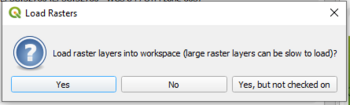
- Note: Since v3.5, the user is given the option to load raster layers normally, don't load rasters, or load them but toggle the visibity off.

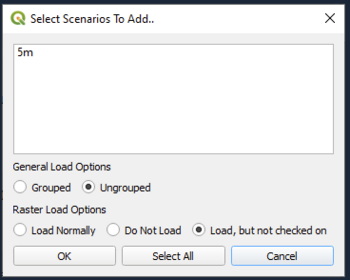
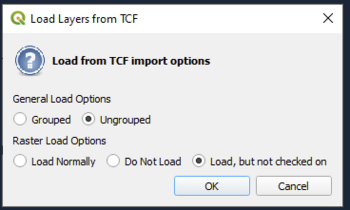
- Note: Since v3.5.2, if the user is using QGIS v3.22 or later the options are now included in the scenario selection dialog box and the option to import layers as 'grouped' or 'ungrouped' are also offered. If there are no scenarios to choose from, a dialog box will still appear with the new options.


- Note: Since v3.7, it is possible for the user to select any control file. E.g. it is possible to select the TGC to import layers from
- Note: Since v3.8.2, additional options to change the load order are available:
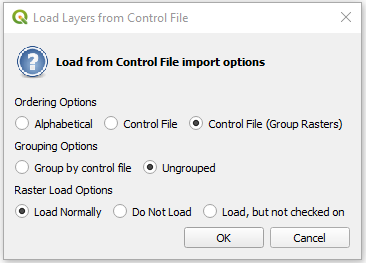

- Alphabetical - This is the default option. Raster inputs will be separated and be at the bottom of the layer tree.
- Control File - This option will retain the order of the inputs in control file completely. Inputs read in later will be toward the top of the layer tree.
- Control File (Group Rasters) - This option will retain the order of the inputs in the control file but will group the rasters at the bottom of the layer tree (if there is more than one raster input, relatively they will be ordered by the conrol file order).
Example

| Up |
|---|
 Back to TUFLOW QGIS Plugin Main Page Back to TUFLOW QGIS Plugin Main Page
|