Tutorial M04 GIS Inputs QGIS: Difference between revisions
Jump to navigation
Jump to search
Content deleted Content added
Created page with "= Introduction = QGIS is used to create, import and view input data.<br> <br> = TUFLOW Project Re-Configuration = Re-configure the TUFLOW project to use and save empty files..." |
No edit summary |
||
| (9 intermediate revisions by 4 users not shown) | |||
| Line 11: | Line 11: | ||
<li>Click 'OK' and save the QGIS workspace by selecting Project > Save As.<br> |
<li>Click 'OK' and save the QGIS workspace by selecting Project > Save As.<br> |
||
<br> |
<br> |
||
[[File: |
[[File:M04_SHP_ConfigureProject.PNG]]<br><br> |
||
<li>Set the QGIS workspace projection to EPSG:32760, see <u>[https://wiki.tuflow.com/index.php?title= |
<li>Set the QGIS workspace projection to EPSG:32760, see <u>[https://wiki.tuflow.com/index.php?title=Tutorial_Site_Familiarisation_QGIS#Set_the_Projection Set the Projection]</u>. |
||
</ol> |
</ol> |
||
<br> |
<br> |
||
| Line 18: | Line 18: | ||
= Method = |
= Method = |
||
Navigate to the '''Module_04\Tutorial_Data''' folder. Copy and save all the below layers into the '''Module_04\TUFLOW\model\gis''' folder: <br> |
Navigate to the '''Module_04\Tutorial_Data''' folder. Copy and save all the below layers into the '''Module_04\TUFLOW\model\gis''' folder: <br> |
||
:*2d_lfcsh_M04_bridge_001_L |
:*'''2d_lfcsh_M04_bridge_001_L''' |
||
:*2d_po_M04_001_L |
:*'''2d_po_M04_001_L''' |
||
:*2d_po_M04_001_P |
:*'''2d_po_M04_001_P''' |
||
:*2d_zsh_M02_cut_002_R |
:*'''2d_zsh_M02_cut_002_R''' |
||
Investigate the supplied files: |
Investigate the supplied files: |
||
| Line 29: | Line 29: | ||
:*Select Layer > Add layer > Add Vector Layer and navigate to the '''Module_04\TUFLOW\model\gis''' folder. |
:*Select Layer > Add layer > Add Vector Layer and navigate to the '''Module_04\TUFLOW\model\gis''' folder. |
||
<li>The 2d_zsh file cuts through the road embankment, see <u>[[Tutorial_M02 | Module 2]]</u> for more information.<br> |
<li>The 2d_zsh file cuts through the road embankment, see <u>[[Tutorial_M02 | Module 2]]</u> for more information.<br> |
||
<li>The 2d_lfcsh represents the bridge in 2D, it has layers of varying blockage and form loss for piers, bridge deck and railings. The layers of the bridge structure are defined as: |
<li>The 2d_lfcsh represents the bridge in 2D, it has layers of varying blockage and form loss for piers, bridge deck and railings. The layers of the bridge structure are defined as:<br> |
||
<ol> |
|||
[[File:M04 bridge layers 01.png |
[[File:M04 bridge layers 01.png]]<br> |
||
</ol> |
|||
:*Layer 1: Beneath the bridge deck. |
:*Layer 1: Beneath the bridge deck. |
||
:*Layer 2: The bridge deck. |
:*Layer 2: The bridge deck. |
||
:*Layer 3: The bridge rails. |
:*Layer 3: The bridge rails. |
||
:*Layer 4: Flow above the rails (assumed to be unimpeded). |
:*Layer 4: Flow above the rails (assumed to be unimpeded). |
||
Refer to the <u>[https://docs.tuflow.com/classic-hpc/manual/latest/ TUFLOW Manual]</u> for more information on the attributes.<br> |
|||
<br> |
<br> |
||
{{Video|name=Animation_M04_GIS_01b.mp4|width=1232}}<br> |
|||
[[File:Animation M04 GIS 01a.gif]]<br> |
|||
<br> |
<br> |
||
<li>The 2d_po files include a structure group output for the 2D bridge. The 'Label' attribute links the 2d_po line to the 2d_po points by the same attribute ‘Bridge’. |
<li>The 2d_po files include a structure group output for the 2D bridge. The 'Label' attribute links the 2d_po line to the 2d_po points by the same attribute ‘Bridge’. |
||
| Line 47: | Line 49: | ||
:*Label = Bridge |
:*Label = Bridge |
||
<br> |
<br> |
||
{{Video|name=Animation_M04_GIS_02a.mp4|width=1232}}<br> |
|||
[[File:Animation M04 GIS 02a.gif]]<br> |
|||
</ol> |
</ol> |
||
<br> |
<br> |
||
Latest revision as of 09:53, 23 September 2024
Introduction
QGIS is used to create, import and view input data.
TUFLOW Project Re-Configuration
Re-configure the TUFLOW project to use and save empty files to the correct folder:
- Go to Plugins > TUFLOW > Editing > Configure / Create TUFLOW Project.
- Change the folder which contains TUFLOW to the Module_04 folder. This is the only change required, the model folder structure and template empty files are supplied from previous model.
Note: The 'results' and 'check' folder get automatically created when the TUFLOW model is run.
- Click 'OK' and save the QGIS workspace by selecting Project > Save As.
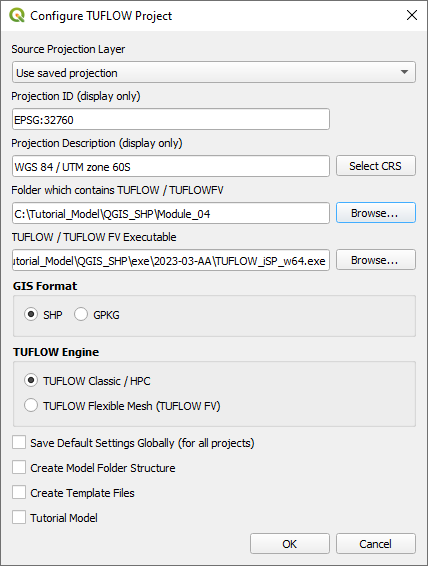
- Set the QGIS workspace projection to EPSG:32760, see Set the Projection.

Method
Navigate to the Module_04\Tutorial_Data folder. Copy and save all the below layers into the Module_04\TUFLOW\model\gis folder:
- 2d_lfcsh_M04_bridge_001_L
- 2d_po_M04_001_L
- 2d_po_M04_001_P
- 2d_zsh_M02_cut_002_R
Investigate the supplied files:
- Open the files, either:
- Drag and drop the .shp files into the QGIS workspace, or
- Select Layer > Add layer > Add Vector Layer and navigate to the Module_04\TUFLOW\model\gis folder.
- The 2d_zsh file cuts through the road embankment, see Module 2 for more information.
- The 2d_lfcsh represents the bridge in 2D, it has layers of varying blockage and form loss for piers, bridge deck and railings. The layers of the bridge structure are defined as:
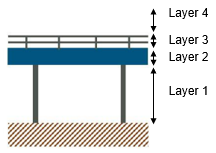
- Layer 1: Beneath the bridge deck.
- Layer 2: The bridge deck.
- Layer 3: The bridge rails.
- Layer 4: Flow above the rails (assumed to be unimpeded).
Refer to the TUFLOW Manual for more information on the attributes.
- The 2d_po files include a structure group output for the 2D bridge. The 'Label' attribute links the 2d_po line to the 2d_po points by the same attribute ‘Bridge’.
- The 2d_po line is snapped to the 2d_lfcsh from left to right looking downstream and has the following attributes:
- Type = QS (structure flow)
- Label = Bridge
- The 2d_po points are digitised upstream and downstream of the 2d_lfcsh and have the following attributes:
- Type = HU (water level upstream) and HD (water level downstream)
- Label = Bridge

Conclusion
- The 2d_lfcsh layer was supplied for use as a 2D bridge.
- The 2d_po structure group layers were added to output additional hydraulic information of the 2D bridge.
| Up |
|---|
 Back to Module 4 Main Page Back to Module 4 Main Page
|