Raster Format Conversion Using gdal translate: Difference between revisions
Ellis Symons (talk | contribs) No edit summary |
Ellis Symons (talk | contribs) No edit summary |
||
| (20 intermediate revisions by 2 users not shown) | |||
| Line 13: | Line 13: | ||
<pre>gdal_translate.exe -of AAIGrid -co SIGNIFICANT_DIGITS=8 DEM_M01_5m.tif DEM_M01_5m.asc</pre> |
<pre>gdal_translate.exe -of AAIGrid -co SIGNIFICANT_DIGITS=8 DEM_M01_5m.tif DEM_M01_5m.asc</pre> |
||
==Adding Compression |
==Adding Compression To GeoTIFF== |
||
<Br> |
<Br> |
||
'''Using DEFLATE Compression on Output GeoTIFF''' |
'''Using DEFLATE Compression on Output GeoTIFF''' |
||
| Line 31: | Line 31: | ||
<br> |
<br> |
||
'''ASC to GeoTIFF'''<Br> |
'''ASC to GeoTIFF'''<Br> |
||
:* ''< |
:* ''<tt>-a_srs <srs_def></tt>'': Override the projection of the output file (no transformations performed). Srs_def can be an EPSG or WKT CRS definition. |
||
<pre>gdal_translate.exe -of GTiff -a_srs "EPSG:32760" DEM_M01_5m.asc DEM_M01_5m.tif</pre> |
<pre>gdal_translate.exe -of GTiff -a_srs "EPSG:32760" DEM_M01_5m.asc DEM_M01_5m.tif</pre> |
||
==Cloud Optimised GeoTIFFs== |
|||
| ⚫ | |||
<br> |
|||
Cloud Optimised GeoTIFFs (COGs) are a format of GeoTIFF which are set up to allow easy storage and distribution via the Cloud. The GeoTIFFs are formatted slightly differently with internal tiling, overviews and compression which makes it easier to access and download parts of the data corresponding to the particular study area of interest, without the requirement to download the entire file first. COGs aren't currently supported by the 2023 version of TUFLOW. Currently they would need to be converted using gdal translate.<Br> |
|||
'''COG to GeoTIFF'''<Br> |
|||
<pre>gdal_translate.exe -of GTiff DEM_M01_5m_COG.tif DEM_M01_5m.tif</pre> |
|||
You can also do the conversion with the compression options described '''<u>[[Raster_Format_Conversion_Using_gdal_translate#Adding_Compression_To_GeoTIFF | above]]</u>'''. |
|||
| ⚫ | |||
<br> |
<br> |
||
'''Convert to a new GPKG Database Where Layer Name is Different Than Database Name'''<Br> |
'''Convert to a new GPKG Database Where Layer Name is Different Than Database Name'''<Br> |
||
| Line 57: | Line 66: | ||
<pre>gdal_translate.exe -of EHdr DEM_M01_5m.tif DEM_M01_5m.flt</pre> |
<pre>gdal_translate.exe -of EHdr DEM_M01_5m.tif DEM_M01_5m.flt</pre> |
||
<li> The output ".flt" is identical to the "FLT" supported by TUFLOW so no updates to this file are required. The ".hdr" however is slightly different and requires manual updating.<br> |
<li> The output ".flt" is identical to the "FLT" supported by TUFLOW so no updates to this file are required. The ".hdr" however is slightly different and requires manual updating.<br> |
||
<br> |
|||
The output ".hdr" will look something like below:<br> |
The output ".hdr" will look something like below:<br> |
||
<pre> |
<pre> |
||
| Line 73: | Line 83: | ||
YDIM 0.5 |
YDIM 0.5 |
||
NODATA -9999 |
NODATA -9999 |
||
</pre> |
|||
The format supported by TUFLOW needs to look something like:<br> |
|||
<pre> |
|||
ncols <n> |
|||
nrows <n> |
|||
xllcorner <decimal no.> |
|||
yllcorner <decimal no.> |
|||
cellsize <decimal no.> |
|||
NODATA_value <decimal no.> |
|||
byteorder LSBFIRST |
|||
</pre> |
|||
The conversion is mostly a matter of renaming the header text (it should not be case sensitive in TUFLOW). There is one exception to this, the "tie-point" is different in the "EHdr" format. The "EHdr" format references the middle of the top-left cell, whereas the "FLT" format supported in TUFLOW expects the lower-left corner (similar to the ASC format).<Br> |
|||
<br> |
|||
[[File: ehdr_flt_tie_point_comparison.PNG|800px]]<Br> |
|||
<br> |
|||
Therefore the following conversions are required: |
|||
<pre>xllcorner = ULXMAP - (XDIM / 2)</pre> |
|||
<pre>yllcorner = ULYMAP - (NROW * YDIM) + (YDIM / 2)</pre> |
|||
If using the ".hdr" created by gdal_translate.exe from above, the resulting converted "TUFLOW Supported .hdr" will look like:<Br> |
|||
<Br> |
|||
: <b>''Note:''</b> Spaces are required between the text and value (do not use tabs) |
|||
: <b>''Note 2:''</b> "byteorder LSBFIRST" is only applicable if "BYTEORDER=I" in the exported ".hdr" |
|||
: <b>''Note 3:''</b> TUFLOW currenlty only supports square grid cells (XDIM = YDIM) |
|||
: <b>''Note 4:''</b> "FLT" only suppots single band rasters, "EHdr" supports multiple bands and so does "GeoTIFF", therefore be careful if converting to an "EHdr" from a "GeoTIFF" that contains multiple bands. |
|||
<pre> |
|||
ncols 1895 |
|||
nrows 2137 |
|||
xllcorner 292786.25 |
|||
yllcorner 6177386.25 |
|||
cellsize 0.5 |
|||
NODATA_value -9999 |
|||
byteorder LSBFIRST |
|||
</pre> |
</pre> |
||
</ol> |
</ol> |
||
<br> |
|||
<Br> |
|||
{{Tips Navigation |
|||
|uplink=[[GDAL_Tips_and_Tricks#GDAL_Programs| Back to GDAL Tips and Tricks]] |
|||
}} |
|||
Latest revision as of 20:20, 15 November 2024
This page lists useful batch file examples for using gdal_translate.exe. For complete documentation on this tool please visit gdal.org/programs/gdal_translate
Basic Format Conversion
Format conversion can be done using "-of <format_name>" then specifying the "<source_dataset> <destination_dataset>".
ASC to GeoTIFF
gdal_translate.exe -of GTiff DEM_M01_5m.asc DEM_M01_5m.tif
ASC to GPKG
gdal_translate.exe -of GPKG DEM_M01_5m.asc DEM_M01_5m.gpkg
GeoTIFF to ASC
- -co: (Creation Option) - output format specific option. Flag must be used for each creation option used. - More Details
- SIGNIFICANT_DIGITS=<n>: limits the precision of the output
- -co: (Creation Option) - output format specific option. Flag must be used for each creation option used. - More Details
gdal_translate.exe -of AAIGrid -co SIGNIFICANT_DIGITS=8 DEM_M01_5m.tif DEM_M01_5m.asc
Adding Compression To GeoTIFF
Using DEFLATE Compression on Output GeoTIFF
- -co: (Creation Option) - output format specific option. Flag must be used for each creation option used - More Details
- COMPRESS=<method>: "NONE", "DEFLATE", "LZW", and "PACKBITS" are currently supported by TUFLOW
- -co: (Creation Option) - output format specific option. Flag must be used for each creation option used - More Details
gdal_translate.exe -of GTiff -co COMPRESS=DEFLATE DEM_M01_5m.asc DEM_M01_5m.tif
Specifying the Compression Level for the DEFLATE Compression Method
- -co: (Creation Option) - output format specific option. Flag must be used for each creation option used - More Details
- ZLEVEL=[1-9]
- -co: (Creation Option) - output format specific option. Flag must be used for each creation option used - More Details
gdal_translate.exe -of GTiff -co COMPRESS=DEFLATE -co ZLEVEL=9 DEM_M01_5m.asc DEM_M01_5m.tif
Adding a Horizontal Predictor to the Compression
- -co: (Creation Option) - output format specific option. Flag must be used for each creation option used - More Details
- PREDICTOR=[1/2/3]: 1 (No Predictor) and 2 (Horizontal Predictor) currently supported by TUFLOW
- -co: (Creation Option) - output format specific option. Flag must be used for each creation option used - More Details
gdal_translate.exe -of GTiff -co COMPRESS=DEFLATE -co ZLEVEL=9 -co PREDICTOR=2 DEM_M01_5m.asc DEM_M01_5m.tif
Assigning a Projection
ASC to GeoTIFF
- -a_srs <srs_def>: Override the projection of the output file (no transformations performed). Srs_def can be an EPSG or WKT CRS definition.
gdal_translate.exe -of GTiff -a_srs "EPSG:32760" DEM_M01_5m.asc DEM_M01_5m.tif
Cloud Optimised GeoTIFFs
Cloud Optimised GeoTIFFs (COGs) are a format of GeoTIFF which are set up to allow easy storage and distribution via the Cloud. The GeoTIFFs are formatted slightly differently with internal tiling, overviews and compression which makes it easier to access and download parts of the data corresponding to the particular study area of interest, without the requirement to download the entire file first. COGs aren't currently supported by the 2023 version of TUFLOW. Currently they would need to be converted using gdal translate.
COG to GeoTIFF
gdal_translate.exe -of GTiff DEM_M01_5m_COG.tif DEM_M01_5m.tif
You can also do the conversion with the compression options described above.
Converting To/From GPKG
Convert to a new GPKG Database Where Layer Name is Different Than Database Name
- -co: (Creation Option) - output format specific option. Flag must be used for each creation option used - More Details
- RASTER_TABLE=<name>: The name of the output layer within database
- -co: (Creation Option) - output format specific option. Flag must be used for each creation option used - More Details
gdal_translate.exe -of GPKG -co RASTER_TABLE=DEM_M01_5m DEM_M01_5m.asc DEM_database.gpkg
Convert to an existing GPKG Database Where Layer Name is Different Than Database Name
- -co: (Creation Option) - output format specific option. Flag must be used for each creation option used - More Details
- APPEND_SUBDATASET=[YES/NO]: If "YES" the existing GPKG will not be priorly destroyed.
- -co: (Creation Option) - output format specific option. Flag must be used for each creation option used - More Details
gdal_translate.exe -of GPKG -co RASTER_TABLE=DEM_M01_5m -co APPEND_SUBDATASET=YES DEM_M01_5m.asc DEM_database.gpkg
GPKG to GeoTIFF Where the Layer Name is Different Than the Database Name
- -oo: (Opening Option) - input format specific option. Flag must be used for each opening option used - More Details
- TABLE=<name>: Name of the raster within the GPKG to be converted.
- -oo: (Opening Option) - input format specific option. Flag must be used for each opening option used - More Details
gdal_translate.exe -of GTiff -oo TABLE=DEM_M01_5m DEM_database.gpkg DEM_M01_5m.tif
Converting To FLT
FLT is not supported as a "write" format in GDAL (the driver name is "AIG" and is read-only - More Details). Fortunately GDAL does support writing to a similar format, "EHdr", however requires some additional steps to convert the ".hdr" into one that is supported by TUFLOW. The steps below outline this process:
- Note: The ASC_to_ASC Utility supports conversion between ASC and FLT, therefore if converting from an ASC it's recommended to use this utility instead of the steps below. It's also possible to use gdal_translate.exe to convert to an ASC then use ASC_to_ASC.exe to convert the output to FLT. However if the raster is quite large, the interim step can be time consuming and the steps below outline how to go straight from one raster format straight to FLT using gdal_translate.exe.
- Convert to an "EHdr" raster. This example assumes the input file is a GeoTIFF.
gdal_translate.exe -of EHdr DEM_M01_5m.tif DEM_M01_5m.flt
- The output ".flt" is identical to the "FLT" supported by TUFLOW so no updates to this file are required. The ".hdr" however is slightly different and requires manual updating.
The output ".hdr" will look something like below:
BYTEORDER      I
LAYOUT         BIL
NROWS          2137
NCOLS          1895
NBANDS         1
NBITS          32
BANDROWBYTES   7580
TOTALROWBYTES  7580
PIXELTYPE      FLOAT
ULXMAP         292786.5
ULYMAP         6178454.5
XDIM           0.5
YDIM           0.5
NODATA         -9999
The format supported by TUFLOW needs to look something like:
ncols <n>
nrows <n>
xllcorner <decimal no.>
yllcorner <decimal no.>
cellsize <decimal no.>
NODATA_value <decimal no.>
byteorder LSBFIRST
The conversion is mostly a matter of renaming the header text (it should not be case sensitive in TUFLOW). There is one exception to this, the "tie-point" is different in the "EHdr" format. The "EHdr" format references the middle of the top-left cell, whereas the "FLT" format supported in TUFLOW expects the lower-left corner (similar to the ASC format).
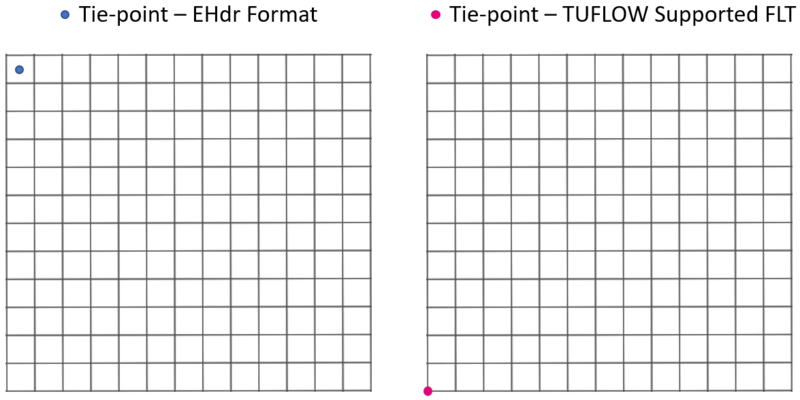
Therefore the following conversions are required:xllcorner = ULXMAP - (XDIM / 2)
yllcorner = ULYMAP - (NROW * YDIM) + (YDIM / 2)
If using the ".hdr" created by gdal_translate.exe from above, the resulting converted "TUFLOW Supported .hdr" will look like:
- Note: Spaces are required between the text and value (do not use tabs)
- Note 2: "byteorder LSBFIRST" is only applicable if "BYTEORDER=I" in the exported ".hdr"
- Note 3: TUFLOW currenlty only supports square grid cells (XDIM = YDIM)
- Note 4: "FLT" only suppots single band rasters, "EHdr" supports multiple bands and so does "GeoTIFF", therefore be careful if converting to an "EHdr" from a "GeoTIFF" that contains multiple bands.
ncols 1895
nrows 2137
xllcorner 292786.25
yllcorner 6177386.25
cellsize 0.5
NODATA_value -9999
byteorder LSBFIRST

| Up |
|---|
 Back to GDAL Tips and Tricks Back to GDAL Tips and Tricks
|