1D Bridges: Difference between revisions
No edit summary |
Anne.Kolega (talk | contribs) m →Irregular Shaped Bridges: i.e. |
||
| (2 intermediate revisions by 2 users not shown) | |||
| Line 1: | Line 1: | ||
=Introduction= |
=Introduction= |
||
The following section looks at bridges using the 1D component of TUFLOW. For information on bridges in the 2D domain see <u>[[TUFLOW_2D_Hydraulic_Structures | 2D Hydraulic Structures]]</u> and <u>[[ |
The following section looks at bridges using the 1D component of TUFLOW. For information on bridges in the 2D domain see <u>[[TUFLOW_2D_Hydraulic_Structures | 2D Hydraulic Structures]]</u> and <u>[[Tutorial M04|Tutorial M04 - Tuflow]]</u>. Example models using bridges in 1D and 2D are available in the [[TUFLOW Example Models#Structures|TUFLOW Example Model Dataset]].<br> |
||
'''Example of a bridge that could be modelled in 1D''' |
'''Example of a bridge that could be modelled in 1D''' |
||
| Line 11: | Line 11: | ||
Care must be taken when choosing the approach to modelling the bridge and setting appropriate loss values. <br> |
Care must be taken when choosing the approach to modelling the bridge and setting appropriate loss values. <br> |
||
<br> |
<br> |
||
=1D Bridge Channel Types= |
=1D Bridge Channel Types= |
||
TUFLOW offers two 1D bridge channels, B and BB. BB channels were introduced for Build 2016-03-AA and are a more advanced solution than B channels, which are retained for legacy models. By default, BB channels are superior to B channels as they:<br> |
TUFLOW offers two 1D bridge channels, B and BB. BB channels were introduced for Build 2016-03-AA and are a more advanced solution than B channels, which are retained for legacy models. By default, BB channels are superior to B channels as they:<br> |
||
| Line 78: | Line 79: | ||
To create an irregular shaped bridge: |
To create an irregular shaped bridge: |
||
<ol> |
<ol> |
||
<li>Create a 1d_tab HW (height vs width) .csv file for each standard shape ( |
<li>Create a 1d_tab HW (height vs width) .csv file for each standard shape (i.e. set up a database of the irregular shapes). For the height value you can start at a value of zero so that height becomes depth (this might making the .csv files easier). As the height increases the width changes to reflect the particular irregular shape you are modeling. In the example below, the width at the top of the arch (2.1m) is set to a small value of 0.001m as opposed to zero as the HW becomes NA past the top of the irregular shape. <br> |
||
[[File:HW_arch_example.JPG|border|900px]] <br> |
[[File:HW_arch_example.JPG|border|900px]] <br> |
||
| Line 85: | Line 86: | ||
[[File:Irregular_culvert_attribute_details.JPG|border|500px]]<br> |
[[File:Irregular_culvert_attribute_details.JPG|border|500px]]<br> |
||
<br> |
<br> |
||
<li>Any number of 1d_tab lines can reference the same .csv file, |
<li>Any number of 1d_tab lines can reference the same .csv file, i.e. you don't need to have a unique .csv file for every 1d_tab line. <br> |
||
[[File:Arch HW attributes.JPG|border|300px]] <br> |
[[File:Arch HW attributes.JPG|border|300px]] <br> |
||
<br> |
<br> |
||
Latest revision as of 11:47, 2 April 2026
Introduction
The following section looks at bridges using the 1D component of TUFLOW. For information on bridges in the 2D domain see 2D Hydraulic Structures and Tutorial M04 - Tuflow. Example models using bridges in 1D and 2D are available in the TUFLOW Example Model Dataset.
Example of a bridge that could be modelled in 1D

London, UK (pht: Rohan King)
Care must be taken when choosing the approach to modelling the bridge and setting appropriate loss values.
1D Bridge Channel Types
TUFLOW offers two 1D bridge channels, B and BB. BB channels were introduced for Build 2016-03-AA and are a more advanced solution than B channels, which are retained for legacy models. By default, BB channels are superior to B channels as they:
- adjust the entrance and exit losses every timestep according to the approach and departure velocities (in the same manner as for other structures such as culverts); and
- automatically simulates pressure flow conditions. The only loss coefficients required to be specified for BB channels are those due to piers, and the bridge deck when it is submerged and not under pressure flow.
Adjustment of losses according to approach/departure velocities is the default from 1D channel to 1D bridge to 1D channel. However, for TUFLOW Builds prior to 2020-10-AA, if the BB bridge is linked directly to a 2D domain (typically via a SX link), there is no adjustment of entrance / exit losses on the sides connected to the 2D. This capability was introduced for 2D channel to 1D bridge to 2D channel in Build 2020-10-AA and onwards, and losses can be automatically adjusted based on the approach/departure 2D velocities across the SX connections by setting "Structure Losses SX == ADJUST" (see Section 6.2 of the 2020-10 Release Note). For B bridges the default is not to adjust losses (refer to the TUFLOW Manual for more information). In the case of 2D connections, refer to the links below for a discussion on the intricacies and challenges of taking into account contraction and expansion losses for 1D structures connected directly to 2D domains:
As a typical rule-of-thumb, if the channel upstream and/or downstream of the bridge is modelled in 1D then the bridge should also be modelled in 1D. Ideally, any change in the channel from ESTRY 1D to 2D or vice-versa should also occur at a structure (i.e. bridge, culvert, etc) to facilitate the transition in solution schemes. The images below displays a typical preferred setup, however as is the case with hydraulic modelling your particular model situation may be different and therefore not always conform to these ideals.
-
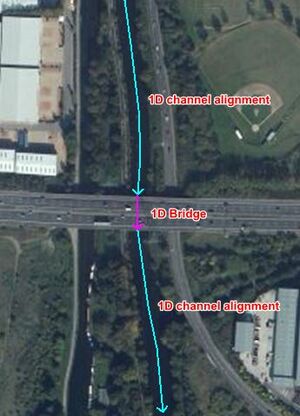
1D channel to 1D bridge to 1D channel -
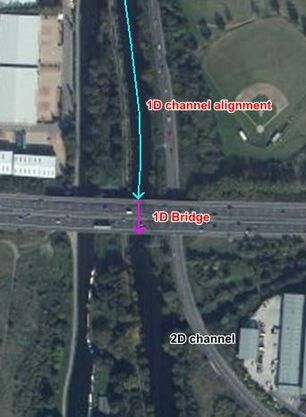
1D channel to 1D bridge to 2D channel -
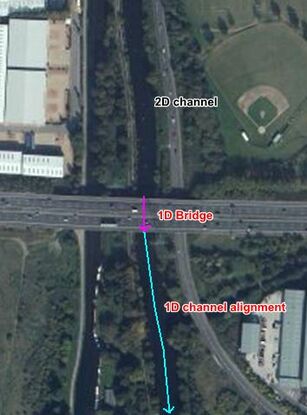
2D channel to 1D bridge to 1D channel


Loss Theory
1D bridge channels do not require length, Manning's n, divergence or bed slope (they are effectively zero-length channels in terms of conveyance) and rely on a reasonable estimate of energy losses associated with re-expansion of water after the vena-contracta (entrance losses), expansion of water downstream (exit losses), pier losses, bridge deck and guard rail losses. Other factors include accounting for occurrence of bridge deck pressure flow and the effects of bridge skew and multiple bridges (shielding effects of an upstream bridge on a downstream bridge).
Contraction/Expansion Losses
Energy loss is caused by the flow contraction due to the expansion of water after the vena-contracta inside a bridge section and the flow expansion downstream of the bridge. The contraction/expansion loss coefficients (or the entry/exit loss coefficients) can be specified for TUFLOW 1D BB bridge using the following attributes:
- EntryC_or_WSa: the entry loss coefficients (default = 0.5).
- ExitC_or_WSb: the exit loss coefficients (default = 1.0).
The entry/exit loss coefficients are adjusted based on the equations in the figure below, which consider the extent of flow contraction/expansion. For example, a clear spanning bridge over a stormwater channel does not cause any contraction/expansion. Therefore, the change in approach velocity, structure velocity and the departure velocity are effectively the same, and the loss coefficients can be automatically reduced based on the following equations:

The entry/exit loss coefficients are not used in the legacy B bridge. Instead, the bridge opening ratio is used to obtain the backwater coefficient Kb value from Figure 6 "Backwater coefficient base curves" of Hydraulics of Bridge Waterways (Bradley, 1978).
Pier Losses
Pier loss coefficients are treated as a direct energy (form) loss and can be derived from information in publications such as:
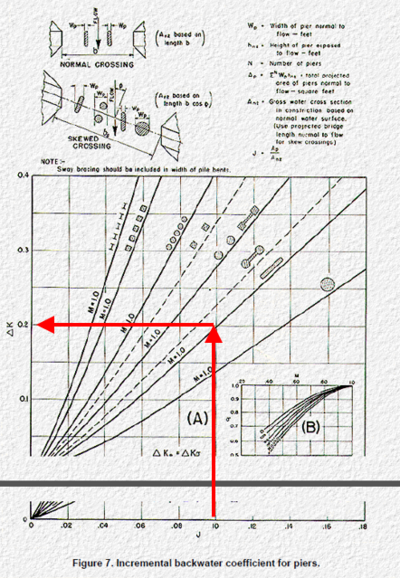
Energy loss estimates from bridge piers (or other obstructions, vertical or horizontal, that do not cause upstream controlled flow regimes like pressure flow), are dependent on the ratio of the obstruction's area perpendicular to the flow direction to the gross flow area of the bridge opening, the shape of the piers or obstruction, and the angularity of the piers/obstruction to the flow direction. For example, using Bradley (1978) the approach is to:
- Calculate the ratio of the water area occupied by piers to the gross water area of the constriction (both based on the normal water surface) and the angularity of the piers. These inputs are used to calculate "J".
- Use Figure 7 (below) to calculate "Kp". This is the value that will be entered into the bridge's LC (loss vs height) table as the energy or form loss coefficient. For piers or obstructions that are non-uniform in dimensions or shape the LC table can be used to vary the losses with height accordingly noting that losses will need to be proportioned with depth to reflect the combined effect of the different obstruction shapes/dimensions.

Deck Losses and Pressure Flow
A pressure flow condition can occur when the water level reaches the bridge deck level (as water is forced through a small opening confined by the bridge abutments and the deck), resulting in additional energy losses. As the bridge becomes totally drowned by the water level, the condition will switch back to the normal submerged bridge deck flow condition. To account for this, once water reaches the height of the bridge deck, the TUFLOW BB bridge tests for either the pressure flow condition or drowned flow condition at every timestep by choosing the flow regime that gives the lower flow:
- The pressure flow equation is based on the Section 8.3 of the Hydraulics of Bridge Waterways (Bradley, 1978), with a default deck discharge coefficient of 0.8. This value can be modified using the 1d_nwk HConF_or_WC attribute. Note that the original hydraulic experiment conducted by Liu (1967) used a flume with a pair of bridge abutments and a deck. This means the impact of both abutments and deck are considered in this approach. The entry/exit losses are switched off during the pressure flow calculation to avoid the overestimation of the contraction/expansion losses.
- For the drowned flow condition, the BB bridge considers extra energy loss caused by the bridge deck/rails using a deck loss coefficient (default = 0.5) in addition to the entry/exit losses. The deck loss coefficient can be adjusted using the WConF_or_WEx attribute or by specifying the LC (energy loss versus height) table.
The _TSF and _TSL layers can be used to find out the regime/form loss values used for BB bridges:
- "P": pressure flow
- "D": ds water level > the soffit level, but it applies normal flow because the normal flow equation predicts smaller velocity
- " ": ds water level < the soffit level, normal flow
For the legacy B channels, the deck loss coefficient was fixed at a value of 1.5625, which is derived from the discharge coefficient in Hydraulics of Bridge Waterways of 0.8 (1.56 = 1/0.8^2) to approximate pressure flow conditions. Whilst this is reasonable when the bridge deck experiences pressure flow, it will over-estimate the losses once the bridge deck starts to drown out and flow returns fully to downstream controlled.
Irregular Shaped Bridges
Modelling an irregular shaped bridge utilises the hydraulic properties elevation-width (CS/HW) type cross section and an irregular type culvert.


London, UK (pht: Rohan King)
To create an irregular shaped bridge:
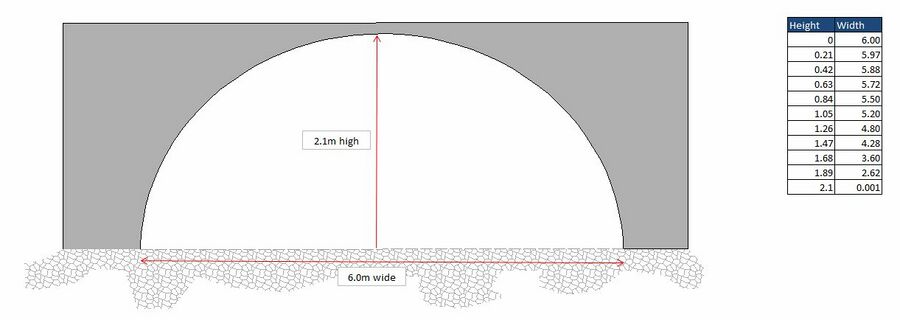
- Create a 1d_tab HW (height vs width) .csv file for each standard shape (i.e. set up a database of the irregular shapes). For the height value you can start at a value of zero so that height becomes depth (this might making the .csv files easier). As the height increases the width changes to reflect the particular irregular shape you are modeling. In the example below, the width at the top of the arch (2.1m) is set to a small value of 0.001m as opposed to zero as the HW becomes NA past the top of the irregular shape.
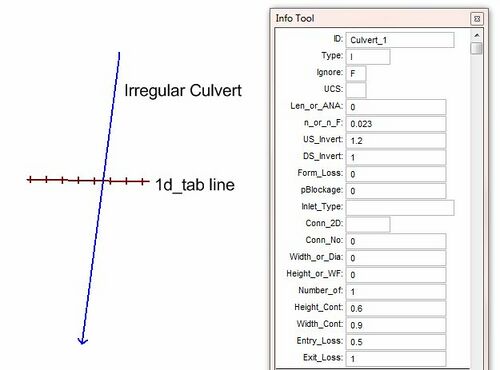
GIS example set up:
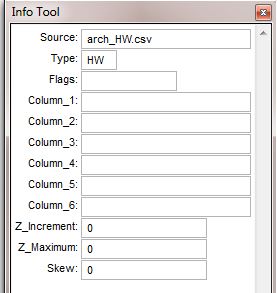
- Any number of 1d_tab lines can reference the same .csv file, i.e. you don't need to have a unique .csv file for every 1d_tab line.
- One option is to copy and paste the 1d_tab lines across each pipe (if you use a two vertex 1d_tab line there is no requirement that the 1d_tab line is snapped to the 1d_nwk pipe line - they just need to intersect). Each line will need to reference the relevant standard irregular shape HW .csv file (this could be automated using SQL Select if you have an attribute on the pipe to indicate which irregular shape it is).
- The inverts of the pipes should raise or lower the standard irregular shape cross-section to the appropriate height.


Check Files
The table below highlights some of the commonly used check files when reviewing 1D bridges. The full list of TUFLOW check files can be found here.
Any further questions please email TUFLOW support: support@tuflow.com
| Up |
|---|
 Back to 1D Channels and Hydraulic Structures Back to 1D Channels and Hydraulic Structures
|