TUFLOW CATCH Tutorial M02 Results QGIS: Difference between revisions
| (18 intermediate revisions by the same user not shown) | |||
| Line 1: | Line 1: | ||
<font color="red"><font size=18>Page Under Construction</font></font> |
|||
== Introduction == |
== Introduction == |
||
Review how the |
Review how the intervention devices are removing pollutants using the TUFLOW CATCH interventions output summary and the TUFLOW HPC mesh results.<br> |
||
Refer to <u>[[TUFLOW_CATCH_Tutorial_M01_Results_QGIS | TUFLOW CATCH Tutorial 01]]</u> for information on mass balance and boundary condition timeseries outputs. |
Refer to <u>[[TUFLOW_CATCH_Tutorial_M01_Results_QGIS | TUFLOW CATCH Tutorial 01]]</u> for information on mass balance and boundary condition timeseries outputs. |
||
| Line 9: | Line 8: | ||
<li> In Windows File Explorer, navigate to the '''TUFLOWCATCH\results''' folder and open '''TC02_001_catchment_hydraulic_intervention_summary.csv'''. |
<li> In Windows File Explorer, navigate to the '''TUFLOWCATCH\results''' folder and open '''TC02_001_catchment_hydraulic_intervention_summary.csv'''. |
||
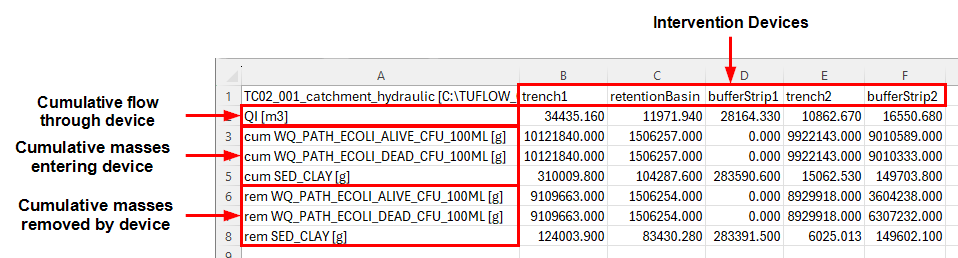
<li> This file contains final cumulative flows, masses entering and masses removed for all intervention devices and pollutants.<br> |
<li> This file contains final cumulative flows, masses entering and masses removed for all intervention devices and pollutants.<br> |
||
'''Note:''' The values in this results file may vary due to the spatial placement of intervention devices ('''2d_im_TC02_001_L''').<br> |
|||
<br> |
<br> |
||
[[File: TC2_interventions_summary_01a.png]]<br> |
|||
[[File: image of summary with arrows pointing to devices and pollutants]]<br> |
|||
<br> |
<br> |
||
<li> Notice that bufferStrip1 has no pathogen masses entering or being removed, as it has no paddocks near it. |
<li> Notice that bufferStrip1 has no pathogen masses entering or being removed, as it has no paddocks near it. |
||
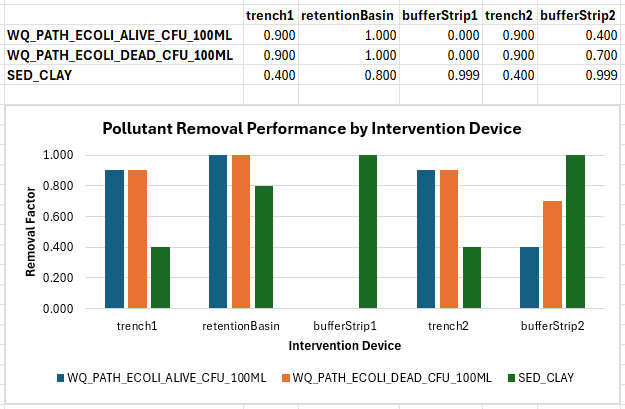
<li> If the removed mass is divided by the cumulative mass, the resulting value represents either the removal constant (if a constant removal equation was used), or the average removal performance (if a table removal method was used). For example, in trench1, the removal performance for SED_CLAY is calculated by: |
<li> If the removed mass is divided by the cumulative mass, the resulting value represents either the removal constant (if a constant removal equation was used), or the average removal performance (if a table removal method was used). For example, in trench1, the removal performance for SED_CLAY is calculated by: |
||
<pre>rem SED_CLAY [g] / cum SED_CLAY [g] = 124003.900 / 310009.800 = 0.400 </pre> |
|||
This value (0.4) matches the removal constant. This constant was specified in the mass removal properties for pollutant 'SED_CLAY' for intervention device 'trench1' in the .tcc.<br> |
|||
In contrast, bufferStrip1 uses a table removal method for SED_CLAY, resulting in: |
|||
<pre>rem SED_CLAY [g] / cum SED_CLAY [g] = 283391.500 / 283590.600 = 0.999 </pre> |
|||
This shows that bufferStrip1 removed significantly more clay than trench1. The graph below demonstrates this calculation for each pollutant across all the treatment devices: <br> |
|||
<br> |
<br> |
||
[[File: |
[[File: TC2_removal_performance_all_devices_01a.png]]<br> |
||
<br> |
<br> |
||
<li><font color=red>other things to show?</font> |
|||
</ol> |
</ol> |
||
==TUFLOW HPC Map Outputs == |
==TUFLOW HPC Map Outputs == |
||
Review the TUFLOW HPC Map outputs with the <u>[[TUFLOW_Viewer | TUFLOW Viewer]]</u>: |
Review the TUFLOW HPC Map outputs with the <u>[[TUFLOW_Viewer | TUFLOW Viewer]]</u>: |
||
:'''Note:''' For further guidance on how to plot, view and style results, please refer to <u>[[TUFLOW_Viewer | TUFLOW Viewer]]</u>. |
|||
<ol> |
<ol> |
||
<li> Load the '''2d_im_TC02_001_L.shp''' layer from the '''TUFLOW\model\gis''' folder into QGIS. |
|||
<li>Open TUFLOW Viewer from the TUFLOW Plugin toolbar.<br> |
<li>Open TUFLOW Viewer from the TUFLOW Plugin toolbar.<br> |
||
<br> |
<br> |
||
| Line 31: | Line 37: | ||
<li>Use the time slider to view the pathogen concentration results. Notice how the E. coli is removed by the treatment devices. In areas where there are no interventions, the pollutant concentrations are much higher (i.e. the eastern waterhole).<br> |
<li>Use the time slider to view the pathogen concentration results. Notice how the E. coli is removed by the treatment devices. In areas where there are no interventions, the pollutant concentrations are much higher (i.e. the eastern waterhole).<br> |
||
<br> |
<br> |
||
{{Video|name=}}<br> |
{{Video|name=animation_TC2_results_01a.mp4|width=1432}}<br> |
||
<li>Select 'Conc SED_CLAY' from the Result Type list. Adjust the symbology as needed. |
<li>Select 'Conc SED_CLAY' from the Result Type list. Adjust the symbology as needed. |
||
<li>Zoom in to bufferStrip1. Use the Plot Time Series tool (from Map Multi) to place a timeseries point on either side of the intervention device to see how bufferStrip1 is removing the sediment.<br> |
<li>Zoom in to bufferStrip1. Use the Plot Time Series tool (from Map Multi) to place a timeseries point on either side of the intervention device to see how bufferStrip1 is removing the sediment.<br> |
||
<br> |
<br> |
||
{{Video|name=}}<br> |
{{Video|name=animation_TC2_results_02a.mp4|width=1432}}<br> |
||
<li>Using the same process as above, observe the mass removal occurring at the other devices. <br> |
<li>Using the same process as above, observe the mass removal occurring at the other intervention devices. <br> |
||
<br> |
<br> |
||
{{Video|name=}}<br> |
{{Video|name=animation_TC2_results_03a.mp4|width=1432}}<br> |
||
</ol> |
</ol> |
||
Latest revision as of 15:22, 9 July 2025
Introduction
Review how the intervention devices are removing pollutants using the TUFLOW CATCH interventions output summary and the TUFLOW HPC mesh results.
Refer to TUFLOW CATCH Tutorial 01 for information on mass balance and boundary condition timeseries outputs.
TUFLOW CATCH Interventions Output Summary
Review the interventions summary:
- In Windows File Explorer, navigate to the TUFLOWCATCH\results folder and open TC02_001_catchment_hydraulic_intervention_summary.csv.
- This file contains final cumulative flows, masses entering and masses removed for all intervention devices and pollutants.
Note: The values in this results file may vary due to the spatial placement of intervention devices (2d_im_TC02_001_L).
- Notice that bufferStrip1 has no pathogen masses entering or being removed, as it has no paddocks near it.
- If the removed mass is divided by the cumulative mass, the resulting value represents either the removal constant (if a constant removal equation was used), or the average removal performance (if a table removal method was used). For example, in trench1, the removal performance for SED_CLAY is calculated by:
rem SED_CLAY [g] / cum SED_CLAY [g] = 124003.900 / 310009.800 = 0.400
This value (0.4) matches the removal constant. This constant was specified in the mass removal properties for pollutant 'SED_CLAY' for intervention device 'trench1' in the .tcc.
In contrast, bufferStrip1 uses a table removal method for SED_CLAY, resulting in:rem SED_CLAY [g] / cum SED_CLAY [g] = 283391.500 / 283590.600 = 0.999
This shows that bufferStrip1 removed significantly more clay than trench1. The graph below demonstrates this calculation for each pollutant across all the treatment devices:


TUFLOW HPC Map Outputs
Review the TUFLOW HPC Map outputs with the TUFLOW Viewer:
- Note: For further guidance on how to plot, view and style results, please refer to TUFLOW Viewer.
- Load the 2d_im_TC02_001_L.shp layer from the TUFLOW\model\gis folder into QGIS.
- Open TUFLOW Viewer from the TUFLOW Plugin toolbar.

- Open TUFLOW Viewer from the TUFLOW Plugin toolbar and open the simulation results. Select File > Load Results - Map Outputs. Navigate to the TUFLOWCATCH\results folder and select TC02_001_catchment_hydraulic.xmdf.
- In the TUFLOW Viewer panel, select 'Conc WQ_PATH_ECOLI_ALIVE_100ML' from the Result Type list. Adjust the symbology as needed. Refer to TUFLOW CATCH Tutorial 01 for details.
- Use the time slider to view the pathogen concentration results. Notice how the E. coli is removed by the treatment devices. In areas where there are no interventions, the pollutant concentrations are much higher (i.e. the eastern waterhole).
- Select 'Conc SED_CLAY' from the Result Type list. Adjust the symbology as needed.
- Zoom in to bufferStrip1. Use the Plot Time Series tool (from Map Multi) to place a timeseries point on either side of the intervention device to see how bufferStrip1 is removing the sediment.
- Using the same process as above, observe the mass removal occurring at the other intervention devices.

| Up |
|---|
 Back to TUFLOW CATCH Tutorial 02 Back to TUFLOW CATCH Tutorial 02
|