TUFLOW CATCH Tutorial M04: Difference between revisions
| (One intermediate revision by the same user not shown) | |||
| Line 47: | Line 47: | ||
*Project Folder: Click '...', and navigate to the '''TUFLOW_CATCH_Module_04\Modelling''' folder. |
*Project Folder: Click '...', and navigate to the '''TUFLOW_CATCH_Module_04\Modelling''' folder. |
||
*Project CRS: Click the drop down menu and select 'Project CRS: EPSG:32760 - WGS 84 / UTM zone 60S’. |
*Project CRS: Click the drop down menu and select 'Project CRS: EPSG:32760 - WGS 84 / UTM zone 60S’. |
||
* TUFLOW HPC Executable: Click '...', and navigate to the '''exe\TUFLOW\ |
* TUFLOW HPC Executable: Click '...', and navigate to the '''exe\TUFLOW\2026.0.0 folder'''. Select '''TUFLOW_iSP_w64.exe'''. |
||
* TUFLOW FV Executable: Click '...', and navigate to the '''exe\TUFLOWFV\ |
* TUFLOW FV Executable: Click '...', and navigate to the '''exe\TUFLOWFV\2026.0.0''' folder. Select '''TUFLOWFV.exe'''. |
||
* Default GIS Format: Click the drop down menu and select 'SHP'. |
* Default GIS Format: Click the drop down menu and select 'SHP'. |
||
* Tick on 'Setup Control File Templates'. |
* Tick on 'Setup Control File Templates'. |
||
| Line 247: | Line 247: | ||
<li>In Windows File Explorer, navigate to the '''TUFLOWCATCH\runs''' folder. Save a copy of '''_run_TC03_CATCH.bat''' as '''_run_TC04_CATCH.bat''' and open the file in a text editor. |
<li>In Windows File Explorer, navigate to the '''TUFLOWCATCH\runs''' folder. Save a copy of '''_run_TC03_CATCH.bat''' as '''_run_TC04_CATCH.bat''' and open the file in a text editor. |
||
<li>Update the batch file to reference the '''TC04_001.tcc''':<br> |
<li>Update the batch file to reference the '''TC04_001.tcc''':<br> |
||
<tt><font color=blue>set </font>exe<font color=red>=</font>"..\..\..\..\exe\TUFLOWCATCH\ |
<tt><font color=blue>set </font>exe<font color=red>=</font>"..\..\..\..\exe\TUFLOWCATCH\2026.0.0\TUFLOWCATCH.exe"</tt><br> |
||
<tt><font color=orange>%exe%</font> TC04_001.tcc</font></tt> |
<tt><font color=orange>%exe%</font> TC04_001.tcc</font></tt> |
||
<li>Double click the batch file in file explorer to run the simulation. <br> |
<li>Double click the batch file in file explorer to run the simulation. <br> |
||
Latest revision as of 12:09, 30 March 2026
Introduction
In this module, a TUFLOW CATCH integrated model with interventions is developed.
TUFLOW CATCH Tutorial 04 is built from the models created in TUFLOW CATCH Tutorial 02 and TUFLOW CATCH Tutorial 03. The completed TUFLOW CATCH Tutorial 03 is provided in the TUFLOW_CATCH_Module_04\Modelling folder of the download dataset as the starting point for this tutorial. If unfamiliar with TUFLOW CATCH, it is recommended to complete TUFLOW CATCH Tutorial 01, TUFLOW CATCH Tutorial 02 and TUFLOW CATCH Tutorial 03 prior to starting this tutorial.
Note: An NVIDIA GPU card is required to run this tutorial model. If this is not available, a shortened simulation can be run on CPU by updating the following commands in the Global Settings section of the TUFLOW CATCH Control file (.tcc):
- Hardware == CPU
- End Time == 01/01/2021 12:00:00
Meteorological Data
Meteorological inputs are defined in boundary condition blocks within the receiving model block of the TUFLOW CATCH Control file (.tcc). For this tutorial, timeseries meteorological data has been supplied.
- In Windows File Explorer, navigate to the TUFLOW_CATCH_Module_04\Tutorial_Data folder. Copy the TC04_met_ts_001.csv and paste it in the TUFLOW_CATCH_Module_04\Modelling\TUFLOWFV\bc_dbase\met folder. This file contains the timeseries meteorological data.
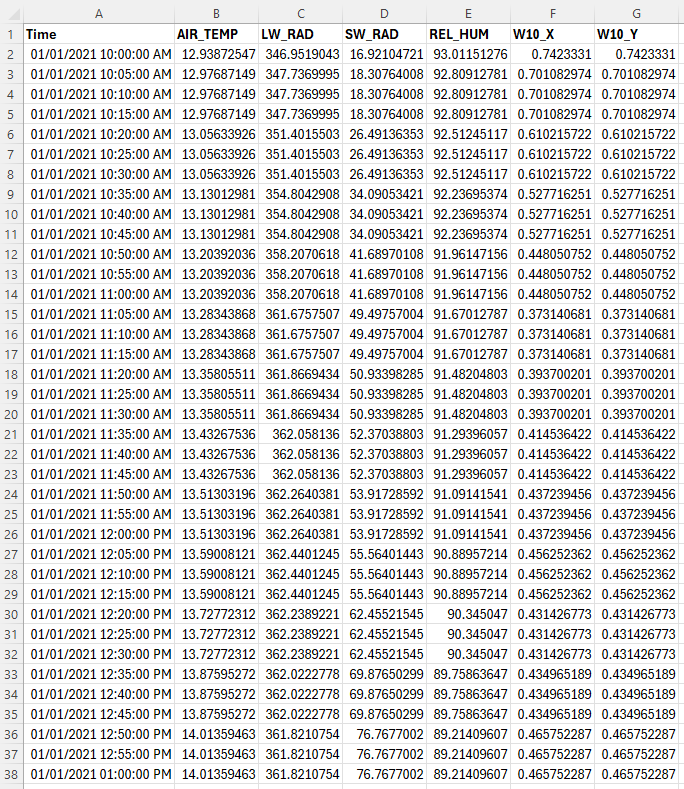
- Open the file. As this file is read by TUFLOW FV, the first column (Time) must contain the date is ISODATE format (DD/MM/YYYY hh:mm:ss). The other columns contain the data for the meteorological conditions that will be simulated in this model:
- AIR_TEMP: Air temperature (degrees Celsius)
- REL_HUM: Relative humidity (%)
- LW_RAD: Downward longwave radiation (W m-2)
- W10_X: Zonal wind velocity at 10m (m s-1)
- SW_RAD: Downward shortwave radiation (W m-2)
- W10_Y: Meridional wind velocity at 10m (m s-1)

Simulation Control Files
The following steps will require use of a text editor. The tutorial demonstration uses Notepad++. For its configuration information refer to Notepad++ Tips.
Generate Template Files
This tutorial requires a Water Quality Control file (.fvwq) and a Sediment Transport Control file (.fvsed). Use the TUFLOW CATCH plugin to generate template files:
- In QGIS, go to Processing > Toolbox from the top drop down menu options to open the Processing Toolbox.
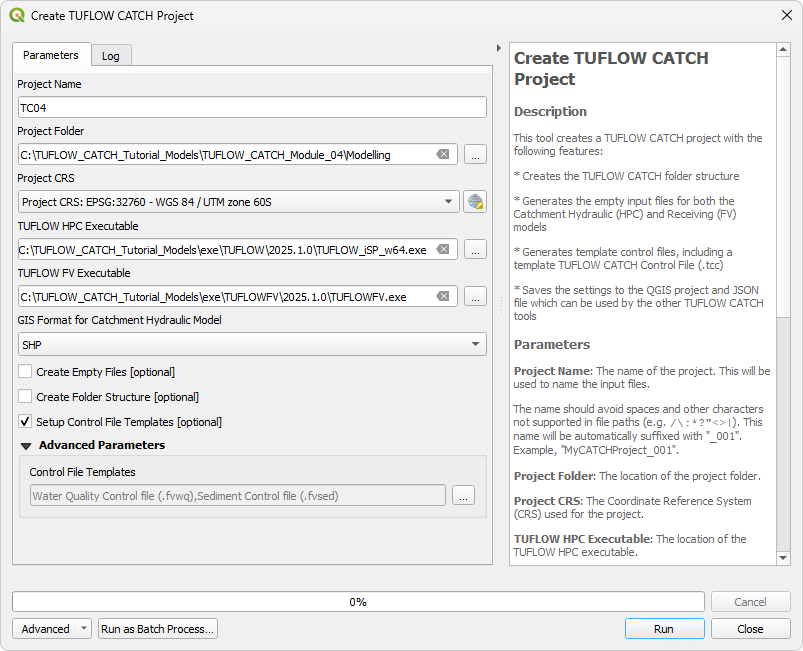
- Go to TUFLOW Catch in the processing tool list and select 'Create TUFLOW Catch Project'. This opens the dialog shown below:
- Project Name: TC04
- Project Folder: Click '...', and navigate to the TUFLOW_CATCH_Module_04\Modelling folder.
- Project CRS: Click the drop down menu and select 'Project CRS: EPSG:32760 - WGS 84 / UTM zone 60S’.
- TUFLOW HPC Executable: Click '...', and navigate to the exe\TUFLOW\2026.0.0 folder. Select TUFLOW_iSP_w64.exe.
- TUFLOW FV Executable: Click '...', and navigate to the exe\TUFLOWFV\2026.0.0 folder. Select TUFLOWFV.exe.
- Default GIS Format: Click the drop down menu and select 'SHP'.
- Tick on 'Setup Control File Templates'.
- Control File Templates: Expand the 'Advanced Parameters' section. Click '...', and tick on: Water Quality Control file (.fvwq) and Sediment Control file (.fvsed). Ensure all other files are ticked off.
- Click 'Run'. Once the tool has finished click 'Close'.

Water Quality Control File (FVWQ)
- Navigate to the TUFLOWFV\wqm folder and open TC04_001.fvwq in a text editor.
- In the 'Simulation Controls' sections, update the following commands:
Simulation Class == DO ! Specify the simulation class to Dissolved Oxygen
WQ dt == 300 ! Interval for updating the water quality module
WQ Units == mgL ! Specify the units to be mgL
- In the 'Constituent Model Settings', add the following commands to specify the constituent (oxygen and pathogens) parameters. For more information on the model settings for each constituent, refer to the TUFLOW FV Water Quality Manual: Section 4.6.3.1 (Oxygen) and Section 4.6.3.2 (Pathogens).
Oxygen Model == O2 ! Set the oxygen model
- Oxygen Min Max == 0.0, 12.0 ! Specify the allowable minimum and maximum oxygen concentrations
- Oxygen Benthic == 4.7, 1.08 ! Specify the global benthic parameters
Pathogen Model == Free, Ecoli ! Set the pathogen model and name
- Alive Min Max == 0.0, 1e7 ! Specify the allowable minimum and maximum concentrations
- Mortality == 0.08, 2e-12, 6.1, 1.0, 1.11 ! Specify the mortality parameters
- Visible Inactivation == 0.082, 0.0067, 0.5 ! Specify the visible light inactivation parameters
- UVA Inactivation == 0.5, 0.0067, 0.5 ! Specify the UV-A light inactivation parameters
- UVB Inactivation == 1.0, 0.0067, 0.5 ! Specify the UV-B light inactivation parameters
- Settling == -0.03 ! Specify the settling of non-attached pathogens
- Oxygen Min Max == 0.0, 12.0 ! Specify the allowable minimum and maximum oxygen concentrations
- In the 'Material Specifications' section, add the following material blocks to specify oxygen flux for each material ID.
Material == Default ! Defines default properties for all materials
- Oxygen Flux == -1400.0
Material == 1 ! Defines properties for material ID 1 (overwrites default)
- Oxygen Flux == -1100.0
Material == 2 ! Defines properties for material ID 2 (overwrites default)
- Oxygen Flux == -1200.0
Material == 3 ! Defines properties for material ID 3 (overwrites default)
- Oxygen Flux == -1300.0
- Oxygen Flux == -1400.0
- Save the FVWQ.
Sediment Transport Control File (FVSED)
- Navigate to the TUFLOWFV\stm folder and open TC04_001.fvsed in a text editor.
- Update the following command to match the output interval for the rest of the model (300secs or 5mins):
Update dt == 300 ! Interval for updating the sediment transport module
- In the 'Settings' section, update the following commands. For more information on these commands, please refer to the TUFLOW FV Sediment Transport Manual.
Erosion Depth Limits == 0.1, 0.5 ! Depth limits within which the erosion rate is scaled down (meters)
Deposition Depth Limits == 0.1, 0.5 ! Depth limits within which the deposition rate is scaled down (meters)
Bed Roughness Model == ks ! Set bed roughness model
Bed Roughness Parameters == 0.02, 0.02 ! Specify the bed roughness for current and waves
- In the 'Fractions' section, add in the following Fraction block to set the parameters for clay.
Fraction == Clay ! Set sediment fraction
- d50 == 0.0002 ! Specify the median grain size of the sediment fraction (meters)
- Particle Density == 2650.0 ! Specify the density of the particle group (kg/m3)
- Settling Model == Constant ! Set the settling model
- Settling Parameters == 1e-05 ! Specify constant settling velocity (m/s)
- Critical Stress Model == Constant ! Set the critical stress model
- Critical Stress Parameters == 0.15 ! Specify constant critical stress (N/m2)
- Erosion Model == Mehta ! Set the erosion model
- Erosion Parameters == 0.01, 0.5, 1.0 ! Specify constant erosion rate (g/m2s), critical shear stress (N/m2) and power coefficient
- Deposition Model == ws0 ! Set the deposition model
- d50 == 0.0002 ! Specify the median grain size of the sediment fraction (meters)
- In the 'Materials' section, add the following material blocks to set the sediment transport for each material ID.
Material == 1, 2 ! Defines properties for material IDs 1 and 2
- Nlayer == 1 ! Number of sediment bed layers
- Layer == 1 ! Bed layer number
- Dry Density == 800 ! Dry density of bed layer (kg/m3)
- Initial Mass == 1500 ! Initial mass of each sediment fraction (kg/m2)
- Dry Density == 800 ! Dry density of bed layer (kg/m3)
- End Layer
Material == 3 ! Defines properties for material ID 3
- Nlayer == 1 ! Number of sediment bed layers
- Layer == 1 ! Bed layer number
- Dry Density == 800 ! Dry density of bed layer (kg/m3)
- Initial Mass == 3200 ! Initial mass of each sediment fraction (kg/m2)
- Dry Density == 800 ! Dry density of bed layer (kg/m3)
- End Layer
- Nlayer == 1 ! Number of sediment bed layers
- Save the FVSED.
TUFLOW CATCH Control File (TCC)
Global Settings
For this tutorial, leave all commands as is. This section of the .tcc was populated in TUFLOW CATCH Tutorial 01.
Catchment Hydraulic Model
This block contains commands that construct the TUFLOW HPC simulation.
- Save a copy of TC03_001.tcc as TC04_001.tcc in the TUFLOW_CATCH_Module_04\Modelling\TUFLOWCATCH\runs folder.
- Open TC04_001.tcc in a text editor, and comment out the following command:
! Pollutant == Salinity, Temperature, WQ_DISS_OXYGEN_MG_L, WQ_PATH_ECOLI_ALIVE_CFU_100ML, WQ_PATH_ECOLI_DEAD_CFU_100ML, SED_CLAY ! Specify the pollutant names
Pollutant Export Model
This block contains commands that control the pollutant export (and other constituent) simulation. As this tutorial model is an integrated simulation with interventions, we must turn the pollutant export model back on:
- Set the pollutant export model:
Catchment Pollutant Export Model == Mass Accumulation Release
- Uncomment all the commands. The pollutant export model block should look the same as in TUFLOW CATCH Tutorial 02
Receiving Model
This block contains commands that construct the TUFLOW FV simulation. For this tutorial, the receiving model block must be updated to include water quality and sediment transport.
- In the 'General Parameters' section, update the following commands to turn on salinity, temperature, sediment and heat. For more information on these commands, refer to Appendix B of the TUFLOW FV Manual
Include Salinity == 1,0
Include Temperature == 1,0
Include Sediment == 1,0
Include Heat == 1
- In the 'Water Quality' section, update the following commands to set the general WQ parameters and to reference the Water Quality Control file.
Water Quality Model == TUFLOW
Water Quality Control File == ..\..\TUFLOWFV\wqm\TC04_001.fvwq ! Reference the Water Quality Control File
Water Quality Model Directory == ..\..\TUFLOWFV\wqm\ ! Location of the Water Quality Directory
Cell Water Quality Depth == 0.05 ! Minimum depth to execute water quality calculations (meters)
- In the 'Sediment Transport' section, update the following command to reference the Sediment Control file:
Sediment Control File == ..\..\TUFLOWFV\stm\TC04_001.fvsed ! Reference the Sediment Control File
- In the 'Initial Conditions' section, update the following commands to set the initial temperature, salinity, sediment concentration and water quality concentrations. The initial water level was set in TUFLOW CATCH Tutorial 03.
Initial Temperature == 17.0 ! Specify initial temperature (degrees Celsius)
Initial Salinity == 0.0 ! Specify initial salinity (psu)
Initial Sediment Concentration == 20 ! Specify initial suspended sediment concentration for clay (mg/L)
Initial WQ Concentration == 8.0, 1e6, 1e6 ! Specify initial water quality concentration for dissolved oxygen, alive and dead E. coli
- In the 'Meteorology' section, add the following boundary condition blocks to specify meteorological conditions. The variable 'met_ts' is used to define the location of the meteorological data.
Set Variable met_ts == ..\..\TUFLOWFV\bc_dbase\met\TC04_met_ts_001.csv
BC == LW_RAD, <<met_ts>> ! Downward longwave radiation (W m-2)
- BC Header == Time, LW_RAD ! Column headers to read from time series file
- BC Update dt == 300 ! Specify update timestep for BC (seconds)
- BC Time Units == Hours ! Specify time units
- BC Reference Time == 01/01/2021 10:00 ! Specify boundary condition reference time
BC == SW_RAD, <<met_ts>> ! Downward shortwave radiation (W m-2)
- BC Header == Time, SW_RAD
- BC Update dt == 300
- BC Time Units == Hours
- BC Reference Time == 01/01/2021 10:00
BC == W10, <<met_ts>> ! Wind velocity at 10m (m s-1)
- BC Header == Time, W10_X, W10_Y
- BC Update dt == 300
- BC Time Units == Hours
- BC Reference Time == 01/01/2021 10:00
BC == AIR_TEMP, <<met_ts>> ! Temperature input (deg C)
- BC Header == Time, AIR_TEMP
- BC Update dt == 300
- BC Time Units == Hours
- BC Reference Time == 01/01/2021 10:00
BC == REL_HUM, <<met_ts>> ! Relative humidity (%)
- BC Header == Time, REL_HUM
- BC Update dt == 300
- BC Time Units == Hours
- BC Reference Time == 01/01/2021 10:00
- BC Header == Time, LW_RAD ! Column headers to read from time series file
- In the 'Outputs' section, update the existing NetCDF output block to include sediment:
Output == NetCDF
- Output Parameters == h, v, d, sed_1 ! Outputs water level, velocity, depth and sediment
- Output Interval == 30 ! Interval to output the data (seconds)
- Suffix == HD ! Specify suffix for the output NetCDF file
- Output Parameters == h, v, d, sed_1 ! Outputs water level, velocity, depth and sediment
- At the end of the 'Outputs' section, add the following output block to output water quality results.
Output == NetCDF
- Output Parameters == wq_all ! Outputs water quality results
- Output Interval == 30 ! Interval to output the data (seconds)
- Suffix == WQ ! Specify suffix for the output NetCDF file
- Output Parameters == wq_all ! Outputs water quality results
- Save the TCC.
Running the Simulation
- In Windows File Explorer, navigate to the TUFLOWCATCH\runs folder. Save a copy of _run_TC03_CATCH.bat as _run_TC04_CATCH.bat and open the file in a text editor.
- Update the batch file to reference the TC04_001.tcc:
set exe="..\..\..\..\exe\TUFLOWCATCH\2026.0.0\TUFLOWCATCH.exe"
%exe% TC04_001.tcc - Double click the batch file in file explorer to run the simulation.
Troubleshooting
See tips on common mistakes and troubleshooting steps if the model doesn't run:
Results Output
Complete the steps outlined in the following links to review simulation results from the TUFLOW CATCH integrated model simulation:
Conclusion
- A TUFLOW CATCH Integrated model was created.
- Meteorological data, water quality and sediment transport were added to the model.
- A TUFLOW CATCH JSON file was created to review the transfer of results (particularly pollutants) between the TUFLOW HPC and the TUFLOW FV domains.
- For further training opportunities see TUFLOW Training Catalogue and/or contact training@tuflow.com.
| Up |
|---|
 Back to Tutorial Introduction Main Page Back to Tutorial Introduction Main Page
|