User Guide Local Licences: Difference between revisions
Jump to navigation
Jump to search
Content deleted Content added
Chris Huxley (talk | contribs) No edit summary |
Chris Huxley (talk | contribs) No edit summary |
||
| Line 7: | Line 7: | ||
<li> Follow the steps listed in the <u>[[WIBU_Licence_Update_Request | Licence Update Request]]</u> section of the Wiki. You will need to email the licence file to <font color="blue"><u>sales@tuflow.com</u></font>. The sales team with email you an updated licence file containing your specific licence configuration. |
<li> Follow the steps listed in the <u>[[WIBU_Licence_Update_Request | Licence Update Request]]</u> section of the Wiki. You will need to email the licence file to <font color="blue"><u>sales@tuflow.com</u></font>. The sales team with email you an updated licence file containing your specific licence configuration. |
||
<li> Import the updated licence file to accept the licence update (<u>[[WIBU_Licence_Update_Import|Licence Update Import]]</u>). |
<li> Import the updated licence file to accept the licence update (<u>[[WIBU_Licence_Update_Import|Licence Update Import]]</u>). |
||
<li> After activating your licence, insert your Local licence dongle |
<li> After activating your licence, insert your Local licence dongle into your computer (if it isn't already). Double click the TUFLOW Executable (for example TUFLOW_iSP_w64.exe). A DOS window should open. Review the licence information listed. Check the licence types and numbers.<br> |
||
[[File:TUFLOW_DOS_Test1.JPG|600px]] <br> |
[[File:TUFLOW_DOS_Test1.JPG|600px]] <br> |
||
Press enter to close the DOS window. <br> |
Press enter to close the DOS window. <br> |
||
Revision as of 14:51, 29 June 2017
This section is relevant for people with a Local TUFLOW licence. Please refer to Free DEMO Version New User Guide if you don't have a licence or Network Licence New User Guide if you have a Network licence.
- Download the latest TUFLOW executable from the TUFLOW website: Tuflow Release Download. TUFLOW is a standalone console application. As such, it doesn't require installation to run.
- Plug your new Local licence dongle into your computer.
- Download and install the Licencing Dongle Drivers (CodeMeter RunTime Kit): Installing Licensing Software
- Follow the steps listed in the Licence Update Request section of the Wiki. You will need to email the licence file to sales@tuflow.com. The sales team with email you an updated licence file containing your specific licence configuration.
- Import the updated licence file to accept the licence update (Licence Update Import).
- After activating your licence, insert your Local licence dongle into your computer (if it isn't already). Double click the TUFLOW Executable (for example TUFLOW_iSP_w64.exe). A DOS window should open. Review the licence information listed. Check the licence types and numbers.
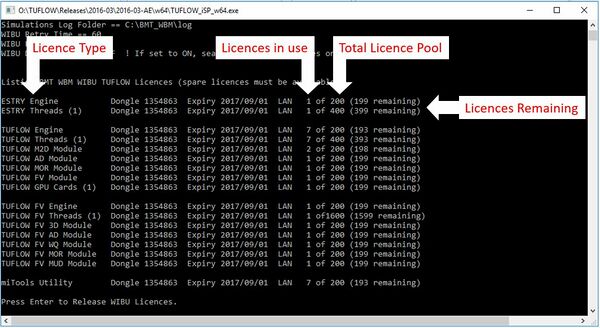
Press enter to close the DOS window.
Note: Local TUFLOW licences are associated with the USB dongle. All computers running TUFLOW must have Licencing Dongle Drivers (CodeMeter RunTime Kit) installed and the USB dongle plugged in for a simulation to initialise. The Licence Update Request should only be required once annually to update the USB dongle licence and provide access to new updated versions of TUFLOW. - You are now ready to start TUFLOW modelling.
- Download the TUFLOW Tutorial Dataset: Tutorial Model Download
- User documentation is available from the Tutorial Model section of the Wiki. Learn how to use TUFLOW by following the user documentation.
- Run TUFLOW using any of the options listed in the Running TUFLOW section of the Wiki.
- Over 60 example models demonstrating the most commonly used TUFLOW features are available from the Example Models section of the Wiki. Use these models to learn how to implement features not included in the TUFLOW Tutorials. Refer to the TUFLOW Manual for further supporting information.
- Other useful information is contained in the Wiki. In particular new users often find the Tips and Tricks section on the right-hand side of the home page and the Modelling Guidance sections particularly useful.
- If you're interested in becoming a part of the TUFLOW User Community please join the TUFLOW Forum and LinkedIn User Group.
- Please email support@tuflow.com if you have any technical questions or sales@tuflow.com if you would like to purchase additional licences or add-on modules. Price information is available from the TUFLOW Website
