Tutorial Troubleshooting QGIS: Difference between revisions
| Line 45: | Line 45: | ||
<li>Check the location of the TUFLOW executable. Right click on the .exe from the batch file and ensure that the executable can be found and open. |
<li>Check the location of the TUFLOW executable. Right click on the .exe from the batch file and ensure that the executable can be found and open. |
||
<li>Check the location of the TCF. Right click on the TCF from the batch file and ensure that the file can be found and open. |
<li>Check the location of the TCF. Right click on the TCF from the batch file and ensure that the file can be found and open. |
||
<li>If using ' |
<li>If using environment variable 'set exe', confirm there are no spaces surrounding the equals sign (e.g. set exe="..\..\..\..\exe\2020-10-AD\TUFLOW_iSP_w64.exe"). |
||
<li>Check where the model and executable are located. We recommend to '''not''' use the C drive or an external hard drive. |
<li>Check where the model and executable are located. We recommend to '''not''' use the C drive or an external hard drive. |
||
<li>TUFLOW doesn't currently support UNC paths. The folder with the executable has to be opened with a mapped drive. Type "net use <drive>: \\server_name\share_name" in the command line to map desired drive. |
<li>TUFLOW doesn't currently support UNC paths. The folder with the executable has to be opened with a mapped drive. Type "net use <drive>: \\server_name\share_name" in the command line to map desired drive. |
||
Revision as of 13:59, 12 May 2022
Introduction
This troubleshooting page contains common errors and steps to follow when investigating models.
Common Errors
Unsaved Control Files
Changes may have been made in a control file that are unsaved resulting in files not being found or errors occurring.
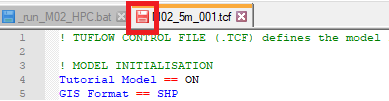
- Check that all simulation control files and batch files are saved (
 ). A red icon indicates that there are unsaved changes in the file:


Unsaved GIS Layers
Changes may have been made in a GIS layer that are unsaved resulting in errors occurring.
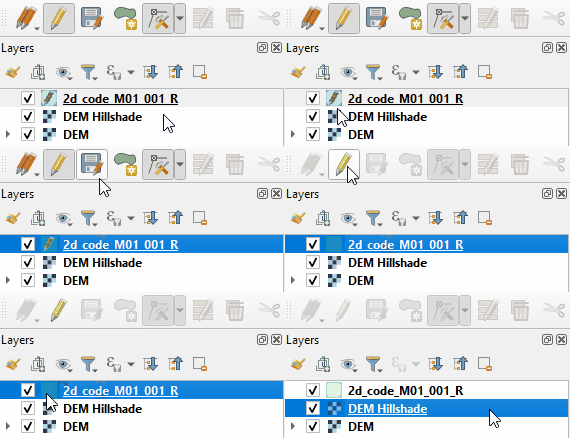
- Check that all GIS input layers have been saved. If the 'Save Layer Edits' icon is available (
 ), there are unsaved edits in the layer.
- A pencil icon on the layer (
 ) indicates that the layer is still editable and may contain unsaved edits. It is recommended to always turn off editing for all input layers.


Typos in Control Files
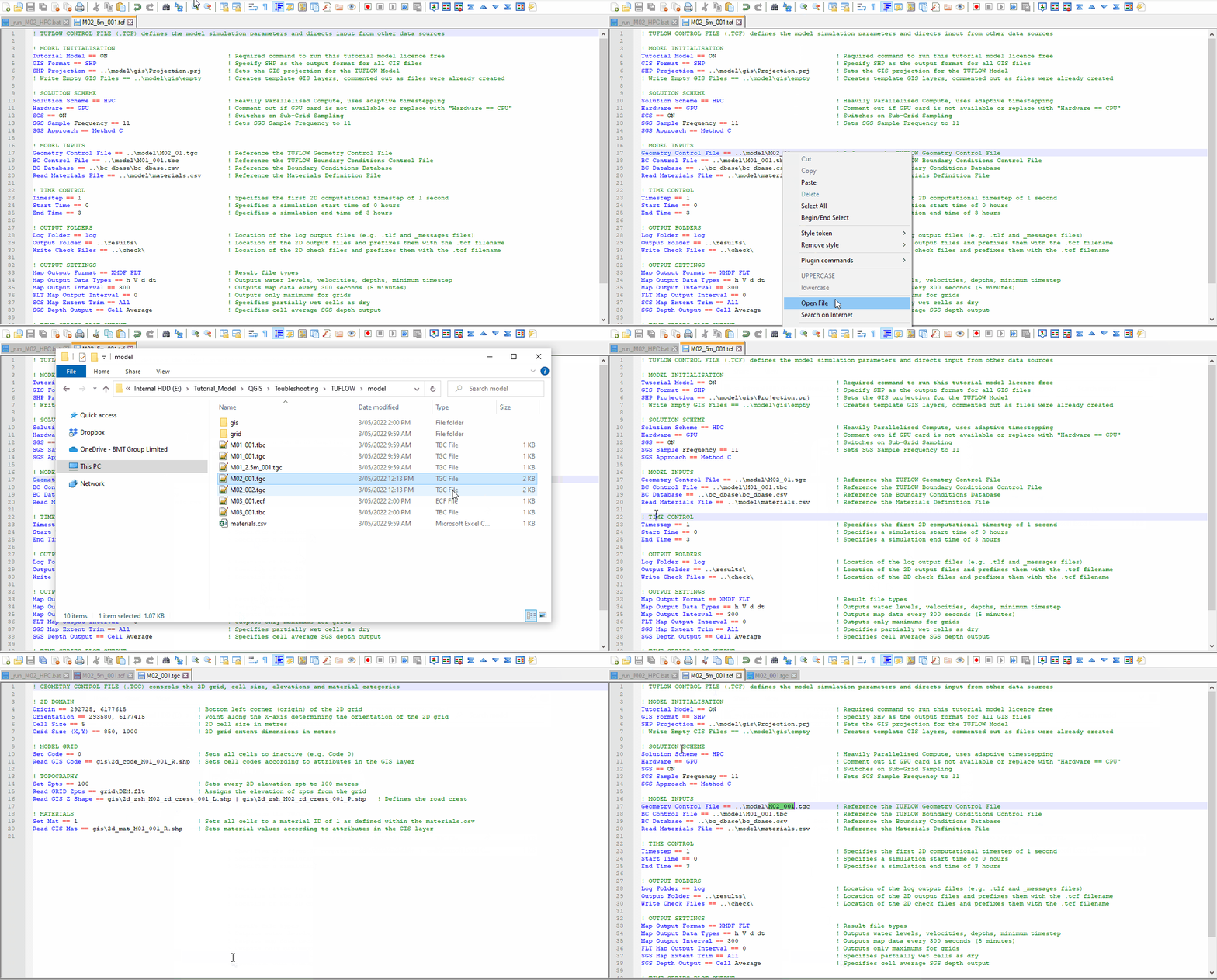
Typos in control files are common. A 'does not exist' pop up will appear if this has occurred:

To fix the reference:
- Locate the file that cannot by found, in this example it is M02_01.tgc.
- Review what the model file is called (navigate to the TUFLOW\model folder).
- The file referenced should be M02_001.tgc.
- Update the reference in the TCF and confirm the file can now be found by right clicking on the file and selecting open.

Troubleshooting Steps
DOS Window Flashes and Disappears
If a batch file has been clicked and a DOS window flashes up and disappears:
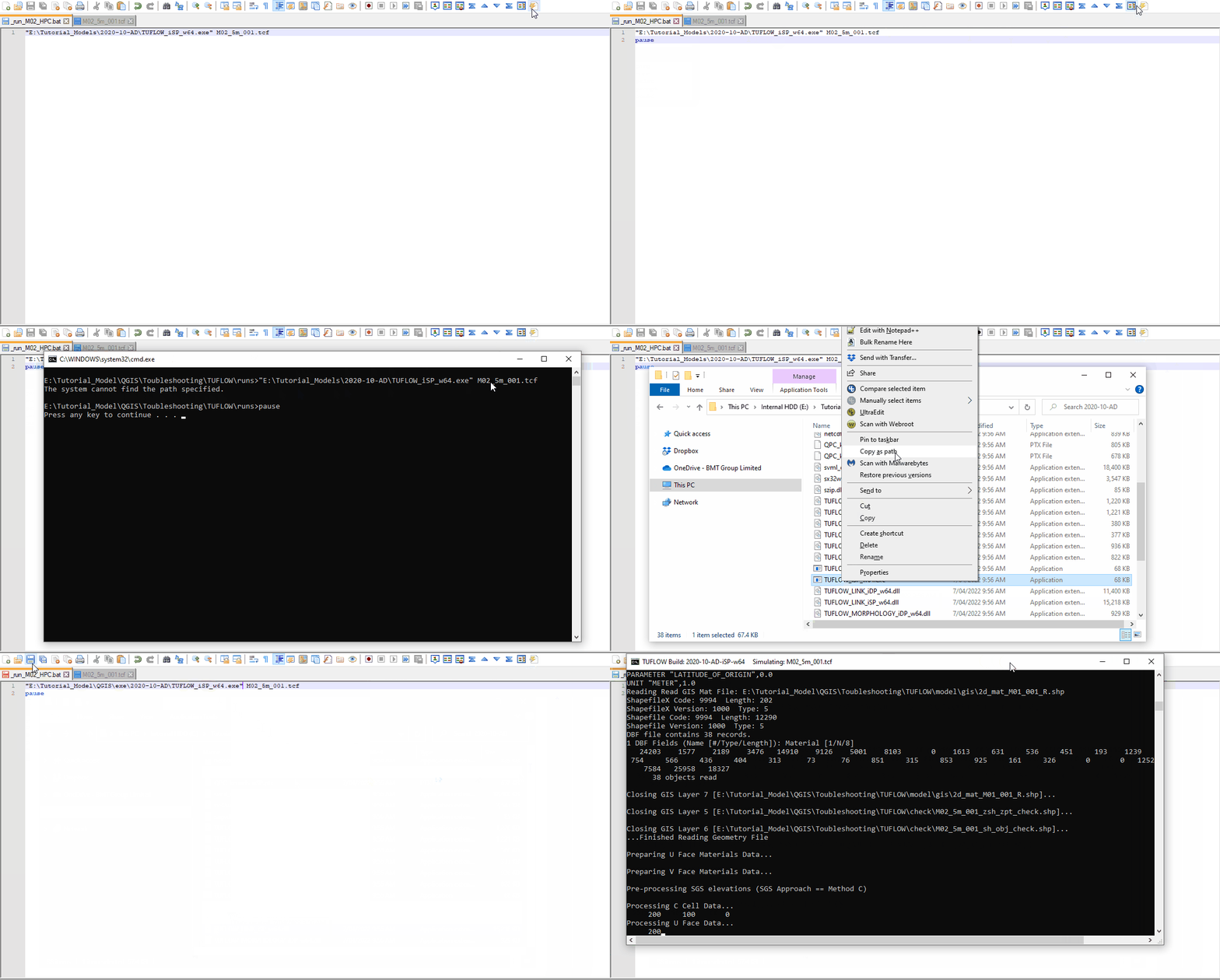
- Check the location of the TUFLOW executable. Right click on the .exe from the batch file and ensure that the executable can be found and open.
- Check the location of the TCF. Right click on the TCF from the batch file and ensure that the file can be found and open.
- If using environment variable 'set exe', confirm there are no spaces surrounding the equals sign (e.g. set exe="..\..\..\..\exe\2020-10-AD\TUFLOW_iSP_w64.exe").
- Check where the model and executable are located. We recommend to not use the C drive or an external hard drive.
- TUFLOW doesn't currently support UNC paths. The folder with the executable has to be opened with a mapped drive. Type "net use <drive>: \\server_name\share_name" in the command line to map desired drive.
- Write 'pause' at the end of the script. Re-run the batch file and the DOS window will remain, giving some more information. In the below example, the file path to the TUFLOW exe is incorrect:

_ TUFLOW Simulations (*.log)
- Navigate to the TUFLOW\runs folder and open the _ TUFLOW Simulations.log in a text editor.
- Confirm if the simulation has 'Started' and 'Finished'.
- If there is no log file, see here.
TUFLOW Log File (*.tlf)
Open the TUFLOW log file (*.tlf) and confirm at the bottom of the file, that the model run finished successfully by observing "Simulation FINISHED". If the simulation has not finished:
- Scroll to the bottom of the TLF, work from the bottom up to review any error, check or warning messages. If no error messages appear, see XX.
- Review the Error number and open the link provided in a web browser:
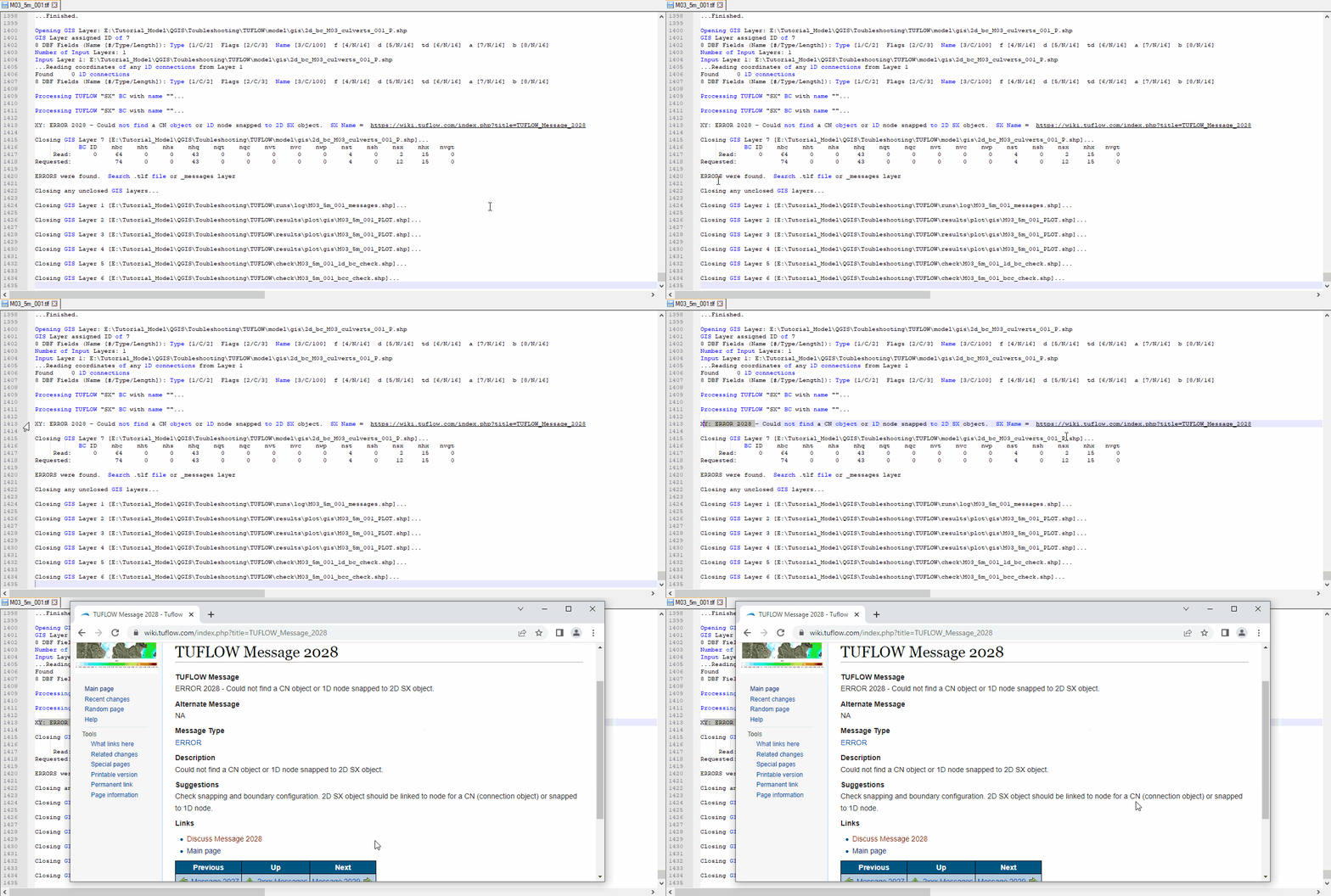
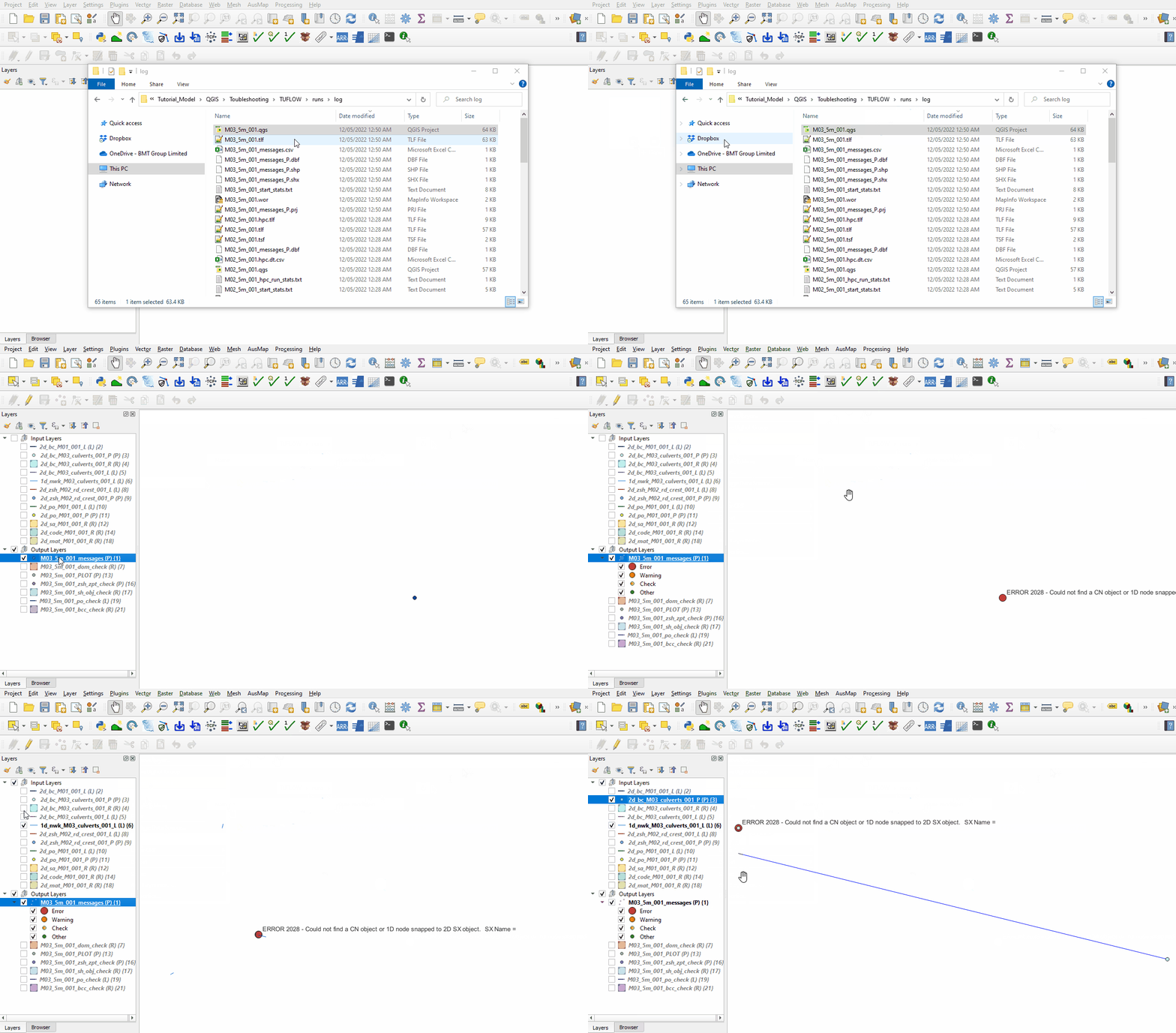
- Open the workspace in QGIS from the TUFLOW\runs\log folder.
- Click 'Apply TUFLOW Stying'.
- Zoom in to the location of any error messages, turn on labelling to view the error.


HPC TUFLOW Log File (*hpc.tlf)
If there is no error message in the TLF and the last line shows:
[[]]
- The model has been set up to run on GPU and there is no GPU available, or
- The GPU needs a driver update, for more information see Update GPU Driver.
Conclusion
If the above tips do not assist in fixing the error, email support@tuflow.com.
| Up |
|---|
 Back to Tutorial Introduction Main Page Back to Tutorial Introduction Main Page
|