Tutorial M08 001 Check Files QGIS GPKG: Difference between revisions
Jump to navigation
Jump to search
Content deleted Content added
| Line 22: | Line 22: | ||
This tutorial introduces: |
This tutorial introduces: |
||
:*[[Check_Files_2d_grd | _grd_check_R]] |
:*[[Check_Files_2d_grd | _grd_check_R]] |
||
Map the Project Folder as a Favourite: |
|||
<ol> |
|||
<li>Within the QGIS Browser Panel, right click on 'Favorites' and select 'Add a Directory...'. |
|||
<li>Navigate to the '''Module_08''' folder and select it. |
|||
</ol> |
|||
Review the check files: <br> |
Review the check files: <br> |
||
| Line 27: | Line 33: | ||
:*'''M08_5m_001_grd_check_R''' |
:*'''M08_5m_001_grd_check_R''' |
||
:*'''M08_2.5m_001_grd_check_R''' |
:*'''M08_2.5m_001_grd_check_R''' |
||
<ol> |
<ol> |
||
<li>Open the files, either: |
<li>Open the files, either: |
||
<ol><li> |
<ol><li>Within the QGIS Browser Panel, navigate to the 10m, 5m and 2m check file database (e.g. '''Module_08\TUFLOW\check\M08_5m_001_Check.gpkg'''). Double click on the grd_check_R layer for each to open them, or |
||
<li> |
<li>In File Explorer, navigate to the '''Module_08\TUFLOW\check''' folder, drag and drop individually the 10m, 5m and 2.5m check file database (e.g. '''M08_5m_001_Check.gpkg''') into the QGIS workspace and select the grd check layer.</ol> |
||
<li>Use the 'Apply TUFLOW Styles to Open Layers'. |
<li>Use the 'Apply TUFLOW Styles to Open Layers'. |
||
<li>The grd_check is the 2D grid defined by the 2d_code layer and contains a region object for each cell. It is useful to understand how the model is orientated, the cell size in relation to the hydraulic features and where certain calculations occur in the model. In this tutorial, the grid is orientated to align with the downstream road. |
<li>The grd_check is the 2D grid defined by the 2d_code layer and contains a region object for each cell. It is useful to understand how the model is orientated, the cell size in relation to the hydraulic features and where certain calculations occur in the model. In this tutorial, the grid is orientated to align with the downstream road. |
||
Revision as of 20:38, 13 July 2023
Page Under Construction
Introduction
QGIS is used to import the check files and review the grid cell sizes.
TUFLOW Project Re-Configuration
Re-configure the TUFLOW project to use and save empty files to the correct folder:
- Go to Plugins > TUFLOW > Editing > Configure / Create TUFLOW Project.
- Change the folder which contains TUFLOW to the Module_08 folder. This is the only change required, the model folder structure and template empty files are supplied from previous model.
Note: The 'results' and 'check' folder get automatically created when the TUFLOW model is run.
- Click 'OK' and save the QGIS workspace by selecting Project > Save As.
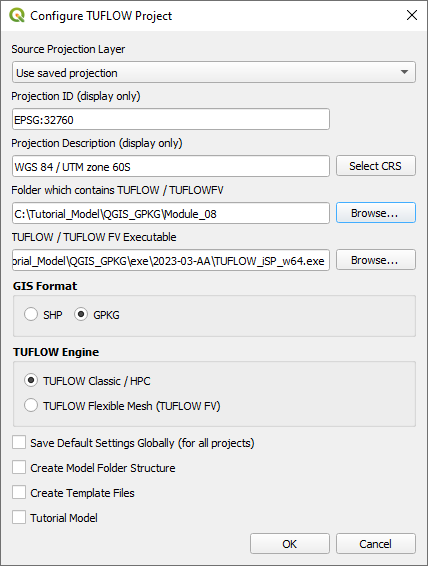
- Set the QGIS workspace projection to EPSG:32760, see Set the Projection.

Method
This tutorial introduces:
Map the Project Folder as a Favourite:
- Within the QGIS Browser Panel, right click on 'Favorites' and select 'Add a Directory...'.
- Navigate to the Module_08 folder and select it.
Review the check files:
- M08_10m_001_grd_check_R
- M08_5m_001_grd_check_R
- M08_2.5m_001_grd_check_R
- Open the files, either:
- Within the QGIS Browser Panel, navigate to the 10m, 5m and 2m check file database (e.g. Module_08\TUFLOW\check\M08_5m_001_Check.gpkg). Double click on the grd_check_R layer for each to open them, or
- In File Explorer, navigate to the Module_08\TUFLOW\check folder, drag and drop individually the 10m, 5m and 2.5m check file database (e.g. M08_5m_001_Check.gpkg) into the QGIS workspace and select the grd check layer.
- Use the 'Apply TUFLOW Styles to Open Layers'.
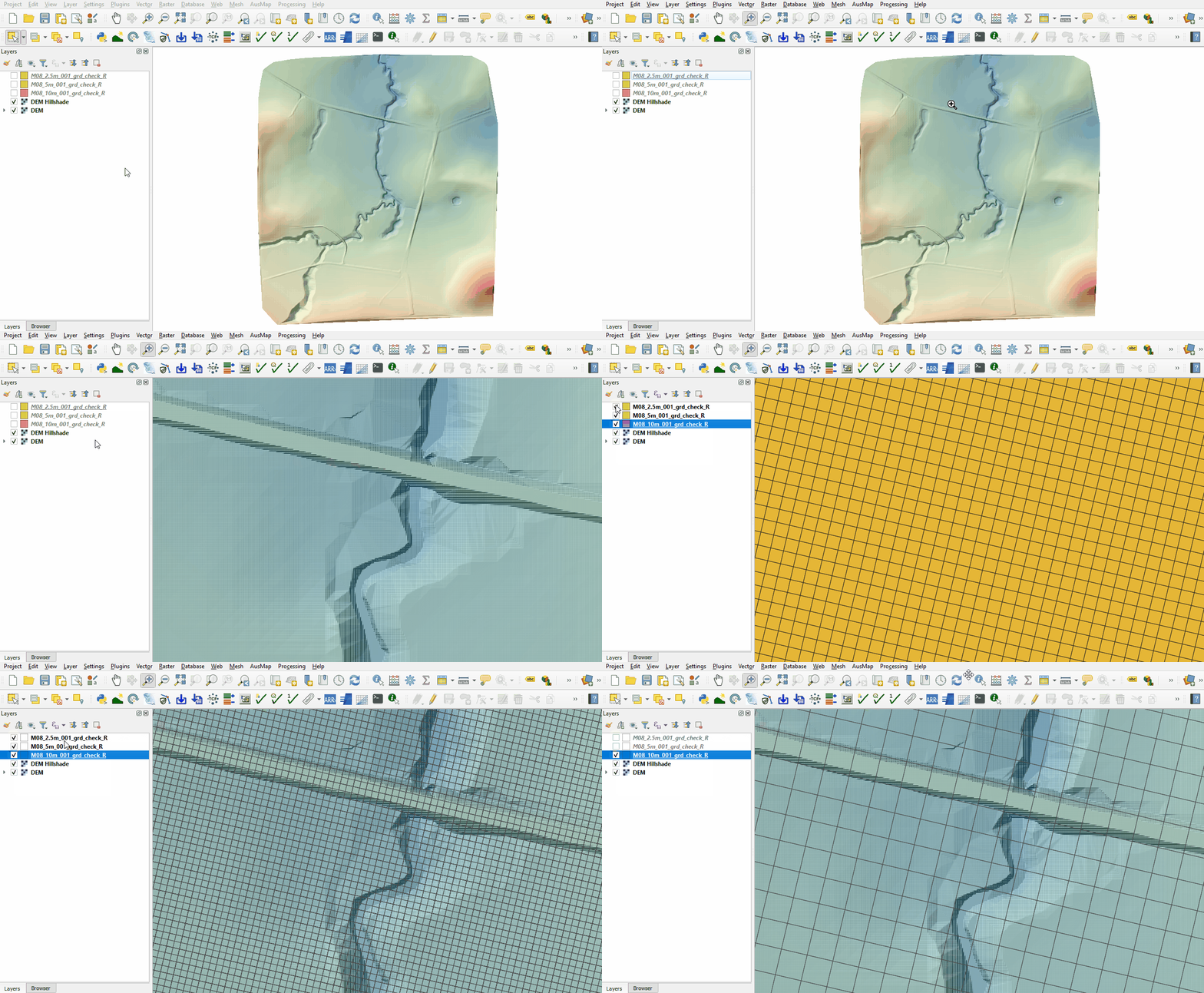
- The grd_check is the 2D grid defined by the 2d_code layer and contains a region object for each cell. It is useful to understand how the model is orientated, the cell size in relation to the hydraulic features and where certain calculations occur in the model. In this tutorial, the grid is orientated to align with the downstream road.
- Compare the cells, inspect how the smaller cell size picks up topographic features compared with the larger cell size.

Conclusion
- The 10m, 5m and 2.5m grids were inspected.
| Up |
|---|
 Back to Module 8 Main Page Back to Module 8 Main Page
|