New User Guide Cloud Server Licences: Difference between revisions
Jump to navigation
Jump to search
Content deleted Content added
Chris Huxley (talk | contribs) No edit summary |
Chris Huxley (talk | contribs) No edit summary |
||
| Line 4: | Line 4: | ||
<li> <u>[[Wibu_Dongles| Install Licencing Dongle Drivers (CodeMeter RunTime Kit)]]</u> on the Network Host computer.<br> |
<li> <u>[[Wibu_Dongles| Install Licencing Dongle Drivers (CodeMeter RunTime Kit)]]</u> on the Network Host computer.<br> |
||
Note: The Network Host does not need to be a server. It can be a standard computer connected to the Local Area Network of your company. If this is the case, make sure the Host computer remains on at all times and the computer is assigned a static IP address. |
Note: The Network Host does not need to be a server. It can be a standard computer connected to the Local Area Network of your company. If this is the case, make sure the Host computer remains on at all times and the computer is assigned a static IP address. |
||
<li> Import your <u>[[WIBU_Configure_Cloud_Client | WIBU Cloud License Credentials File]] to the Network Host</u>. |
|||
<li> Obtain your software lock licence file from sales@tuflow.com by following these steps: <u>[[WIBU_Software_Licence_Update_Request| Request Licence File]]</u>. |
|||
<li> <u>[[WIBU_Licence_Update_Softlock_Import| Import the licence]]</u> to the Network Host computer. |
|||
<li> <u>[[WIBU_Configure_Network_Server_2016| Configure Network Host]]</u> so other (Client) computers can use its available licence(s). |
<li> <u>[[WIBU_Configure_Network_Server_2016| Configure Network Host]]</u> so other (Client) computers can use its available licence(s). |
||
<li> <u>[[Wibu_Dongles| Install Licencing Dongle Drivers (CodeMeter RunTime Kit)]]</u> on all Client computers wishing to access licences from the Network Host. |
<li> <u>[[Wibu_Dongles| Install Licencing Dongle Drivers (CodeMeter RunTime Kit)]]</u> on all Client computers wishing to access licences from the Network Host. |
||
Revision as of 20:02, 20 November 2024
This section is relevant for people with a Cloud Server TUFLOW network licence. For this configuration a company server acts as the licence host, linked to the WIBU server over an internet connection. Modelling computers are connected to the company server via the company’s network.
- Download the latest executable and manual from the Downloads page of the TUFLOW website.
- Install Licencing Dongle Drivers (CodeMeter RunTime Kit) on the Network Host computer.
Note: The Network Host does not need to be a server. It can be a standard computer connected to the Local Area Network of your company. If this is the case, make sure the Host computer remains on at all times and the computer is assigned a static IP address. - Import your WIBU Cloud License Credentials File to the Network Host.
- Configure Network Host so other (Client) computers can use its available licence(s).
- Install Licencing Dongle Drivers (CodeMeter RunTime Kit) on all Client computers wishing to access licences from the Network Host.
- Configure Access to the Network licences on all Client computers.
- Double click the TUFLOW Executable (for example TUFLOW_iSP_w64.exe) from the Network Host computer. A DOS window should open. Review the licence information listed. Check the licence types and numbers associated with your configuration (the licence types and numbers will be different to the example shown below).
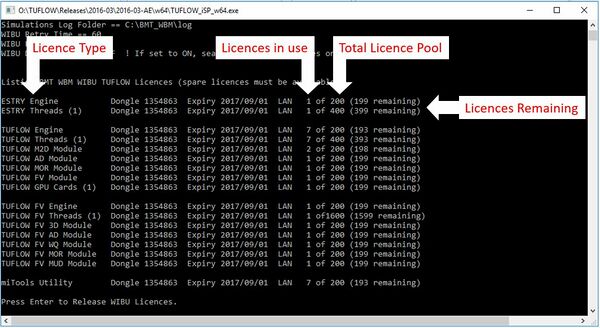
Note: The Licence Update Request and Import steps listed above should only be required once annually to renew the licence and provide access to new major releases of the software (unless licence configuration changes are requested). - Double click the TUFLOW Executable (for example TUFLOW_iSP_w64.exe) from the Client computer. A DOS window should open. Review the licence information listed (example shown above). Check the licence types and numbers. If a licence has not been found, the connection between the client computer and network host has not been successful. Return to step 4 above and work through the configuration steps again.
- You are now ready to start TUFLOW modelling. There are multiple options available to help you learn TUFLOW:
- Free TUFLOW eLearning courses.
These courses are hosted online 24/7. They includes step by step lessons comprising of a combination of written notes, background content videos, demonstration videos and hands-on exercises:
Other paid eLearning courses are also available via the TUFLOW Training Course Catalogue
- TUFLOW Wiki Self-teach Tutorials
- Example Models
This database includes over 60 example models demonstrating the most commonly used TUFLOW features. Use these models to learn how to implement features not included in the TUFLOW eLearning or Wiki Tutorials.
- Free TUFLOW eLearning courses.
- Run TUFLOW using the options listed in the Running TUFLOW section of the Wiki:
- Other resources that may be useful include:
- Other useful information in the Wiki. In particular new users often find the Tips and Tricks section of the homepage and the Modelling Guidance sections useful.
- If you're interested in becoming a part of the TUFLOW User Community please join the TUFLOW LinkedIn User Group.
- Please email support@tuflow.com if you have any technical questions or sales@tuflow.com if you would like to rent additional licences temporarily, purchase additional licences or add-on modules. Price information is available from the Pricing page of the TUFLOW website
