ASC to ASC: Difference between revisions
No edit summary |
|||
| Line 182: | Line 182: | ||
A simple input file similar to the TUFLOW geometry control file is input into the utility. This is nominally given the extension .egc (Estry Geometry Control).<br> |
A simple input file similar to the TUFLOW geometry control file is input into the utility. This is nominally given the extension .egc (Estry Geometry Control).<br> |
||
<br> |
<br> |
||
Two input GIS layers can be used, these are the branch lines and cut lines. The branch line is split into the 1d_nwk layer, a new 1D channel is created for each section. The GIS attributes of these are defined in the sections below. |
|||
===Branch Lines=== |
|||
===Cut Lines=== |
|||
===EGC commands=== |
|||
{| align="center" class="wikitable" |
|||
! Command |
|||
! width=90% | Description |
|||
|- |
|||
|Read GIS Branch|| Reads the branch lines, these are described above. |
|||
|- |
|||
|Read GIS XS|| Reads the cross-section cut lines, these are described above. |
|||
|- |
|||
|Set XS dx|| Sets the default distance across section to extract elevations and materials data. This can be specified on the cut lines as detailed above. |
|||
|- |
|||
|Set XS Z|| Sets the elevation for all points in all cross-sections. |
|||
|- |
|||
|Set XS Mat|| Sets the material ID for all points in all cross-sections. |
|||
|- |
|||
|Read Grid Z|| Read elevations from DEM and assign this to all cross-section extraction points that fall within active DEM pixels. |
|||
|- |
|||
|Read Grid Mat|| Read material IDs from raster grid and assign this to all cross-section extraction points that fall within active DEM pixels. This should be an integer grid. |
|||
|} |
|||
Example:<br> |
Example:<br> |
||
<li><tt>asc_to_asc.exe -egc MR_1d_001.egc</tt><br> |
<li><tt>asc_to_asc.exe -egc MR_1d_001.egc</tt><br> |
||
=Other Options (switches)= |
=Other Options (switches)= |
||
A list of the general switches is provided in the table below, these are available for all operations listed above:<br> |
A list of the general switches is provided in the table below, these are available for all operations listed above:<br> |
||
Revision as of 13:00, 9 February 2017
- asc_to_asc.exe -conv *.flt
Converts all .flt grids to .asc format.
- asc_to_asc.exe -conv DEM_M01.asc
Converts the file "DEM_M01.asc" for .flt format.Maximum
"-max"
Determines the maximum value in all the input .asc files. Two output grids are created:
- A numerical grid containing the maximum value.
- A classified grid with the name _src.asc which contains the source grid for the maximum value.
- A numerical grid containing the maximum value.
- asc_to_asc.exe -max Q100_30min_h.asc Q100_45min_h.asc Q100_60min_h.asc
Creates a new grid containing the maximum of the 3 input water level grids. - asc_to_asc.exe -out Q100_Max_Levels.asc -max Q100_30min_h.asc Q100_45min_h.asc Q100_60min_h.asc
As per item 2 above, but specifies the output name "Q100_Max_Levels.asc". - The first is the difference values between the two .asc files. A difference value only occurs at grid cells that have a value in both grids. If the cell has a null value (ie. the TUFLOW output was dry at that location) in either or both .asc grids, a null value is output.
- A second grid with a “_wd” suffix is output to indicate which .asc grid cells were either previously wet and are now dry or vica versa. Importing this grid into Vertical Mapper creates a .grc (grid classification) grid that has two categories: “Was Wet Now Dry” and “Was Dry Now Wet”. This grid is particularly useful for displaying areas that were previously inundated or previously flood-free.
- asc_to_asc.exe -out difference.asc -dif after_h.asc before_h.asc
Creates new grids comparing the differences in flood levels and extents for:
"difference.asc" = "after_h.asc" - "before_h.asc" - If only one grid is specified this grid is processed.
- If two grids are specified, the first value is used for setting the cutoff depth and the values from the second grid are processed.
- If three grids are specified, the third grid is used for setting the filename for the output grid. This is ignored if the "-out" option is used.
- asc_to_asc.exe -cd0.1 depth.asc
Creates a new depth grid only where the depth is greater than 0.1m. - asc_to_asc.exe -cd0.1 depth.asc levels.asc
Creates a new level grid only where the depth is greater than 0.1m. - asc_to_asc.exe -cd0.1 -out filtered_levels.asc depths.asc levels.asc
As per the example above, but sets the output name as "filtered_levels.asc". - asc_to_asc.exe -resize5 -out DEM_10m.asc DEM_2m.asc
Creates a new 10m DEM (DEM_10m.asc) based on the the 2m DEM using an averaging approach. - asc_to_asc.exe -resize5 -rm_min -out DEM_10m_min.asc DEM_2m.asc
Creates a new 10m DEM (DEM_10m_min.asc) based on the the 2m DEM using an minimum approach. - asc_to_asc.exe -resize5 -rm_max -out DEM_10m_max.asc DEM_2m.asc
Creates a new 10m DEM (DEM_10m_max.asc) based on the the 2m DEM using an maximum approach. - asc_to_asc.exe -trans_m0.3048 DEM.asc
Multiplies all values by 0.3048. - asc_to_asc.exe -trans_m0.3048 -trans_c10 DEM.asc
Multiplies all values by 0.3048 and then adds 10.0. - asc_to_asc.exe -classify classifications.csv results_VMax.asc
Outputs a classified grid, based on the cut off values and names in the "classifications.csv". - asc_to_asc.exe -RGB -grc -classify depth_classify.csv results_dMax.asc
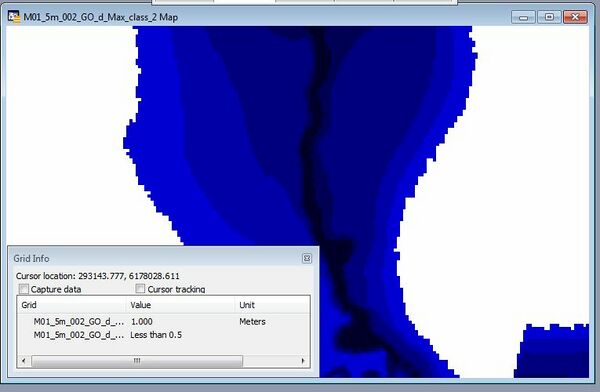
Cutoff Value Name R G B 0.5 Less than 0.5 0 0 192 1.0 0.5 to 1.0 0 0 128 2.0 1.0 to 2.0 0 0 64 In the image below two grids are shown in MapInfo / Vertical Mapper, one is classified without the -grc option and a class number is returned for the grid. The second grid has been created with the -grc option shown, when querying this the label is returned instead.
Extract Breaklines from DEM
"-brkline <gis file in 2d_zsh format>"
This feature was added to the 2013-06-AA version of the utility.
Extracts elevations from a DEM for breaklines in the 2d_zsh format. This GIS input should have four attributes, z, dz, width and shape_options, as described in the TUFLOW manual. For the utility the dz, shape_width and the shape_options are used. Valid shape_options are "Max" and "Min" or blank (average used). The utility will extract an elevation at each vertex along the line. Depending on the line width and DEM cell size, the following methods are used:
- If the width is set to 0, the closest DEM value to the vertex is used. If a "shape_option" is specified this is ignored.
- If the width is greater than 0, but less than 1.5 times the DEM cell size, the four DEM values surrounding the vertex are used. If max or min is specified in the "shape_option" the max or min of the four values is used. If max or min option is not specified (attribute is blank), the average of the four values is used.
- If the width is greater than 1.5 times the DEM cell size, at each vertex a buffer region is created and all non null DEM values within the buffer object are processed. The diameter of the buffer region is equal to the width specified. If max or min option is not specified, the average of the values within the region is used. These buffer regions are outputted as a separate file.
If a dz value is specified (for the 2014-01-AA version or later) this can be used to control the spacing of vertices along the line. If a dz value of 100 is specified the maximum spacing along the line is 100 (metres or feet), if the existing vertices along the line are greater than 100 (m or ft) apart additional vertices are inserted. The method for inserting additional vertices creates equally spaced vertices. For example, if two vertices along a line are spaced 250m apart and a dz attribute of 100m is specified three line segments of 83.3m will be created as opposed to two segments of 100m and one segment of 50m.
NOTE: For the output GIS file, the dz attribute is set to 0.0 regardless of the value set in the input field.Example:
- asc_to_asc.exe -brkline 2d_zsh_breaklines_L.shp DEM.asc
Fuzzy Map
"-fuzzy <input grids>"
This feature was added to the 2014-03-AB version of the utility.
A fuzzy map can be used when comparing a large number of simulations.
For each input grid (or scenario) the grid is classed as either 1 if the results grid is wet or 0 if dry. The total score for each grid cell is is calculated and then divided by the total number of input grids. A value of 1 indicates that the cell was wet in each simulation a value of 0 is dry in all simulations. Grids with a value of 0.5 are most sensitive.
This can be useful for quantifying the sensitivity of the model to parameters.
Example:
- asc_to_asc.exe -fuzzy *_d_Max.flt
Create a fuzzy map from all maximum depth grids in the directory.Histogram
"-histogram bins.csv <input grid>"
This feature was added to the 2014-03-AB version of the utility.
Calculates the number of cells and percentage of cells that fall in each range. Requires and input .csv file containing the bin values.
An example inputs bin file is:
Bin Label 0.25 Less than 0.25 0.5 0.25 to 0.50 1.0 0.5 to 1.0 2.0 1.0 to 2.0 3.0 2.0 to 3.0 5.0 3.0 to 5.0 An example output looks like the below:
Bin Label Count Percentage 0.25 Less than 0.25 986,434 58.61 0.5 0.25 to 0.50 334,422 19.87 1.0 0.5 to 1.0 216,449 12.86 2.0 1.0 to 2.0 118,452 7.04 3.0 2.0 to 3.0 10,206 0.61 5.0 3.0 to 5.0 15,998 0.95 Above 5.0 Above 5.0 973 0.06
Example: - asc_to_asc_w64.exe –histogram histogram_bins.csv results_d_Max.asc
- asc_to_asc.exe -egc MR_1d_001.egc
Other Options (switches)
A list of the general switches is provided in the table below, these are available for all operations listed above:
Switch Description "-b" Run the utility in batch mode, this suppresses the prompt to press enter at the end of processing. Used in .bat files where two or more files are to be processed. "-out <output grid name>" Specify the output filename for the new grid. This overwrites the a third grid if using the -dif option described above.
Note: a space is required between the -out and the filename."-flt" Set the output grid format to binary float (.flt). "-asc" Set the output grid format to ESRI ascii format (.asc). "-grc" For use with the "-classify" option and .asc format output. This creates a classified grid (uses name rather than number). This is only valid if using Vertical Mapper, neither QGIS or ArcMap will recognise this format. This can also be used with the -RGB option to specify the output colouring of your grid.
Introduction
asc_to_asc.exe is a utility that can be used to perform a range of operations on gridded files. The input grids can be either ESRI ASCII grid (.asc) or binary float grids (.flt), both of which can be input and output from TUFLOW.
This utility is useful for comparing and processing TUFLOW outputs from different .2dm meshes, which can't be compared with the res_to_res.exe.
For some options (such as processing maximums or differences) the input (.asc or .flt) files must be of the same row/column dimensions.
The inputs can be a combination of .asc and .flt grids and the -asc or -flt options can be used to set the output type.
For a complete list to the operations available, please see the table of contents above.
Operations
Convert
"-conv"
Converts between .flt and .asc format. For this operation the output file type is based on the input, for an input .asc file the output will be in .flt format.
Example:
Difference
"-dif"
Takes the difference between the first two .asc files, the second grid is subtracted from the first. If an optional third .asc file is specified, this is used as the output file, otherwise, asc_to_asc creates its own output filename using the names of the two input .dat files. The output is the first .asc file minus the second .asc file.
Two .asc grids are output:
Cutoff Depth
"-cd<cutoff value>"
Outputs a new file only where the value is greater than the cutoff value.
Resize
"-resize<factor>"
Resize the grid based on the factor above. The factor must be an integer (greater than 1). The output grid has the same origin (lower left) coordinates as the input grid. The new cell size is the factor times the old cell size. For example if a -resize5 is used on a 2m resolution grid the output grid will be 10m. For processing the grid three options are available
Average (default)
This is the defualt processing method, which can also be specified with the -rm_avg (resize method - average) input flag. When processing for each tile in the new grid, the average of all non-null values in the input grid is taken. For example with a resize factor of 5, the 25 values in the input grid are averaged.
Minimum
Alternative processing method for resize, specified with the -rm_min (resize method - minimum) flag. At each output grid the values is the minimum of the values in the input grid.
Maximum
Alternative processing method for resize, specified with the -rm_max (resize method - maximum) flag. At each output grid the values is the maximum of the values in the input grid.
Transform
Transforms the values using a simple y = mx + c approach the multiplier (m) is specified with flag -trans_m<value>. The add value (c)-trans_c<value>. Only one values is required to be specified.
Classify
Classifies the grid based on the input classifications. The output file is a classified .asc grid. The classification .csv file should have two columns cutoff value and name (in that order). The first line in .csv treated as a header line and ignored. Any values over the greatest cutoff with be outputted to class "above".
| Cutoff Value | Name |
|---|---|
| 0.5 | Less than 0.5 |
| 1.0 | 0.5 to 1.0 |
| 2.0 | 1.0 to 2.0 |
If using vertical mapper the -grc option can be used to create the .asc file in classified grid format, in this format rather than storing a numerical value when interrogating an area a label is returned. This format is not recognised by ArcMap or QGIS. If using the grc option it is also possible to specify the desired RGB (red, green, blue) values for the output grid in the .csv file used for the classification. The RGB values should be specified in the 3-5th columns of the .csv file.

Extract 1D Model Inputs
This allows 1D Network (1d_nwk) and/or 1D Cross-Sections to be extracted from a series of grids.
A simple input file similar to the TUFLOW geometry control file is input into the utility. This is nominally given the extension .egc (Estry Geometry Control).
Two input GIS layers can be used, these are the branch lines and cut lines. The branch line is split into the 1d_nwk layer, a new 1D channel is created for each section. The GIS attributes of these are defined in the sections below.
Branch Lines
Cut Lines
EGC commands
| Command | Description |
|---|---|
| Read GIS Branch | Reads the branch lines, these are described above. |
| Read GIS XS | Reads the cross-section cut lines, these are described above. |
| Set XS dx | Sets the default distance across section to extract elevations and materials data. This can be specified on the cut lines as detailed above. |
| Set XS Z | Sets the elevation for all points in all cross-sections. |
| Set XS Mat | Sets the material ID for all points in all cross-sections. |
| Read Grid Z | Read elevations from DEM and assign this to all cross-section extraction points that fall within active DEM pixels. |
| Read Grid Mat | Read material IDs from raster grid and assign this to all cross-section extraction points that fall within active DEM pixels. This should be an integer grid. |
Example:
| Up |
|---|
 Back to TUFLOW Utilities Back to TUFLOW Utilities
|