QGIS ARR to TUFLOW: Difference between revisions
Ellis Symons (talk | contribs) |
Ellis Symons (talk | contribs) |
||
| Line 81: | Line 81: | ||
====Output==== |
====Output==== |
||
The tool produced the following outputs:<br> |
The tool produced the following outputs:<br> |
||
[[File: ARR_example_output_folder.PNG | |
[[File: ARR_example_output_folder.PNG | 500px]]<br><br> |
||
[[File: ARR_example_output_folder_data.PNG | |
[[File: ARR_example_output_folder_data.PNG | 500px]]<br><br> |
||
[[File: ARR_example_output_folder_rf_inflow.PNG | |
[[File: ARR_example_output_folder_rf_inflow.PNG | 500px]]<br><br> |
||
====Log File==== |
|||
The following warning was found in the log file:<br> |
|||
* WARNING: 102 preburst rainfall depths exceeded storm initial loss (50.2% of entries) |
|||
<br> |
|||
This is can be checked by looking at the '''burst_initial_loss.csv''' and '''burst_initial_loss.png'''<br> |
|||
[[File: ARR_Burst_Initial_Losses_plot.png | 500px]] |
|||
<br> |
|||
The plot above confirms the warning - a significant portion of the initial loss values are negative. This warning should be taken seriously and ARR offers a number of ways to proceed in Book 2, Section 5.9.9. The tool itself also offers support for modelling a complete storm. For the purpose of this example and simplicity, the model will be assumed to be insensitive to initial loss and negative values will be changed to 0 mm.<br><br> |
|||
====TUFLOW Setup==== |
|||
The following is an example of how the output files are all pieced together and read into TUFLOW. The examples aren't complete control file examples, but rather show the commands to be inserted into each control file with a brief explanation on what's going on.<br><br> |
|||
1. Starting with the spatial distribution of the rainfall losses which is defined in the '''Geometry Control File (TGC)'''.<br> |
|||
'''''Geometry Control File''''' |
|||
<span style="color:blue;">Set Soil</span> <span style="color:red;">==</span> 1 <span style="color:green;">! globally set all active cells to soil type 1</span> |
|||
<span style="color:blue;">Read GIS Soil</span> <span style="color:red;">==</span> <path to GIS file> <span style="color:green;">! Can be used to spatially vary soil type using polygons</span> |
|||
<br> |
|||
2. The soil types have already been defined in the output '''soils.tsoilf''' file - See Section 6.10.4 in the TUFLOW Manual. This file defines soil type 1 as using the initial/continuing loss method. The values '''<<IL_test>>''' and '''<<CL_test>>''' are variables because they have the triangular brackets '''<<>>''' ("test" in this case is the catchment name).<br> |
|||
: [[File: ARR_example_tsoilf.PNG]]<Br> |
|||
3. The IL_test and CL_test variables are being initialised in '''soil_infilatration.trd'''. This file is using <tt>IF statements</tt> to set the values based on the event.<br> |
|||
: [[File: ARR_example_soil_infiltration_trd.PNG]]<br> |
|||
4. Both the '''soils.tsoilf''' and '''soil_infiltration.trd''' need to be read into the '''TUFLOW Control File (TCF)''' (order does not matter). Copy both files to the '''TUFLOW/model''' directory.<br> |
|||
'''''TUFLOW Control File''''' |
|||
<span style="color:blue;">Read Soils File</span> <span style="color:red;">==</span> ..\model\soils.tsoilf <span style="color:green;">! location of soils.tsoilf</span> |
|||
<span style="color:blue;">Read File</span> <span style="color:red;">==</span> ..\model\soil_infiltration.trd <span style="color:green;">! read file containing variable values</span> |
|||
<br> |
|||
5. The boundary database and inflow files also need to be read in. Copy the '''bc_dbase.csv''' and the entire '''rf_inflow''' to the '''TUFLOW/bc_dbase''' directory.<br> |
|||
'''''TUFLOW Control File''''' |
|||
<span style="color:blue;">BC Database</span> <span style="color:red;">==</span> ..\bc_dbase\bc_dbase.csv <span style="color:green;">! location of boundary database</span> |
|||
<br> |
|||
6. An event database has already been populated in the '''Event_File.tef''' output. This file contains an event entry for the one magnitude that was selected, 8 durations (1 hr -> 12 hr), and 10 temporal patterns.<br> |
|||
: [[File: ARR_example_tef.PNG]] |
|||
<br> |
|||
7. The '''Event_File.tef''' also needs to be read into the TCF. Copy the '''Event_File.tef''' into the '''TUFLOW/runs''' directory.<br> |
|||
'''''TUFLOW Control File''''' |
|||
<span style="color:blue;">Event File</span> <span style="color:red;">==</span> Event_File.tef <span style="color:green;">! location event database</span> |
|||
8. When running the model, the flags can be added to the batch file. The event names must match the names in the '''Event_File.tef''' as stated in the command <tt><font color="blue">Define Event</font> font color="red">==</font></tt><br> |
|||
'''''Run Batch File''''' |
|||
TUFLOW.exe -b -e1 1p -e2 060m -e3 TP01 my_model.tcf |
|||
TUFLOW.exe -b -e1 1p -e2 060m -e3 TP02 my_model.tcf |
|||
TUFLOW.exe -b -e1 1p -e2 060m -e3 TP03 my_model.tcf |
|||
TUFLOW.exe -b -e1 1p -e2 060m -e3 TP04 my_model.tcf |
|||
TUFLOW.exe -b -e1 1p -e2 060m -e3 TP05 my_model.tcf |
|||
... and so on |
|||
An example of a naming convention that could be used with the ARR2016 output is: '''<Model_Name>_~e1~~e2~_~e3~_~s1~_00X.tcf''' where |
An example of a naming convention that could be used with the ARR2016 output is: '''<Model_Name>_~e1~~e2~_~e3~_~s1~_00X.tcf''' where |
||
Revision as of 00:35, 11 May 2021
The ARR to TUFLOW utility has been developed to help users set up a TUFLOW model that uses Australian Rainfall and Runoff (ARR) input parameters and the Austalian Bureau of Meteorology (BOM) rainfall by automating the collection and processing of the data. The inputs and outputs of the tool are explained in detail below. Note: this tool helps with data processing however is not a substitute to reading ARR. Similarly this wiki page discusses the use of the tool and the options, however context should be derived from ARR directly. Please see the ARR Website for more information.
Getting Started
Installation
The ARR to TUFLOW tool is a free tool that comes as part of the TUFLOW plugin in QGIS. For instructions on how to install the plugin, read the following wiki page:
How to install the TUFLOW plugin
There are also instructions on installing plugins in the QGIS documentation - if you choose to follow the QGIS documentation, the plugin is called "TUFLOW" in the repository:
Link to QGIS Documentation - Installing and Managing Plugins
QGIS Version
The ARR to TUFLOW tool is, for the most part**, a Python tool that runs independently of QGIS. Therefore the installed QGIS version should not be a significant factor, however occasionally QGIS will update the Python version in the installation. This does present a small risk that the tool will break with QGIS version, although it's considered unlikely (the risk of the tool being broken by updates to the ARR datahub would be higher). If the tool does break, please see The Tool Isn't Working for information (the solution is most likely to update the plugin rather than reinstall an older version of QGIS).
**The tool does use QGIS for pre-processing tasks, such as area and centroid calculation as well as reprojection or cartesian to long-lat conversion.
Opening The ARR to TUFLOW Tool
Once the TUFLOW plugin is installed, the ARR to TUFLOW tool can be opened by clicking the following icon in the plugin toolbar:

Quickstart
- Load a catchment GIS into QGIS - this can either be a polygon or point layer
- Open the ARR to TUFLOW tool
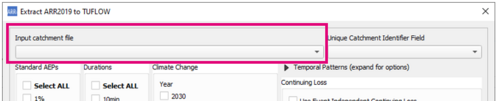
- Select the GIS catchment layer in Input Catchment File dropdown box
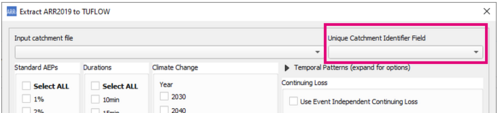
- Select the attribute field to use as the catchment name in the Unique Catchment Identifier Field dropdown
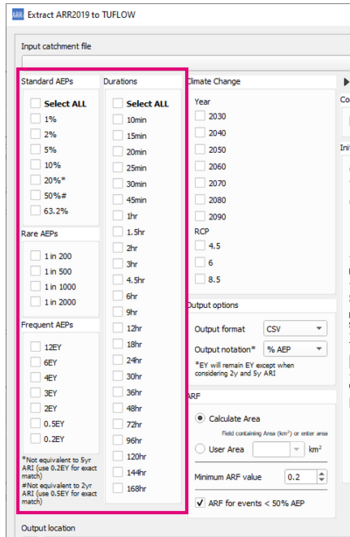
- Select storm event combinations from the list of magnitudes and durations
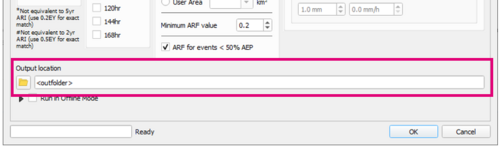
- Choose an output location
- Click OK and wait for the tool to finish


Output
Log File
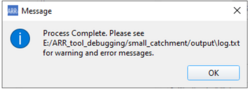
A log file (<catchment_name>_log.txt) will be written to the output folder. The log file will contain all WARNING and ERROR messages as well as logged inputs and processing steps. It's recommended to check the log file after running the tool for any warning or error messages. Most warning messages will be collated and written together near the bottom of the log file to make it easier to review them.
Data Output
The following outputs are located in the folder <output_folder>\data
- Raw BOM and ARR Datahub outputs
- ARR_Web_data_<catchment_name>.txt
- BOM_raw_web_<catchment_name>.html
- Areal_<TP_Zone>_Increments.csv (Areal temporal patterns)
- Rainfall depths
- BOM_Rainfall_Depths_<catchment_name>.csv - processed rainfall depths (after ARF factors)
- ARF Factors
- <catchment_name>_ARF_Factors.csv - calculated ARF factors
- Storm Burst Rainfall Losses
- <catchment_name>_Burst_Initial_Loss.csv - calculated Storm Burst Initial Rainfall Losses (Complete Storm Initial Loss - Preburst Rainfall Depth)
TUFLOW Output
The following outputs are generated by the utility in TUFLOW format. Please see the example below on how to use the output files for a model.
- TUFLOW Rainfall Inflows
- The rainfall inflows are output in the following location <output_folder>\rf_inflows. This output folder is where all the direct rainfall inflows that would be used in the TUFLOW model are output. An inflow file is generated for each event magnitude - duration combination. All available temporal patterns are included in a single file (including climate change options).
- bc_dbase.csv
- TUFLOW boundary condition database. Setup to point to the RF folder with wildcards applied.
- event_file.tef
- TUFLOW Event File. Setup with wildcards applied. To keep the file names from becoming overly long and complicated, Climate Change scenarios are labelled as CC1, CC2.. etc. These correspond to the combinations of climate change scenarios requested by the user e.g. 2090_8.5 (climate change year: 2090, RCP: 8.5)
- soil_infiltration.trd or rainfall_losses.trd - the name of the file will be dependent on the selected loss method, but they are essentially the same file
- This file is a TUFLOW Read File (.trd) that contains variable initialisation for initial and continuing loss values
- soils.tsoilf or materials.csv - which file is output will be dependent on the selected loss method
- soils.tsoilf - rainfall loss file for the infiltration loss method
- materials.csv - rainfall loss file for the rainfall excess method
Example
This example uses the infiltration loss method, however the approach is very similar for the rainfall excess approach.
Tool setup
- events = 1% AEP 1hr -> 12hr
- no climate change scenarios
- infiltration loss approach
- other options left as default (can be seen in image)

Output
The tool produced the following outputs:


Log File
The following warning was found in the log file:
- WARNING: 102 preburst rainfall depths exceeded storm initial loss (50.2% of entries)
This is can be checked by looking at the burst_initial_loss.csv and burst_initial_loss.png

The plot above confirms the warning - a significant portion of the initial loss values are negative. This warning should be taken seriously and ARR offers a number of ways to proceed in Book 2, Section 5.9.9. The tool itself also offers support for modelling a complete storm. For the purpose of this example and simplicity, the model will be assumed to be insensitive to initial loss and negative values will be changed to 0 mm.
TUFLOW Setup
The following is an example of how the output files are all pieced together and read into TUFLOW. The examples aren't complete control file examples, but rather show the commands to be inserted into each control file with a brief explanation on what's going on.
1. Starting with the spatial distribution of the rainfall losses which is defined in the Geometry Control File (TGC).
Geometry Control File
Set Soil == 1  ! globally set all active cells to soil type 1
Read GIS Soil == <path to GIS file>  ! Can be used to spatially vary soil type using polygons
2. The soil types have already been defined in the output soils.tsoilf file - See Section 6.10.4 in the TUFLOW Manual. This file defines soil type 1 as using the initial/continuing loss method. The values <<IL_test>> and <<CL_test>> are variables because they have the triangular brackets <<>> ("test" in this case is the catchment name).

3. The IL_test and CL_test variables are being initialised in soil_infilatration.trd. This file is using IF statements to set the values based on the event.

4. Both the soils.tsoilf and soil_infiltration.trd need to be read into the TUFLOW Control File (TCF) (order does not matter). Copy both files to the TUFLOW/model directory.
TUFLOW Control File
Read Soils File == ..\model\soils.tsoilf  ! location of soils.tsoilf
Read File == ..\model\soil_infiltration.trd  ! read file containing variable values
5. The boundary database and inflow files also need to be read in. Copy the bc_dbase.csv and the entire rf_inflow to the TUFLOW/bc_dbase directory.
TUFLOW Control File
BC Database == ..\bc_dbase\bc_dbase.csv  ! location of boundary database
6. An event database has already been populated in the Event_File.tef output. This file contains an event entry for the one magnitude that was selected, 8 durations (1 hr -> 12 hr), and 10 temporal patterns.

7. The Event_File.tef also needs to be read into the TCF. Copy the Event_File.tef into the TUFLOW/runs directory.
TUFLOW Control File
Event File == Event_File.tef ! location event database
8. When running the model, the flags can be added to the batch file. The event names must match the names in the Event_File.tef as stated in the command Define Event font color="red">==
Run Batch File
TUFLOW.exe -b -e1 1p -e2 060m -e3 TP01 my_model.tcf
TUFLOW.exe -b -e1 1p -e2 060m -e3 TP02 my_model.tcf
TUFLOW.exe -b -e1 1p -e2 060m -e3 TP03 my_model.tcf
TUFLOW.exe -b -e1 1p -e2 060m -e3 TP04 my_model.tcf
TUFLOW.exe -b -e1 1p -e2 060m -e3 TP05 my_model.tcf
... and so on
An example of a naming convention that could be used with the ARR2016 output is: <Model_Name>_~e1~~e2~_~e3~_~s1~_00X.tcf where
- e1 = Event magnitude
- e2 = Event duration
- e3 = climate change scenario
- s1 = user defined scenario switch
For example M01_10p60m_CC1_EXG_001.tcf
How to Run
This tool is a part of the QGIS plugin tool set and can be initiated through the plugin.
File:ARR2016 initiate.PNG
File:QGIS ARR2016 Main Dialog.PNG


- Input GIS catchment layer:
Catchment layer to extract data for. The tool will use the geographical location of the catchment layer for data extraction from the ARR2016 datahub and BOM 2016 rainfall. The catchment layer is able to have multiple features (i.e. a number of subcatchments) and will extract data for each feature.This layer can be either a point or polygon layer. For polygon layers, the polygon centroid is used for geographical data extraction, and the area is used for ARF calculations. For point layers, ARF calculations cannot be automated.
- Unique Catchment Identifier:
The unique catchment identifier is used as the name for the inflow in the TUFLOW model. When extracting data for multiple subcatchments, it is important to have unique identifiers otherwise data will be overwritten if identical names have been used.
- Event Selection:
Select at least one event magnitude and one event duration.
- Climate Change Selection:
Optional climate change parameters. If choosing to include climate change, one year and one RCP must be selected.
- Output Options:
Output options include:- Selecting the format of the inflow files (*.csv or *.ts1)
- Selecting the output notation#:
- % AEP - e.g. 10p60m
- yr ARI - e.g. 10y60m
- # Frequent events (EY) will be denoted with e regardless of above options e.g. 12e60m. The only exception is the 0.5EY and 0.2EY which will be converted to 2y and 5y respectively when using yr ARI
- Areal Reduction Factor:
Choose the method of area calculation for the ARF:- Calculate area from input catchment - the area will be calculated automatically using QGIS (this option can only be used with polygon input layers)
- Manually Specify Area by attribute field - the area can be specified using an attribute field in the input GIS layer. The field containing the area values can be selected using the dropdown box
- To ignore ARF, use Manually Specify Area and select -None- in the dropdown box
- Optional additional temporal patterns
The tool allows the option of adding additional temporal patterns from other regions. This could be useful if your site is on the border of multiple regions and sensitivity with neighbouring temporal patterns is required. The option allows selection of as many additional temporal patterns as desired.
- Initial Loss Options
- Option to choose the preburst percentile (default is median). The initial loss is calculated by Storm Loss minus Preburst.
- Option to choose methods for calculating initial loss for durations less than 60 mins.
- Interpolate to Zero: Assumes an initial loss of 0 mm for a duration of 0 mins and interpolates for values between the 60 min duration and the 0 min duration.
- Rahman et al 2002: From a study of 11 Victorian catchments (source link)
- Hill et al 1996: 1998 (source 1996, source 1998)
- Static Value: User defined value for initial loss for durations less than 60min
- Use 60 min Loss: Adopt 60 min loss for durations less than 60 min
- BOM Terms and Conditions:
By selecting these, you agree to BOM's Conditions and Caveat (required to run run the utility)
- Output Location:
User defined folder where the outputs and log file of the utility will be written to
Log File
The log.txt file is written out into the same location as the other outputs and contains WARNING and ERROR messages from the tool.
The log.txt file is very important and should be checked after running the tool to check whether it has successfully run.
The QGIS utility calls an external Python script and once the script has completed (whether successfully or unsuccessfully) QGIS will report the process as complete. Therefore the user must check the log.txt file to check whether there has been any errors.
How to Read
- The first thing the log file will output is the version of the ARR_to_TUFLOW python script
File:QGIS ARR2016 log header text.png - The next item written will be a list of the inputs
File:QGIS ARR2016 log inputs.png - Following this will be a description of the function the utility is performing - e.g. extracting BOM data
- The last part is the most important and is where ERRORs and WARNINGs are written
File:QGIS ARR2016 log errors warnings.png


If reading in more than one catchment, each catchment extraction is a separate process and will be appended to the log.txt file.
Data Output
The following outputs are located in the folder <output_folder>\data
- Raw BOM and ARR Datahub outputs
- The raw data extracted from ARR2016 datahub and BOM2016 IFD
- ARR_Web_data_<catchment_name>.txt
- BOM_raw_web_<catchment_name>.html
- The raw data extracted from ARR2016 datahub and BOM2016 IFD
- Rainfall depths
- Processed rainfall depths after Areal Reduction Factors have been applied
- BOM_Rainfall_Depths_<catchment_name>.csv
- Processed rainfall depths after Areal Reduction Factors have been applied
- ARF Factors
- Calculated ARF factors applied to the rainfall depths
- <catchment_name>_ARF_Factors.csv
- Calculated ARF factors applied to the rainfall depths
- Storm Burst Rainfall Losses
- Calculated Storm Burst Initial Rainfall Losses (Complete Storm Initial Loss - Preburst Rainfall Depth)
- <catchment_name>_Burst_Initial_Loss.csv
- Calculated Storm Burst Initial Rainfall Losses (Complete Storm Initial Loss - Preburst Rainfall Depth)
TUFLOW Output
The following outputs are generated by the utility in TUFLOW format:
- Rainfall Inflows
- The rainfall inflows are output in the following location <output_folder>\rf_inflows. This output folder is where all the direct rainfall inflows that would be used in the TUFLOW model are output. An inflow file is generated for each event magnitude - duration combination. All available temporal patterns are included in a single file (including climate change options).
- <catchment_name>_RF_<magnitude><duration>.csv
- The rainfall inflows are output in the following location <output_folder>\rf_inflows. This output folder is where all the direct rainfall inflows that would be used in the TUFLOW model are output. An inflow file is generated for each event magnitude - duration combination. All available temporal patterns are included in a single file (including climate change options).
- BC_Dbase
- TUFLOW boundary condition database. Setup to point to the RF folder with wildcards applied.
- bc_dbase.csv
- TUFLOW boundary condition database. Setup to point to the RF folder with wildcards applied.
- Tuflow Event File
- TUFLOW Event File. Setup with wildcards applied. To keep the file names from becoming overly long and complicated, Climate Change scenarios are labelled as CC1, CC2.. etc. These correspond to the combinations of climate change scenarios requested by the user e.g. 2090_8.5 (climate change year: 2090, RCP: 8.5)
- Event_File.tef
- TUFLOW Event File. Setup with wildcards applied. To keep the file names from becoming overly long and complicated, Climate Change scenarios are labelled as CC1, CC2.. etc. These correspond to the combinations of climate change scenarios requested by the user e.g. 2090_8.5 (climate change year: 2090, RCP: 8.5)
An example of a naming convention that could be used with the ARR2016 output is: <Model_Name>_~e1~~e2~_~e3~_~s1~_00X.tcf where
- e1 = Event magnitude
- e2 = Event duration
- e3 = climate change scenario
- s1 = user defined scenario switch
For example M01_10p60m_CC1_EXG_001.tcf
Future Enhancements
- Automatic output to user choice of TUFLOW rainfall loss - infiltration / rainfall excess
The Tool Isn't Working
Can't access websites
For whatever reasons, sometimes the BOM or ARR Datahub websites are down or unable to be accessed by the tool. The below are a set of instructions that can be used as a workaround should this occur: