QGIS to update MapInfo model: Difference between revisions
Chris Huxley (talk | contribs) No edit summary |
Chris Huxley (talk | contribs) No edit summary |
||
| Line 27: | Line 27: | ||
<li> Copy the following command line to clipboard from '''Create_Empties.tcf''': <font color="blue"><tt>SHP Projection</tt></font> <font color="red"><tt>==</tt></font><tt> ..\model\gis\Projection.prj</tt> |
<li> Copy the following command line to clipboard from '''Create_Empties.tcf''': <font color="blue"><tt>SHP Projection</tt></font> <font color="red"><tt>==</tt></font><tt> ..\model\gis\Projection.prj</tt> |
||
<li> Paste the command to the existing TUFLOW model TCF (the one using the MapInfo format inputs), <font color="blue"><tt>MI Projection</tt></font> <font color="red"><tt>==</tt></font> |
<li> Paste the command to the existing TUFLOW model TCF (the one using the MapInfo format inputs), <font color="blue"><tt>MI Projection</tt></font> <font color="red"><tt>==</tt></font> |
||
<li> Also in the existing TUFLOW model TCF, replace the command <font color="blue"><tt>GIS Format</tt></font> <font color="red"><tt> == </tt></font> <tt>MIF</tt> with, <font color="blue"><tt>GIS Format</tt></font> <font color="red"><tt> == </tt></font> <tt>SHP</tt> |
<li> Also in the existing TUFLOW model TCF, replace the command <font color="blue"><tt>GIS Format</tt></font> <font color="red"><tt> == </tt></font> <tt>MIF</tt> with, <font color="blue"><tt>GIS Format</tt></font> <font color="red"><tt> == </tt></font> <tt>SHP</tt><br> |
||
[[File:MapInfo_to_QGIS_009.PNG|450px]]<br> |
[[File:MapInfo_to_QGIS_009.PNG|450px]]<br> |
||
</ol> |
</ol> |
||
| Line 34: | Line 34: | ||
When updating a model it is best practice to leave the MapInfo file references as is, and use TUFLOW's data layering functionality to add new GIS entries below existing MapInfo entries. For example.<br> |
When updating a model it is best practice to leave the MapInfo file references as is, and use TUFLOW's data layering functionality to add new GIS entries below existing MapInfo entries. For example.<br> |
||
[[File:MapInfo_to_QGIS_011.PNG| |
[[File:MapInfo_to_QGIS_011.PNG|800px]]<br> |
||
However, if you need to make changes to existing MIF files, follow these steps to convert the to SHP file format: |
However, if you need to make changes to existing MIF files, follow these steps to convert the to SHP file format: |
||
<ol> |
<ol> |
||
| Line 41: | Line 41: | ||
<li> Copy the features from the MapInfo layers to the relevant new QGIS SHP files. Note, double check the attribute values have been correctly transferred to the new file. In some rare instances when the field attribute type is incompatible this does not occur. |
<li> Copy the features from the MapInfo layers to the relevant new QGIS SHP files. Note, double check the attribute values have been correctly transferred to the new file. In some rare instances when the field attribute type is incompatible this does not occur. |
||
<li> Update the commands within your updated TUFLOW model to reference to the new QGIS SHP files. For future traceability it is best to comment out the prior MapInfo input commands using <font color="green"><tt>!</tt></font>, instead of deleting them.<br> |
<li> Update the commands within your updated TUFLOW model to reference to the new QGIS SHP files. For future traceability it is best to comment out the prior MapInfo input commands using <font color="green"><tt>!</tt></font>, instead of deleting them.<br> |
||
| ⚫ | |||
</ol> |
</ol> |
||
| ⚫ | |||
<br> |
<br> |
||
Revision as of 17:26, 16 June 2021
Question: Can I use QGIS as the model build/update environment if a model has previously been developed using MapInfo?
Answer: Yes. TUFLOW models can use a combination of MapInfo MIF/MID and QGIS SHP files. The existing MapInfo files can be left in their current form and new updates can be added using SHP format files created using QGIS (or other GIS software for that matter).
How? Follow these steps:
- Open QGIS. If you haven't already, install the QGIS TUFLOW Plugin.
- Familarise yourself with the projection of the MapInfo files used by the existing model. You can do this using QGIS:
- Drag a mif file from the existing model folder into the Map Window of QGIS. This will open it for viewing. Editing the read only file in QGIS will not possible.
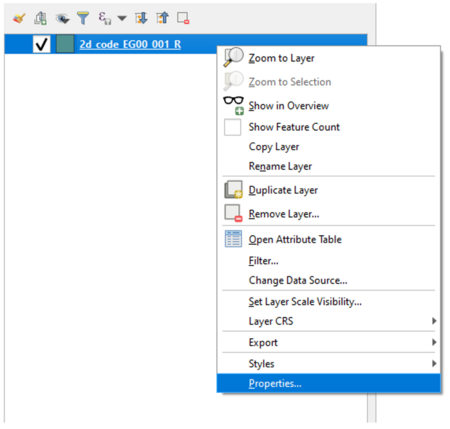
- Right click the MapInfo File in the QGIS Layer Panel and select Properties.
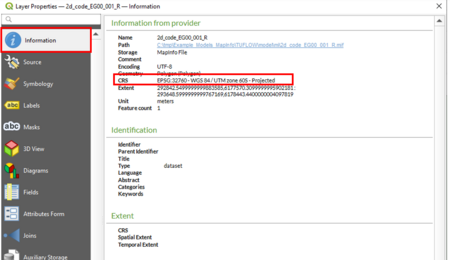
- Select Information in the left title block and review the listed CRS details.
- Initialise your QGIS session using the TUFLOW Plugin:
- Select Plugins >> TUFLOW >> Editing > Create/Configure TUFLOW Project.
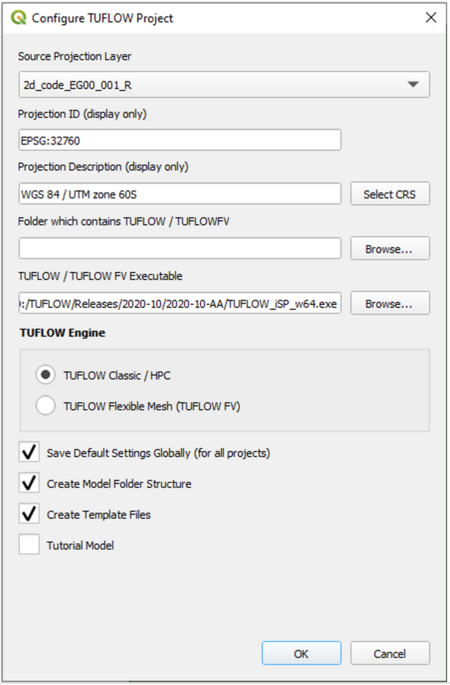
- Select the open MapInfo file via the Source Project Layer drop menu. This will populate the Projection information for you. Check the projection details match the CRS details from the previous step.
- Select the folder that contains the existing TUFLOW model using the MapInfo format inputs. You will be adding QGIS inputs to the same folder location.
- Select the TUFLOW Executable location.
- Tick TUFLOW Classic / HPC.
- Tick Save Default Settings.
- Tick Create Model Folder Structure. This will add any missing folders to the existing folder structure (e.g. TUFLOW/gis).
- Tick Create Template Files. This will create the QGIS empty template files for any future additions to the model.
- Select OK.
- Open the following two TCF Files:
- TUFLOW/runs/Create_Empties.tcf. this file was created when you completed the Create/Configure TUFLOW Project steps; and
- The TCF file for the existing TUFLOW model using the MapInfo format inputs.
- Copy the following command line to clipboard from Create_Empties.tcf: SHP Projection == ..\model\gis\Projection.prj
- Paste the command to the existing TUFLOW model TCF (the one using the MapInfo format inputs), MI Projection ==
- Also in the existing TUFLOW model TCF, replace the command GIS Format == MIF with, GIS Format == SHP



You will now be able to add compatible QGIS SHP format files to your model. The QGIS TUFLOW Plugin "Import empty file" tool is recommended.

When updating a model it is best practice to leave the MapInfo file references as is, and use TUFLOW's data layering functionality to add new GIS entries below existing MapInfo entries. For example.
File:MapInfo to QGIS 011.PNG
However, if you need to make changes to existing MIF files, follow these steps to convert the to SHP file format:

- Open the MapInfo MIF file in GIS. If the file includes a combination of regions, lines and point object QGIS will display a pop-up message asking which of these features you would like to open. Select "All". QGIS will split the MIF file into its respective object types.
- Import empty QGIS SHP template files for the required object types.
- Copy the features from the MapInfo layers to the relevant new QGIS SHP files. Note, double check the attribute values have been correctly transferred to the new file. In some rare instances when the field attribute type is incompatible this does not occur.
- Update the commands within your updated TUFLOW model to reference to the new QGIS SHP files. For future traceability it is best to comment out the prior MapInfo input commands using !, instead of deleting them.

| Up |
|---|
 Back to QGIS Tips And Tricks Back to QGIS Tips And Tricks
|