Tutorial M02 001 Check Files QGIS GPKG: Difference between revisions
Jump to navigation
Jump to search
Content deleted Content added
Created page with "= Introduction = QGIS is used to import the check files and review the breaklines topographic changes.<br> <br> = Method = This tutorial introduces: :*Check_Files_2d_grd |..." |
|||
| Line 10: | Line 10: | ||
Review the check files: <br> |
Review the check files: <br> |
||
<ol> |
<ol> |
||
<li> |
<li>Drag and drop the '''M01_5m_001_Check.gpkg''' from the '''Module_02\TUFLOW\check''' folder into QGIS. |
||
<li>Open the following layers into QGIS (hold Ctrl to select multiple): |
|||
:*'''M02_5m_001_grd_check_R.shp''' |
|||
:*''' |
:*'''M02_5m_001_grd_check_R''' |
||
:*'''M02_5m_001_zsh_zpt_check_P''' |
|||
<li>Use the 'Apply TUFLOW Styles to Open Layers'. |
<li>Use the 'Apply TUFLOW Styles to Open Layers'. |
||
<li>Use the 'Apply GPKG Layer Names'. |
|||
<li>The grd_check is the 2D grid defined by the 2d_code layer and contains a region object for each cell. It is useful to understand how the model is orientated, the cell size in relation to the hydraulic features and where certain calculations occur in the model. In this tutorial, the grid is orientated to align with the downstream road. |
<li>The grd_check is the 2D grid defined by the 2d_code layer and contains a region object for each cell. It is useful to understand how the model is orientated, the cell size in relation to the hydraulic features and where certain calculations occur in the model. In this tutorial, the grid is orientated to align with the downstream road. |
||
<li>The zsh_zpt_check file contains the Zpts modified by the 2d_zsh layers with updated elevation, change in elevation and source layer. |
<li>The zsh_zpt_check file contains the Zpts modified by the 2d_zsh layers with updated elevation, change in elevation and source layer. |
||
Revision as of 15:41, 19 May 2023
Introduction
QGIS is used to import the check files and review the breaklines topographic changes.
Method
This tutorial introduces:
Review the check files:
- Drag and drop the M01_5m_001_Check.gpkg from the Module_02\TUFLOW\check folder into QGIS.
- Open the following layers into QGIS (hold Ctrl to select multiple):
- M02_5m_001_grd_check_R
- M02_5m_001_zsh_zpt_check_P
- Use the 'Apply TUFLOW Styles to Open Layers'.
- Use the 'Apply GPKG Layer Names'.
- The grd_check is the 2D grid defined by the 2d_code layer and contains a region object for each cell. It is useful to understand how the model is orientated, the cell size in relation to the hydraulic features and where certain calculations occur in the model. In this tutorial, the grid is orientated to align with the downstream road.
- The zsh_zpt_check file contains the Zpts modified by the 2d_zsh layers with updated elevation, change in elevation and source layer.
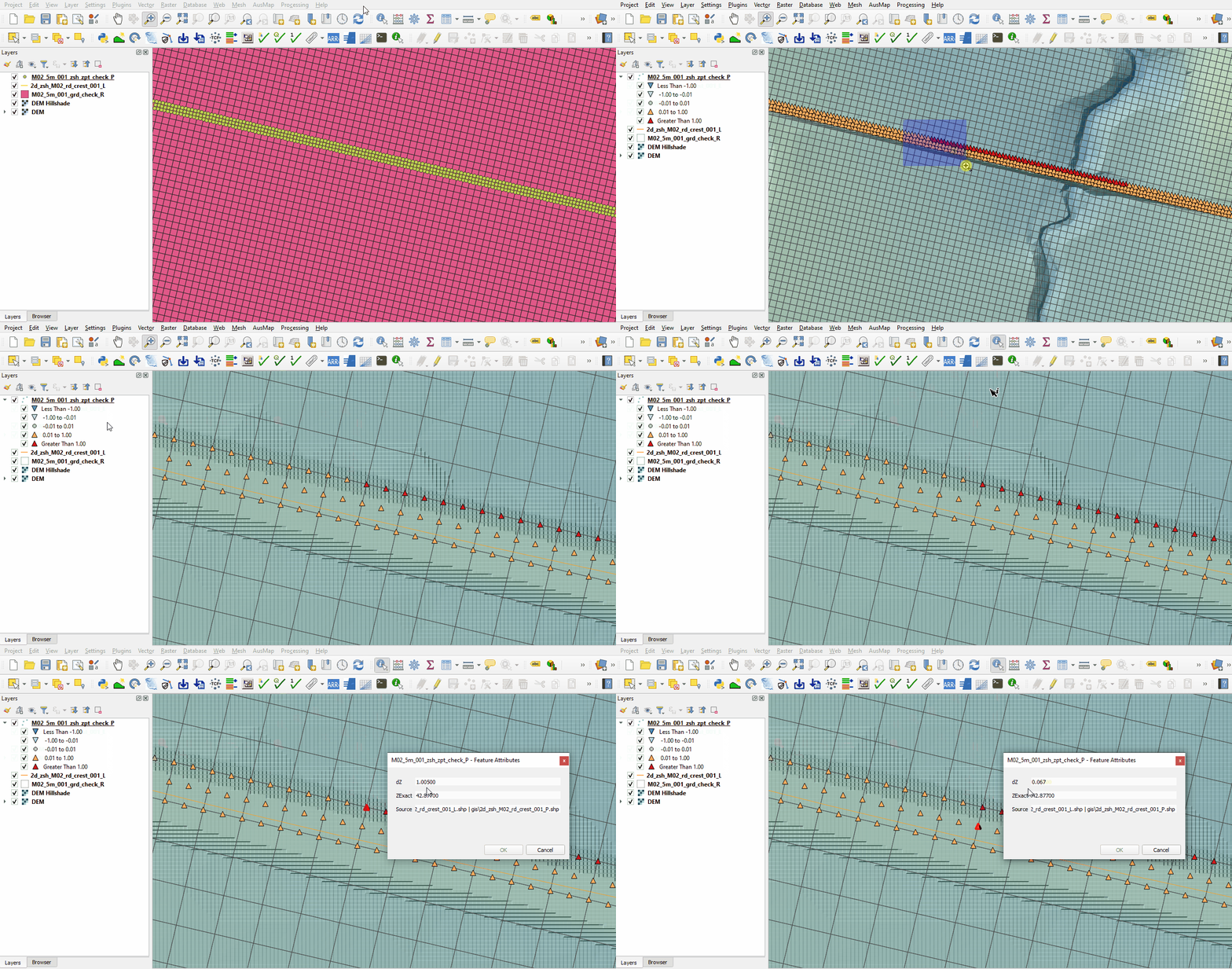
- Zoom to the road at the north side of the model. The Shape_Width attribute is specified the same as the cell size, a thick breakline is used with entire cells being modified. The TUFLOW style colour codes the symbols based on the amount raised, or lowered.
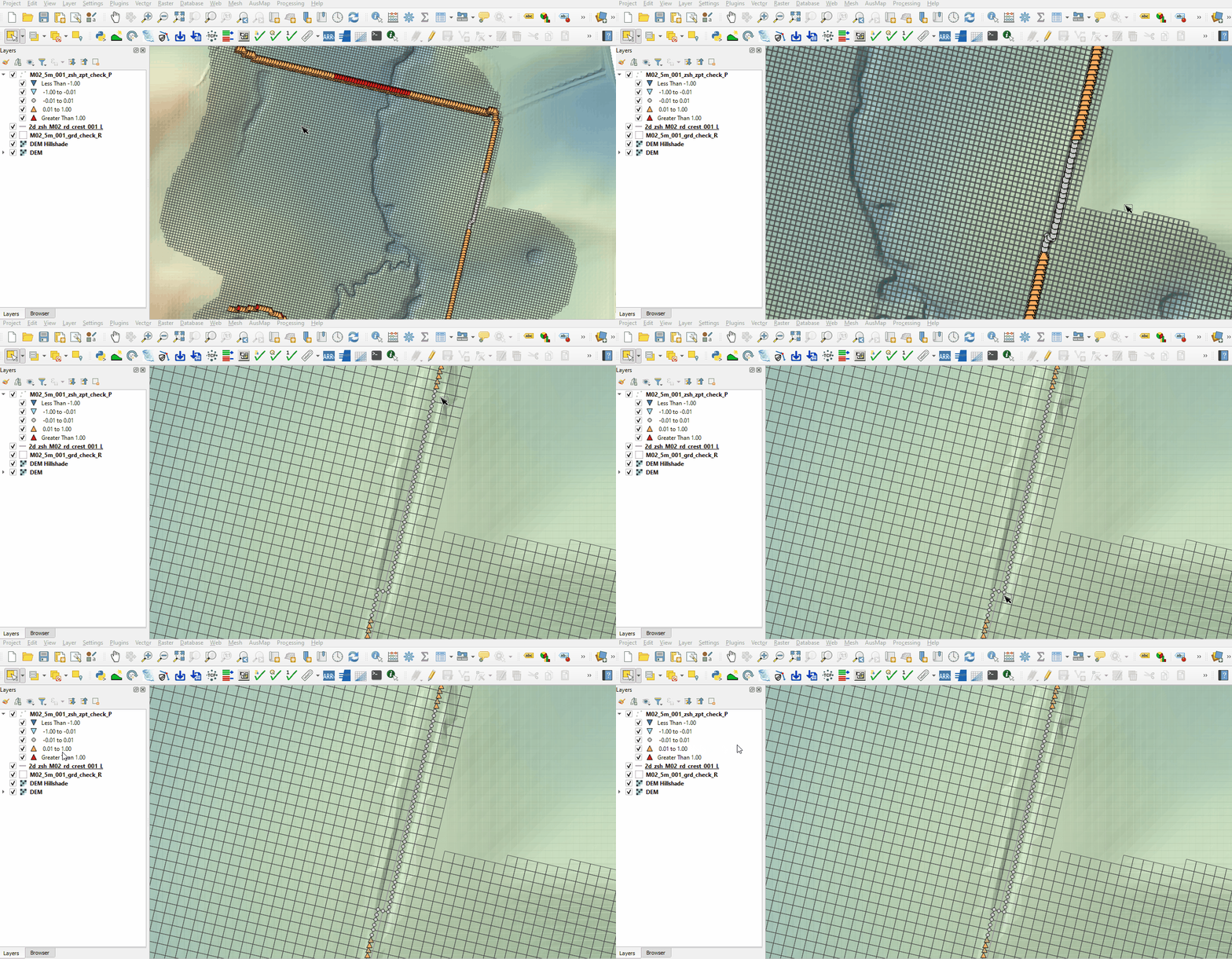
- The road on the east side of the model has a blank Shape_Width attribute, a thin breakline is used with only the cell sides and cell corners being modified. This prevents water from flowing across the breakline until the elevation is overtopped without modifying the entire cell elevation. The TUFLOW styling shows a portion of the breakline with grey points where the elevation is unchanged. This is because the elevation along the line is higher than the breakline points and Shape_Option of 'MAX' ensures the maximum elevation is used.


Conclusion
- The topographic modifications representing the road embankments were inspected.
| Up |
|---|
 Back to Module 2 Main Page Back to Module 2 Main Page
|