Tutorial M02 001 GIS Inputs QGIS GPKG: Difference between revisions
Jump to navigation
Jump to search
Content deleted Content added
| Line 23: | Line 23: | ||
<ol> |
<ol> |
||
<li>Navigate to the '''Module_02\TUFLOW\model\gis''' folder. Save a copy of '''M01_001.gpkg''' as '''M02_001.gpkg'''. |
<li>Navigate to the '''Module_02\TUFLOW\model\gis''' folder. Save a copy of '''M01_001.gpkg''' as '''M02_001.gpkg'''. |
||
<li>From the QGIS Browser |
<li>From the QGIS Browser Panel, right click on 'Favorites' and select 'Add a Directory...'. |
||
<li>Navigate to the '''Module_02''' folder and select it. |
<li>Navigate to the '''Module_02''' folder and select it. |
||
</ol> |
</ol> |
||
| Line 34: | Line 34: | ||
<ol> |
<ol> |
||
<li>Open the files, either: |
<li>Open the files, either: |
||
:* |
:*Within the QGIS Browser Panel, navigate to '''M01_002.gpkg''' and double click the layers, or |
||
:* |
:*In File Explorer, drag and drop the '''M02_001.gpkg''' into the QGIS workspace and select the layers (hold Ctrl to select multiple). |
||
<li>The 2d_zsh line layer represents the breaklines: |
<li>The 2d_zsh line layer represents the breaklines: |
||
:*No ‘Z’ attribute is specified, the elevations are taken from the 2d_zsh point layer. |
:*No ‘Z’ attribute is specified, the elevations are taken from the 2d_zsh point layer. |
||
Revision as of 10:07, 2 June 2023
Page Under Construction
Introduction
QGIS is used to create, import and view input data.
TUFLOW Project Re-Configuration
Re-configure the TUFLOW project to use and save empty files to the correct folder:
- Go to Plugins > TUFLOW > Editing > Configure / Create TUFLOW Project.
- Change the folder which contains TUFLOW to the Module_02 folder. This is the only change required, the model folder structure and template empty files are supplied from previous model.
Note: The 'results' and 'check' folder get automatically created when the TUFLOW model is run.
- Click 'OK' and save the QGIS workspace by selecting Project > Save As.
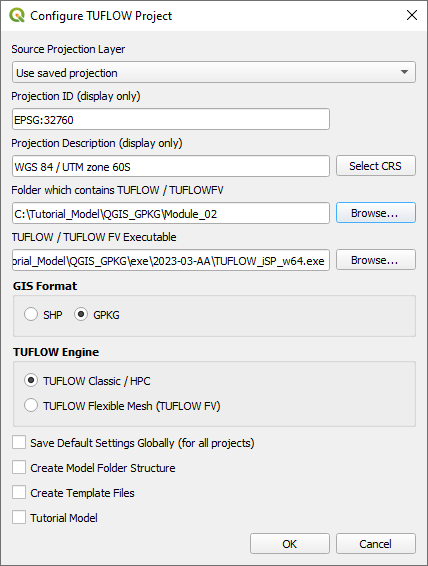
- Set the QGIS workspace projection to EPSG:32760, see Set the Projection.

Method
Set up the GeoPackage Database:
- Navigate to the Module_02\TUFLOW\model\gis folder. Save a copy of M01_001.gpkg as M02_001.gpkg.
- From the QGIS Browser Panel, right click on 'Favorites' and select 'Add a Directory...'.
- Navigate to the Module_02 folder and select it.
Within the QGIS Browser Panel, navigate to the Module_02\Tutorial_Data folder. Drag and drop the following layers into the M02_001.gpkg:
- 2d_zsh_M02_rd_crest_001_L
- 2d_zsh_M02_rd_crest_001_P
Investigate the supplied files:
- Open the files, either:
- Within the QGIS Browser Panel, navigate to M01_002.gpkg and double click the layers, or
- In File Explorer, drag and drop the M02_001.gpkg into the QGIS workspace and select the layers (hold Ctrl to select multiple).
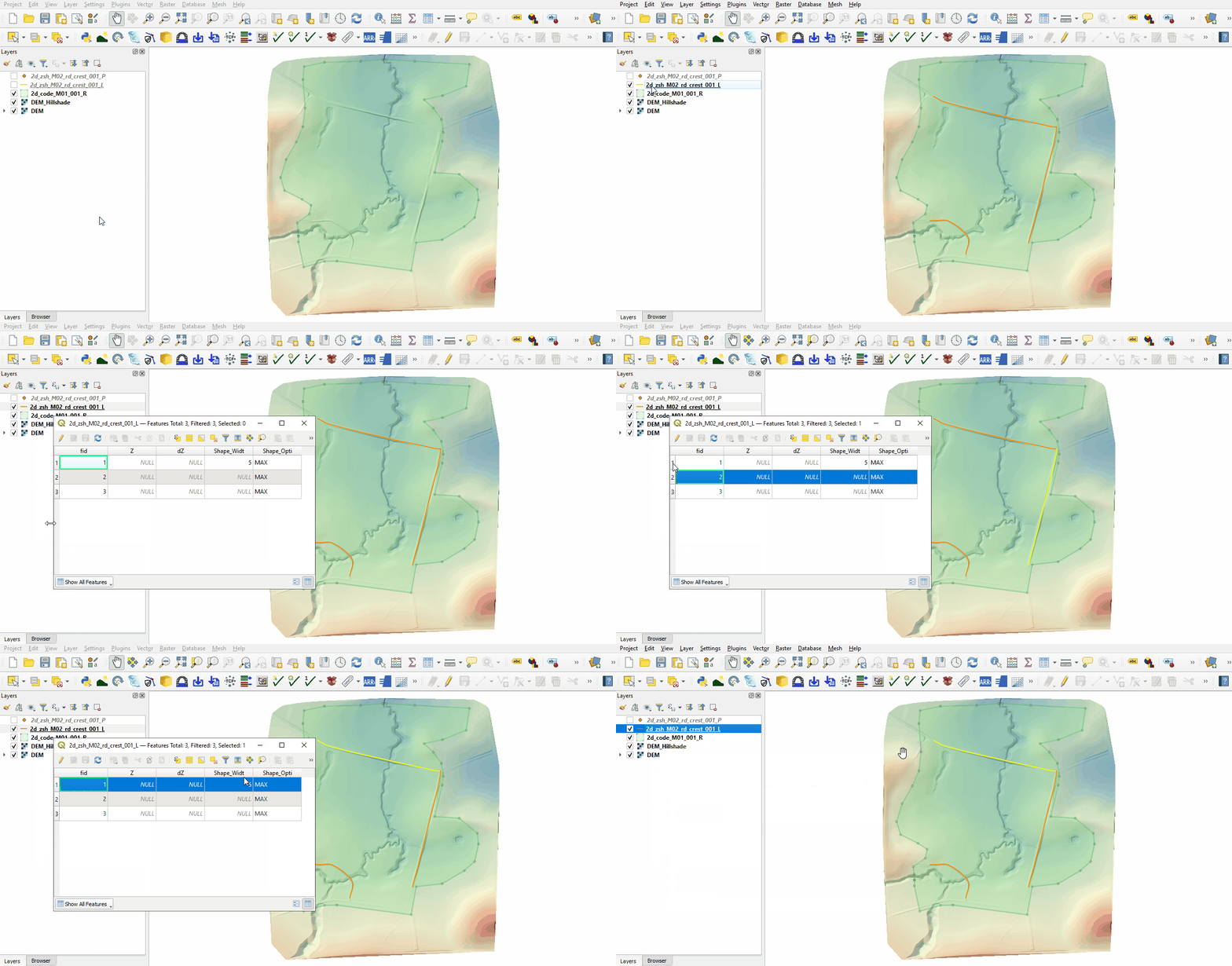
- The 2d_zsh line layer represents the breaklines:
- No ‘Z’ attribute is specified, the elevations are taken from the 2d_zsh point layer.
- The breakline on the north side has the same Shape_Width as the cell size, this is a thick breakline modifying whole cells. The other two breaklines don't have the attribute specified, these are thin breaklines modifying only the cell sides and cell corners.
- The Shape_Option of 'MAX' is specified for all breaklines. The Zpt elevations only changes when the Z shape elevation at the Zpt is higher. The purpose of the Z shape is to enforce the highest elevations along the road crest.
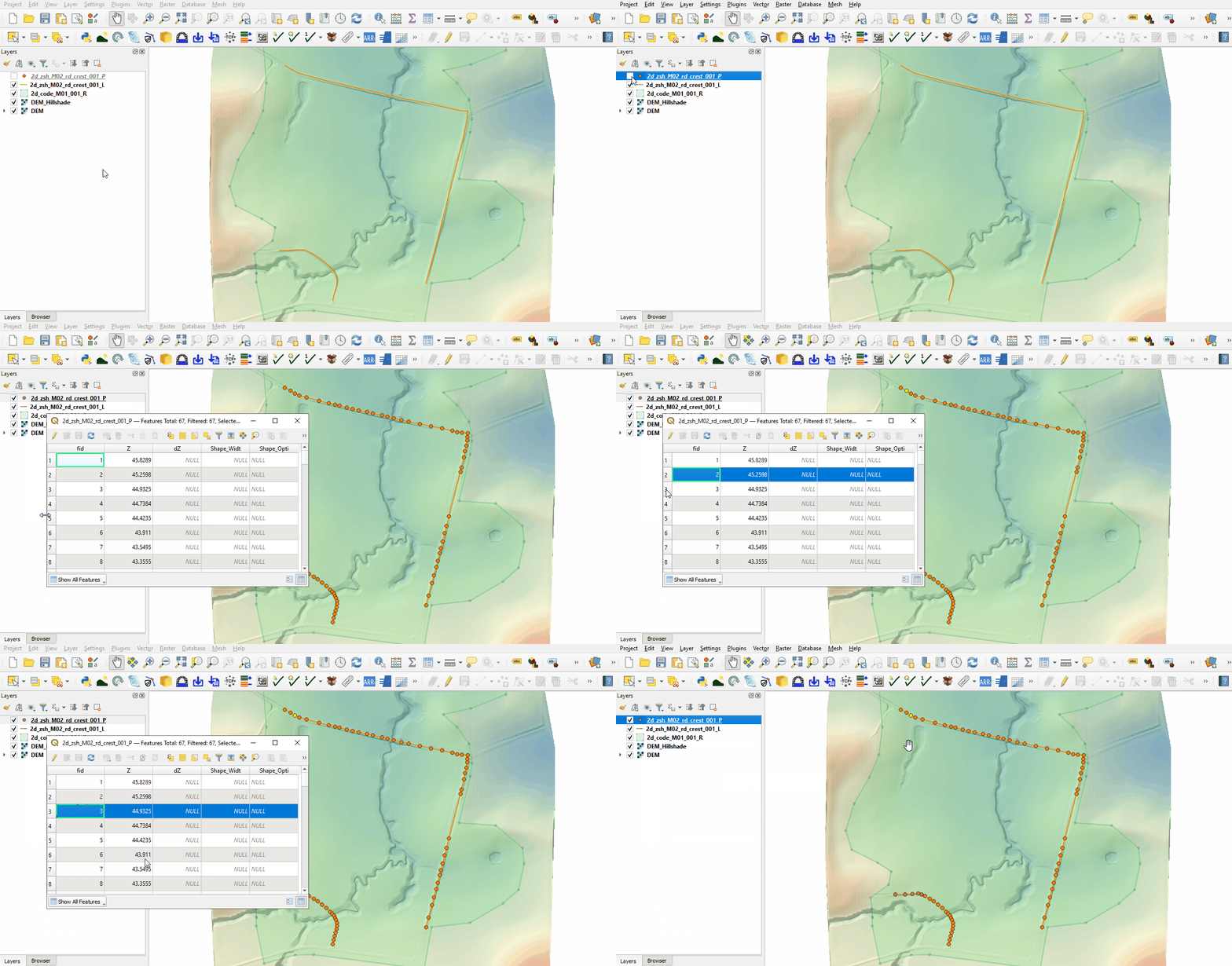
- The 2d_zsh point layer is used to apply elevation to the breaklines:
- The values in the 'Z' attribute are elevations above datum assigned to each point. The elevations are being interpolated along the breakline.
- The points must be snapped to the vertices of the 2d_zsh line to instruct TUFLOW that these layers are linked. If no points are in the layer, the elevation on the line object is used, i.e. the elevation along the line does not vary. For more information, see Table 6-8 of the 2018 TUFLOW Manual.


Creating Breaklines (Optional)
Breaklines are provided for this tutorial, however, these could be made using the breakline flag with the asc_to_asc utility which extracts elevations from a DEM for breaklines in the 2d_zsh format. The utility is provided in the exe/asc_to_asc folder. It can also be downloaded from the TUFLOW website and saved into a folder with other utilities.
- Create a new folder called Data_Processing in the Module_02 folder.
- Use the 'Import Empty File' tool to create a new 2d_zsh layer called ‘breaklines’ as a ‘line’ type. In the Spatial Database Options, select 'All to one'. Navigate to the Data_Processing folder and create a new GeoPackage database called M02_Breaklines.gpkg. Click Save and hit 'OK'.
- Digitise a line using the ‘Add Line Feature’ button following the road crest. This could match the provided breaklines or be an section of road not covered by the original breakline.
- Enter the following attributes and save the file:
- Z: Null
- dZ: 30
- Shape_Width: 5
- Shape_Option: Max
- Create a new batch file _run_M02_asc_to_asc_Breaklines.bat in the Module_02\Data_Processing folder and open it in a text editor.
- Input the following (Note: Utility location may differ):
set asc_to_asc="..\..\exe\asc_to_asc.2023-03-AA\asc_to_asc_w64.exe"
- Use the -brkline flag to call the breakline function. The utility then expects the 2d_zsh_breaklines layer and the DEM.
%asc_to_asc% -brkline "M02_Breaklines.gpkg >> 2d_zsh_breaklines_L" ..\TUFLOW\model\grid\DEM.tif
- Save the batch file and double click it in file explorer to run the utility.
- The utility creates a new M02_Breaklines_brkline.gpkg that contains a points layer and updates the lines layer. These layers can be copied into M02_001.gpkg and read into the TGC.
Conclusion
- Two 2d_zsh layers were inspected to enforce the breaklines in the model.
| Up |
|---|
 Back to Module 2 Main Page Back to Module 2 Main Page
|