Advection Dispersion Modelling: Difference between revisions
Created page with "=Introduction= TUFLOW’s Advection Dispersion (AD) Module is an extension of the TUFLOW Classic/HPC engines. It is a computer program for simulating depth-averaged, two and o..." |
|||
| Line 12: | Line 12: | ||
<ol><li>Use a text editor to create an empty .adcf file and save it to the “runs” folder.</ol> |
<ol><li>Use a text editor to create an empty .adcf file and save it to the “runs” folder.</ol> |
||
<li>Set up AD global database (.csv file) |
<li>Set up AD global database (.csv file) |
||
<ol><li> Set up TUFLOW AD global database in the “bc_dbase” folder. |
<ol><li> Set up TUFLOW AD global database in the “bc_dbase” folder. For example:<br> |
||
[[File:EG17 AD Consit 001.png]]<br> |
|||
<li>In the .adcf file use the "AD Global Database" command to set the location of the global database as follows.<br> |
<li>In the .adcf file use the "AD Global Database" command to set the location of the global database as follows.<br> |
||
<font color="blue"><tt>AD Global Database</tt></font><font color="red"><tt> == </tt></font><font color="black"><tt>..\bc dbase\my_ad_global_dbase.csv</tt></font></ol> |
<font color="blue"><tt>AD Global Database</tt></font><font color="red"><tt> == </tt></font><font color="black"><tt>..\bc dbase\my_ad_global_dbase.csv</tt></font></ol> |
||
<li>Setup up the boundary condition tables (.csv file(s)) |
<li>Setup up the boundary condition tables (.csv file(s)) |
||
<ol><li>Setup the boundary condition table(s) in the “bc_dbase” folder.< |
<ol><li>Setup the boundary condition table(s) in the “bc_dbase” folder. For example:<br> |
||
[[File:EG17 conc 001.png]]<br></ol> |
|||
<li>Setup up the boundary condition database (.csv file) |
<li>Setup up the boundary condition database (.csv file) |
||
<ol><li>Setup the boundary condition database in the “bc_dbase” folder that references the tables set up in the previous step. |
<ol><li>Setup the boundary condition database in the “bc_dbase” folder that references the tables set up in the previous step.<br> |
||
[[File:EG17 AD 001.png]]<br> |
|||
<li>In the .adcf file use the "AD BC Database" command to set the location of the bc database as follows.<br> |
<li>In the .adcf file use the "AD BC Database" command to set the location of the bc database as follows.<br> |
||
<font color="blue"><tt>AD BC Database</tt></font><font color="red"><tt> == </tt></font><font color="black"><tt>..\bc dbase\my_ad_bc_dbase.csv</tt></font></ol> |
<font color="blue"><tt>AD BC Database</tt></font><font color="red"><tt> == </tt></font><font color="black"><tt>..\bc dbase\my_ad_bc_dbase.csv</tt></font></ol> |
||
| Line 27: | Line 31: | ||
<ol><li>Run TUFLOW as normal. The AD module will be called and results files written. </ol> |
<ol><li>Run TUFLOW as normal. The AD module will be called and results files written. </ol> |
||
</ol> |
</ol> |
||
==Example Models== |
==Example Models== |
||
Revision as of 00:45, 9 March 2024
Introduction
TUFLOW’s Advection Dispersion (AD) Module is an extension of the TUFLOW Classic/HPC engines. It is a computer program for simulating depth-averaged, two and one-dimensional constituent fate and transport. An example of such a constituent might include salinity. Both dissolved and particulate constituents can be simulated. TUFLOW AD takes depth and velocity fields computed by the TUFLOW Classic and HPC solvers and uses this information, together with initial and boundary conditions, to simulate the advection and dispersion of constituents.
TUFLOW AD is specifically oriented towards such analyses in systems including coastal waters, estuaries, rivers, floodplains and urban areas. The AD module is discussed in the TUFLOW Advection Dispersion Manual.
Model Development
Setting Up a New Model
The steps below describe the process for setting up a TUFLOW AD model. It is assumed that the user is familiar with TUFLOW and that the folder structure for TUFLOW has been setup with all required files. The user should run the TUFLOW model without the AD module first to make sure that it is appropriately configured and stable.
- Create a TUFLOW AD control file (.adcf)
- Use a text editor to create an empty .adcf file and save it to the “runs” folder.
- Set up AD global database (.csv file)
- Set up TUFLOW AD global database in the “bc_dbase” folder. For example:

- In the .adcf file use the "AD Global Database" command to set the location of the global database as follows.
AD Global Database == ..\bc dbase\my_ad_global_dbase.csv
- Set up TUFLOW AD global database in the “bc_dbase” folder. For example:
- Setup up the boundary condition tables (.csv file(s))
- Setup the boundary condition table(s) in the “bc_dbase” folder. For example:
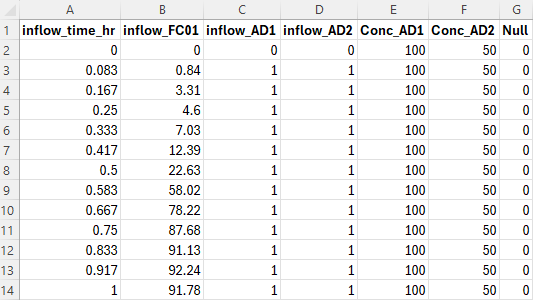
- Setup the boundary condition table(s) in the “bc_dbase” folder. For example:
- Setup up the boundary condition database (.csv file)
- Setup the boundary condition database in the “bc_dbase” folder that references the tables set up in the previous step.

- In the .adcf file use the "AD BC Database" command to set the location of the bc database as follows.
AD BC Database == ..\bc dbase\my_ad_bc_dbase.csv
- Setup the boundary condition database in the “bc_dbase” folder that references the tables set up in the previous step.
- Setup up TUFLOW to activate the AD module (.tcf file)
- In the .tcf file use the command "AD Control File" to set the location of the adcf and activate execution of the AD module as follows.
AD Control File == ad_run.adcf
- In the .tcf file use the command "AD Control File" to set the location of the adcf and activate execution of the AD module as follows.
- Run the model
- Run TUFLOW as normal. The AD module will be called and results files written.


Example Models
Example TUFLOW AD models, including settling and decay, are available via the TUFLOW Example Model Dataset.