WIBU Configure Network Client: Difference between revisions
Chris Huxley (talk | contribs) No edit summary |
Chris Huxley (talk | contribs) No edit summary |
||
| Line 18: | Line 18: | ||
<br> |
<br> |
||
Click Apply to make the changes. |
Click Apply to make the changes. |
||
<li>The client machine should now be configured to access the network TUFLOW dongle. This can be |
<li>The client machine should now be configured to access the network TUFLOW dongle. This can be tested on the server by double clicking the TUFLOW Executable (for example TUFLOW_iSP_w64.exe). A DOS window should open which lists the licence information (licence types and numbers will be different to the example shown below).<br> |
||
[[File:TUFLOW_DOS_Test1.JPG|600px]] </li> |
|||
</ol> |
</ol> |
||
<br> |
<br> |
||
=Troubleshooting= |
|||
If your licences are not listed in the DOS window when you test whether the connection to the server has been successful, consider the following: |
|||
== Check Server Connectivity == |
|||
A easy way to check for connectivity between the client computer and the licence server is to ping the server from the client machine. This can be done by: |
|||
<ol> |
|||
<li>Open a command prompt on the client computer (Start >> Run and then type in '''cmd''' or simpy type '''cmd''' into the search option in the start menu</li> |
|||
<li>Enter the command <tt>ping <server></tt> where <server> is the IP address or server name as entered into the CodeMeter server search list. For example:<br> |
|||
<tt>ping 192.168.1.1</tt><br> |
|||
<tt>ping TUFLOW_server</tt><br> |
|||
If successful a the output will show that a reply is received as per the image below.<br> |
|||
[[File:CM ping server.jpg]] |
|||
<br> |
|||
<br> |
|||
If no reply is received, there appears to be a connectivity or firewall issue preventing access between the client and the server. Resolving this should hopefully allow the client computer to access the TUFLOW server. |
|||
</li> |
|||
</ol> |
|||
== Check AV and Port Blocking == |
|||
If the above steps have been performed and the client computer is still unable to access the network licence, the most likely reason is that there is anti-virus or a firewall blocking access. By default the Codemeter software uses port 22350 for communication. This can be changed in the '''Configuration >> Server''' tab in CodeMeter webadmin. Temporarily disabling any antivirus on the computers could be used to confirm if this is causing the communication issue, if so, an exception would need to be added to your AV software. |
|||
=Other= |
|||
If you are unable to get TUFLOW connecting to a network licence please contact <u>support@tuflow.com</u>. |
|||
{{Tips Navigation |
{{Tips Navigation |
||
|uplink=[[Wibu_Dongles| Return to WIBU Licensing Main Page]] |
|uplink=[[Wibu_Dongles| Return to WIBU Licensing Main Page]] |
||
Revision as of 11:46, 2 December 2024
Introduction
This page contains instructions for configuring a client computer to access a network TUFLOW licence. This requires that you have:
- CodeMeter Runtime kit installed on the client machine, see Installing CodeMeter Runtime Kit.
- Configured the network server, see Configure Network Server.
Method
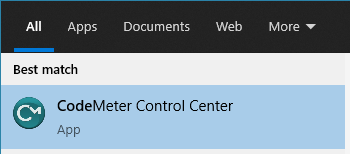
- Open the CodeMeter Control Center via the start menu:
- Open the WebAdmin via the button in the lower right.
- In CodeMeter WebAdmin navigate to the Configuration >> Basic >> Sever Search List tab and enter the server name or IP address in the Server Search list. Click Add to include the server IP to the list.
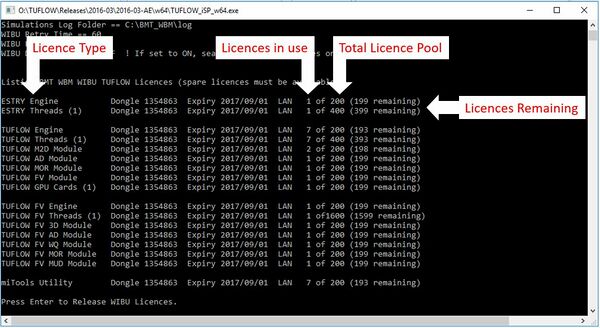
- The client machine should now be configured to access the network TUFLOW dongle. This can be tested on the server by double clicking the TUFLOW Executable (for example TUFLOW_iSP_w64.exe). A DOS window should open which lists the licence information (licence types and numbers will be different to the example shown below).


Click Apply to make the changes.

Troubleshooting
If your licences are not listed in the DOS window when you test whether the connection to the server has been successful, consider the following:
Check Server Connectivity
A easy way to check for connectivity between the client computer and the licence server is to ping the server from the client machine. This can be done by:
- Open a command prompt on the client computer (Start >> Run and then type in cmd or simpy type cmd into the search option in the start menu
- Enter the command ping <server> where <server> is the IP address or server name as entered into the CodeMeter server search list. For example:
ping 192.168.1.1
ping TUFLOW_server
If successful a the output will show that a reply is received as per the image below.
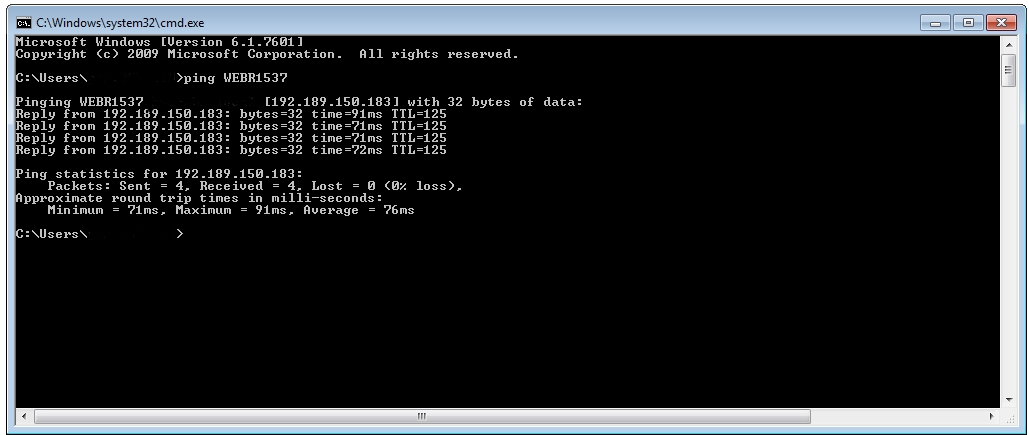
If no reply is received, there appears to be a connectivity or firewall issue preventing access between the client and the server. Resolving this should hopefully allow the client computer to access the TUFLOW server.

Check AV and Port Blocking
If the above steps have been performed and the client computer is still unable to access the network licence, the most likely reason is that there is anti-virus or a firewall blocking access. By default the Codemeter software uses port 22350 for communication. This can be changed in the Configuration >> Server tab in CodeMeter webadmin. Temporarily disabling any antivirus on the computers could be used to confirm if this is causing the communication issue, if so, an exception would need to be added to your AV software.
Other
If you are unable to get TUFLOW connecting to a network licence please contact support@tuflow.com.
| Up |
|---|
 Return to WIBU Licensing Main Page Return to WIBU Licensing Main Page
|