Tutorial M04 002 GIS Inputs QGIS: Difference between revisions
Jump to navigation
Jump to search
Content deleted Content added
Created page with "= Introduction = QGIS is used to create, import and view input data.<br> <br> = TUFLOW Project Re-Configuration = Re-configure the TUFLOW project to use and save empty files..." |
|||
| Line 29: | Line 29: | ||
:*Select Layer > Add layer > Add Vector Layer and navigate to the '''Module_04\TUFLOW\model\gis''' folder. |
:*Select Layer > Add layer > Add Vector Layer and navigate to the '''Module_04\TUFLOW\model\gis''' folder. |
||
<li>The 2d_zsh file cuts through the road embankment, see <u>[[Tutorial_M02 | Module 2]]</u> for more information.<br> |
<li>The 2d_zsh file cuts through the road embankment, see <u>[[Tutorial_M02 | Module 2]]</u> for more information.<br> |
||
<li>The |
<li>The 2d_bg represents the bridge in 2D, it has layers of varying blockage and form loss for the “pier layer” and the “super structure layer”, which consists of the “deck layer” and the “rail layer”. <br> |
||
| ⚫ | |||
<ol> |
|||
[[File:M04 bridge layers 01.png]]<br> |
|||
</ol> |
|||
:*Layer 1: Beneath the bridge deck. |
|||
:*Layer 2: The bridge deck. |
|||
:*Layer 3: The bridge rails. |
|||
:*Layer 4: Flow above the rails (assumed to be unimpeded). |
|||
| ⚫ | |||
<br> |
<br> |
||
{{Video|name=Animation_M04_GIS_01b.mp4|width=1232}}<br> |
{{Video|name=Animation_M04_GIS_01b.mp4|width=1232}}<br> |
||
Revision as of 22:06, 17 January 2025
Introduction
QGIS is used to create, import and view input data.
TUFLOW Project Re-Configuration
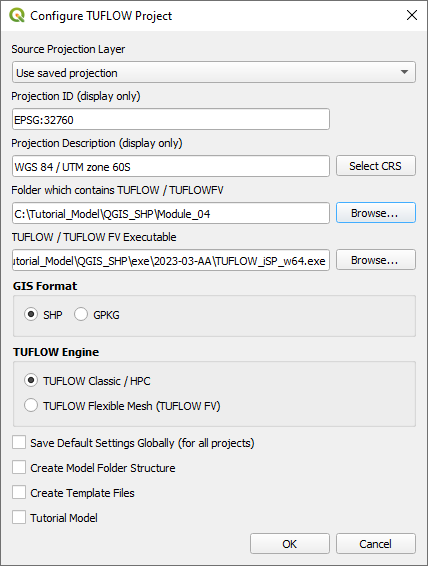
Re-configure the TUFLOW project to use and save empty files to the correct folder:
- Go to Plugins > TUFLOW > Editing > Configure / Create TUFLOW Project.
- Change the folder which contains TUFLOW to the Module_04 folder. This is the only change required, the model folder structure and template empty files are supplied from previous model.
Note: The 'results' and 'check' folder get automatically created when the TUFLOW model is run.
- Click 'OK' and save the QGIS workspace by selecting Project > Save As.
- Set the QGIS workspace projection to EPSG:32760, see Set the Projection.

Method
Navigate to the Module_04\Tutorial_Data folder. Copy and save all the below layers into the Module_04\TUFLOW\model\gis folder:
- 2d_bg_M04_002_L
- 2d_po_M04_001_L
- 2d_po_M04_001_P
- 2d_zsh_M02_cut_002_R
Investigate the supplied files:
- Open the files, either:
- Drag and drop the .shp files into the QGIS workspace, or
- Select Layer > Add layer > Add Vector Layer and navigate to the Module_04\TUFLOW\model\gis folder.
- The 2d_zsh file cuts through the road embankment, see Module 2 for more information.
- The 2d_bg represents the bridge in 2D, it has layers of varying blockage and form loss for the “pier layer” and the “super structure layer”, which consists of the “deck layer” and the “rail layer”.
Refer to the | Manual for more information on the attributes of the 2d_bg layer.
- The 2d_po files include a structure group output for the 2D bridge. The 'Label' attribute links the 2d_po line to the 2d_po points by the same attribute ‘Bridge’.
- The 2d_po line is snapped to the 2d_lfcsh from left to right looking downstream and has the following attributes:
- Type = QS (structure flow)
- Label = Bridge
- The 2d_po points are digitised upstream and downstream of the 2d_lfcsh and have the following attributes:
- Type = HU (water level upstream) and HD (water level downstream)
- Label = Bridge
Conclusion
- The 2d_lfcsh layer was supplied for use as a 2D bridge.
- The 2d_po structure group layers were added to output additional hydraulic information of the 2D bridge.
| Up |
|---|
 Back to Module 4 Main Page Back to Module 4 Main Page
|