WIBU Configure Network Client: Difference between revisions
Jump to navigation
Jump to search
Content deleted Content added
Created page with "Introduction= This page contains instructions for configuring a client computer to access a network TUFLOW licence. This requires that you have: * CodeMeter Runtime kit insta..." |
No edit summary |
||
| Line 1: | Line 1: | ||
Introduction= |
=Introduction= |
||
This page contains instructions for configuring a client computer to access a network TUFLOW licence. This requires that you have: |
This page contains instructions for configuring a client computer to access a network TUFLOW licence. This requires that you have: |
||
* CodeMeter Runtime kit installed on the client machine, see [[Wibu_Dongles#Installing_CodeMeter_RunTime_Kit |installing CodeMeter Runtime Kit]].<br> |
* CodeMeter Runtime kit installed on the client machine, see [[Wibu_Dongles#Installing_CodeMeter_RunTime_Kit |installing CodeMeter Runtime Kit]].<br> |
||
Revision as of 14:33, 14 April 2015
Introduction
This page contains instructions for configuring a client computer to access a network TUFLOW licence. This requires that you have:
- CodeMeter Runtime kit installed on the client machine, see installing CodeMeter Runtime Kit.
- Configured the network server, see configure network server.
Method
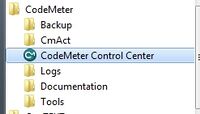
- Open the CodeMeter Control Centre. This can be done via the icon on the taskbar:
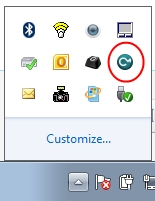
Or via the start menu:
- Open the WebAdmin via the button in the lower left.
- Navigate to the Configuration >> Network tab and enter the server name or IP address in the Server Search list. Hit apply to make the changes.
- The client machine should now be configured to access the network TUFLOW dongle. This can be checked by double clicking on a TUFLOW executable on the client machine.


This can also be access by pointing an internet browser to: [http://localhost:22350/]
