TUFLOW crashing: Difference between revisions
Teegan.Burke (talk | contribs) Tag: Manual revert |
|||
| (13 intermediate revisions by 4 users not shown) | |||
| Line 14: | Line 14: | ||
=How to keep simulation console window open= |
=How to keep simulation console window open= |
||
The simulation console window can display errors not written to the .tlf file and often provides additional information useful for troubleshooting: |
|||
* Insert "pause" at the end of the batch file and remove any Start "TUFLOW", -b and/or -t switch. Simple batch file as below should be used if current batch file doesn't keep the console window open even with the suggested changes. |
|||
* To ensure the console window remains open, add pause at the end of the batch file and remove any Start "TUFLOW", -b, or -t switches. If the console window still closes, use a simplified batch file like the example below. |
|||
| ⚫ | |||
**The batch file console window stating "C:\WINDOWS\system32\cmd.exe" in the header's top left corner won't provide desired information. |
|||
"C:\TUFLOW\Releases\2020-10-AD\TUFLOW_iSP_w64.exe" "M01_5m_001.tcf" |
|||
pause |
pause |
||
| ⚫ | |||
:[[File:TUFLOW Simulation Console with Build Info Displayed.png|frameless|600x600px]] |
|||
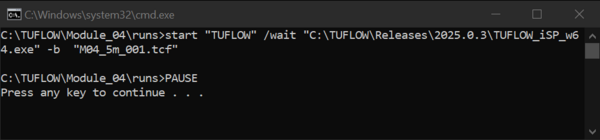
:If start "TUFLOW" is included in the batch file, the console window will instead show "C:\WINDOWS\system32\cmd.exe" in the window header and will not display the desired simulation output, as shown below. |
|||
:[[File:Batch File Console Showing CMD Header Only.png|frameless|600x600px]] |
|||
* Or, let the console window be written to a text file. This will redirect console output messages as well as the standard error stream to the “dump.txt” file, and it will likely record more error information than the usual .tlf file. |
* Or, let the console window be written to a text file. This will redirect console output messages as well as the standard error stream to the “dump.txt” file, and it will likely record more error information than the usual .tlf file. |
||
<pre>"C:\TUFLOW\Releases\2020-10-AD\TUFLOW_iSP_w64.exe" "M01_5m_001.tcf" > dump.txt</pre> |
<pre>"C:\TUFLOW\Releases\2020-10-AD\TUFLOW_iSP_w64.exe" "M01_5m_001.tcf" > dump.txt</pre> |
||
<br> |
|||
=Simulation console window flashes and disappears= |
=Simulation console window flashes and disappears= |
||
| Line 46: | Line 52: | ||
</ol> |
</ol> |
||
<br> |
<br> |
||
=TUFLOW pauses at any time during simulation= |
|||
'''Causes''': |
|||
*Ctrl+S shortcut has been activated. |
|||
*Windows 10 Quick Edit Mode is active. |
|||
'''Suggestions:'''<br> |
|||
See <u>[[Console_Window_Simulation_Paused]]</u> for further guidance. |
|||
=TUFLOW crashes during model initialisation= |
=TUFLOW crashes during model initialisation= |
||
| Line 65: | Line 79: | ||
* The output drive might not have enough free space seemingly crashing at random time (at any map output interval). |
* The output drive might not have enough free space seemingly crashing at random time (at any map output interval). |
||
* Something might be preventing the simulation from writing to network drive such as scheduled backup, updates, restart, deduplication or other scheduled processes. This would often happen at the similar time during the day or week seemingly stopping TUFLOW simulations at random simulation time. TUFLOW is not releasing the licence at the end of the simulation, rather CodeMeter system is determining that the TUFLOW application is no longer running and is therefore releasing the licence. This would show as “Handle xxx automatically released. The application is no longer available.” in the <u>[[WIBU_create_cmDust | cmDust file]]</u>. |
* Something might be preventing the simulation from writing to network drive such as scheduled backup, updates, restart, deduplication or other scheduled processes. This would often happen at the similar time during the day or week seemingly stopping TUFLOW simulations at random simulation time. TUFLOW is not releasing the licence at the end of the simulation, rather CodeMeter system is determining that the TUFLOW application is no longer running and is therefore releasing the licence. This would show as “Handle xxx automatically released. The application is no longer available.” in the <u>[[WIBU_create_cmDust | cmDust file]]</u>. |
||
* Using Windows Terminal (now default on Windows 11) instead of Windows Console Host. This has come up a few times intermittently as causing issues for users, but the TUFLOW team haven’t yet isolated the conditions that cause it. |
|||
'''Suggestions''': |
'''Suggestions''': |
||
* Unstable network: |
* Unstable network: |
||
** Use TUFLOW executable saved on a local drive. |
** Use TUFLOW executable saved on a local drive. |
||
** Set a local drive as the output drive for all checks, results and logs. This can be done using <font color="blue"><tt>Output Drive</tt></font> command in the .tcf. All outputs can be copied back to the network drive at the simulation end if required. Robocopy can be added to the end of the .bat file, example <u>[[TUFLOW_crashing#Robocopy_example_to_automatically_copy_outputs_on_network_drive_after_model_runs | here]]</u>. |
** Set a local drive as the output drive for all checks, results and logs. This can be done using <font color="blue"><tt>Output Drive</tt></font> command in the .tcf. All outputs can be copied back to the network drive at the simulation end if required. Robocopy can be added to the end of the .bat file, example <u>[[TUFLOW_crashing#Robocopy_example_to_automatically_copy_outputs_on_network_drive_after_model_runs | here]]</u>. |
||
* Insufficient storage: |
* Insufficient storage: |
||
** Ensure storage locations that outputs are written to have enough free space. Depending on the infrastructure, reported free space may not be accurate, or performance of storage may substantially degrade as it nears being full. |
** Ensure storage locations that outputs are written to have enough free space. Depending on the infrastructure, reported free space may not be accurate, or performance of storage may substantially degrade as it nears being full. |
||
*Windows Terminal on Windows 11: |
|||
**If after investigating other possible reasons for TUFLOW crashing it is believed running the simulation on Windows Terminal may be the problem, please run the [[WIBU create cmDust|cmDust file]] utility and send [mailto:support@tuflow.com support@tuflow.com] the resulting log from the user profile folder. This may help to narrow down the conditions that may cause TUFLOW to crash. |
|||
**The Windows Terminal provides useful features, and it is not recommend avoiding its use altogether - it ''can'' be disabled altogether, but a lot of functionality would be lost. Instead, we have developed a utility that allows forcing a specific application to start in the Windows Console Host, which is what the Command Prompt used to use by default. The utility is called `tustart` and a copy can be downloaded here: https://downloads.tuflow.com/Utilities/TUStart/tustart.msi. |
|||
**Note: a browser warning is likely to occur that this file is not commonly downloaded, and depending on the browser, the user may need to instruct it to ‘Keep’ or ‘Keep anyway’ to be able to complete the download of the `tustart.msi` file. This is due to the file currently not being available from the main site. It is being consider for inclusion as part of a future TULFOW Installer application. |
|||
**With admin privileges (elevation) on the relevant computer, this utility should be able to installed for all users in one go, which is the recommended way of installing. Without admin privileges, it can be installed just by a given user, but keep in mind that other users would have to separately install it as well. If the solution of forcing TUFLOW to run in Windows Console Host works to prevent unexpected crashed, it is recommend requesting your organisation's IT staff to deploy it properly to relevant modelling machines for all users. The application is packaged in a .msi and digitally signed, so IT staff should not have too many practical issues to install it safely and securely. |
|||
**Once installed, a model can be run like this: <pre>tustart.exe conhost -t “Some title” “C:\Path\to\your\tuflow.exe” -b -e1 event -s1 scenario my_~e1~_~s1~.tcf</pre> |
|||
**Please contact [mailto:support@tuflow.com support@tuflow.com] should any issues arise. |
|||
**If the utility does not actually resolve TUFLOW crashing, it is recommended to uninstall 'tustart', since it won’t have other benefits. |
|||
*Other processes: |
*Other processes: |
||
** Check with IT whether such processes are occurring and if reasonable limits/preferences/priorities can be set to reduce resource use (disk/network), to allow other processes to run in parallel. |
** Check with IT whether such processes are occurring and if reasonable limits/preferences/priorities can be set to reduce resource use (disk/network), to allow other processes to run in parallel. |
||
** Run models locally if it is known the runs will coincide with such processes. |
** Run models locally if it is known the runs will coincide with such processes. |
||
* If you need further help, send the .tlf, .hpc.tlf and <u>[[TUFLOW_crashing#How_to_keep_simulation_console_window_open | snapshot of the console window]]</u> to [mailto:support@tuflow.com support@tuflow.com]. |
* If you need further help, send the .tlf, .hpc.tlf and <u>[[TUFLOW_crashing#How_to_keep_simulation_console_window_open | snapshot of the console window]]</u> to [mailto:support@tuflow.com support@tuflow.com]. |
||
<br> |
|||
=TUFLOW crashes at the end of the simulation before writing out maximum results= |
=TUFLOW crashes at the end of the simulation before writing out maximum results= |
||
The output drive might not have enough free space to write out the full results. If multiple TUFLOW simulations run in parallel, the free space might be filling up faster than expected. There can also be other processes filling up the drive, e.g. other software, backups, other users copying data. The target drive should never |
The output drive might not have enough free space to write out the full results. If multiple TUFLOW simulations run in parallel, the free space might be filling up faster than expected. There can also be other processes filling up the drive, e.g. other software, backups, other users copying data. The target drive should never be filled to the brim, as performance will suffer for all processes.<br> |
||
'''Suggestions:''' |
'''Suggestions:''' |
||
* Ensure storage locations that outputs are written to have enough free space. Depending on the infrastructure, reported free space may not be accurate, or performance of storage may substantially degrade as it nears being full. |
* Ensure storage locations that outputs are written to have enough free space. Depending on the infrastructure, reported free space may not be accurate, or performance of storage may substantially degrade as it nears being full. |
||
| Line 99: | Line 121: | ||
Once a year (usually after mid-year) a new TUFLOW release will need the licence to be updated. This will show in the .tlf file as "Unmaintained since <year>". Follow <u>[[WIBU_Licence_Update_Request | WIBU Licence Update Request]]</u> to get the licence updated. |
Once a year (usually after mid-year) a new TUFLOW release will need the licence to be updated. This will show in the .tlf file as "Unmaintained since <year>". Follow <u>[[WIBU_Licence_Update_Request | WIBU Licence Update Request]]</u> to get the licence updated. |
||
==Console window lists all licences |
==Console window lists all licences and model doesn't run== |
||
If the console window |
If the console window appears as shown below and ends with the line "Press ENTER to Release WIBU Licences", this indicates a licence check was performed. When a licence check is run, the TUFLOW model does not execute, and a .tlf file is not produced. |
||
<ol> [[File: Licence_Check_2.png | 600px]]</ol> |
|||
During the licence check, one licence from each available module is temporarily reserved. These are released either immediately by pressing Enter, or automatically after a few minutes when the console window is closed. |
|||
Once the licences are released by pressing Enter, the console window displays "Not licenced or no local licence free". This confirms that the licences are no longer reserved by the licence check and are available for running TUFLOW models.<ol> [[File: Licence_Check_2.png | 600px]]</ol> |
|||
The licence check is performed in the following situations: |
The licence check is performed in the following situations: |
||
* Double clicking a TUFLOW executable. |
* Double clicking a TUFLOW executable. |
||
* Running a batch file |
* Running a batch file that only specifies the TUFLOW executable. |
||
* Running TUFLOW from Notepad++ |
* Running TUFLOW from Notepad++ with only the TUFLOW executable inserted into the Run function text box. |
||
Suggestions to run a TUFLOW model: |
Suggestions to run a TUFLOW model: |
||
* Include the model .tcf name in the batch file. See <u>[[Running_TUFLOW | Running TUFLOW model]]</u> for further guidance. |
* Include the model .tcf name in the batch file. See <u>[[Running_TUFLOW | Running TUFLOW model]]</u> for further guidance. |
||
* Insert the full required text (example line below) into Notepad++ Run function text box. See <u>[[NotepadPlusPlus_Run_TUFLOW | Running TUFLOW from Notepad++]]</u> for further guidance. |
* Insert the full required text (example line below) into Notepad++ Run function text box. See <u>[[NotepadPlusPlus_Run_TUFLOW | Running TUFLOW from Notepad++]]</u> for further guidance. |
||
<ol> "C:\TUFLOW\2025.0.3\TUFLOW_iSP_w64.exe" "$(FULL_CURRENT_PATH)" </ol> |
<ol> "C:\TUFLOW\2025.0.3\TUFLOW_iSP_w64.exe" "$(FULL_CURRENT_PATH)" </ol> |
||
* See detailed steps on how to run a TUFLOW model in the <u>[[Tutorial_M01#Running_the_Simulation | Tutorial model]]</u>. |
|||
==Running very old TUFLOW releases== |
==Running very old TUFLOW releases== |
||
| Line 116: | Line 142: | ||
==No TUFLOW dongle and licence settings files found (.lcf and .dcf)== |
==No TUFLOW dongle and licence settings files found (.lcf and .dcf)== |
||
Some users might mistake this sentence in the .tlf file as there is an issue with the licence. The "No TUFLOW licence settings files found" sentence is followed by "Default settings applied" and the default settings are listed on the next three lines, e.g. WIBU Retry Time, WIBU Retry Count, WIBU Dongles Only. Only if these settings are required to be different, the licence control file (.lcf) or dongle control file (.dcf) would be |
Some users might mistake this sentence in the .tlf file as there is an issue with the licence. The "No TUFLOW licence settings files found" sentence is followed by "Default settings applied" and the default settings are listed on the next three lines, e.g. WIBU Retry Time, WIBU Retry Count, WIBU Dongles Only. Only if these settings are required to be different, the licence control file (.lcf) or dongle control file (.dcf) would be required. Not having these licence files doesn't prevent TUFLOW from running, it would automatically use the default licence settings. The .tlf should continue past these lines and if there is an error, it would be written as the bottom of the .tlf. |
||
==Technical licence issues== |
==Technical licence issues== |
||
| Line 150: | Line 176: | ||
) |
) |
||
pause</pre> |
pause</pre> |
||
{{Tips Navigation |
|||
|uplink=[[TUFLOW_Modelling_Guidance | Back to TUFLOW Modelling Guidance]] |
|||
}} |
|||
Latest revision as of 10:06, 3 July 2026
Introduction
From time to time TUFLOW simulations can crash. There are multiple reasons why it could happen. This page can be used as a guide to find and rectify the cause of the crash.
Troubleshooting Tips
- Use the latest TUFLOW release available at the TUFLOW website.
- If using GPU, update the graphics card driver to the latest version from the Nvidia website.
- Restart the modelling machine.
- Check the end of .tlf file for an error message.
- Test running the model on a different machine.
- Save all outputs (checks, results and logs) to a local drive and use TUFLOW executable saved on a local drive to determine if network is causing the issue.
- Monitor if the issue is happening to a single model only or every model, at specific time during the simulation or randomly.
How to keep simulation console window open
The simulation console window can display errors not written to the .tlf file and often provides additional information useful for troubleshooting:
- To ensure the console window remains open, add pause at the end of the batch file and remove any Start "TUFLOW", -b, or -t switches. If the console window still closes, use a simplified batch file like the example below.
"C:\TUFLOW\Releases\2020-10-AD\TUFLOW_iSP_w64.exe" "M01_5m_001.tcf"
pause
- The simulation console window is the one that displays the TUFLOW build (e.g. "TUFLOW Build: 2025.0.3-iSP-w64") in the top-left corner of the window header, as shown in the image below.


- If start "TUFLOW" is included in the batch file, the console window will instead show "C:\WINDOWS\system32\cmd.exe" in the window header and will not display the desired simulation output, as shown below.

- Or, let the console window be written to a text file. This will redirect console output messages as well as the standard error stream to the “dump.txt” file, and it will likely record more error information than the usual .tlf file.
"C:\TUFLOW\Releases\2020-10-AD\TUFLOW_iSP_w64.exe" "M01_5m_001.tcf" > dump.txt
Simulation console window flashes and disappears
When batch file is double clicked and the simulation DOW window flashes and disappears the problem might be in the filepath of the TUFLOW executable or incorrect syntax.
Suggestions:
- Check the TUFLOW executable can be found with the specified filepath (absolute or relative).
- Double click the executable, this performs a licence check and console window appears. If it doesn't, move the executable to a location where it is permitted to run. Some locations on C drive might be restricted for some users preventing to execute the simulation.
- TUFLOW doesn't run from a batch file if the filepaths are specified as UNC paths. The folder with both, the executable and the model, must be opened with a mapped drive. Type "net use <drive>: \\server_name\share_name" in the command line to map the drives.
- If using environment variable 'set exe', confirm there are no spaces surrounding the equals sign (e.g. set exe="..\..\..\..\exe\2020-10-AD\TUFLOW_iSP_w64.exe").
- Write 'pause' at the end of the script, rerun the batch file and the console window should remain open providing more information
TCF does not exist
The .tcf name or the filepath is incorrect or not supported.
Suggestions:
- Check the name of the .tcf file and filepath (absolute or relative) is correct.
- TUFLOW doesn't run from a batch file if the filepaths are specified as UNC paths. The folder with both, the executable and the model, must be opened with a mapped drive. Type "net use <drive>: \\server_name\share_name" in the command line to map the drives.
- If your TCF file reference contains any special characters (e.g. é, ë, ä, ö… etc) you may find that TUFLOW does not find the TCF path. The best way to fix this is to make sure the batch file content (the text) and the console are using the same encoding so that the correct characters are being passed to TUFLOW. This can be achieved by using a text editor like Notepad++ to make sure the text is encoded in a chosen format (e.g. UTF-8), then using the
chcp [code]command in the batch file to set the encoding to be identical. An example using UTF-8 is shown below. In Windows, UTF-8 has the code page code = 65001, so at the top of the batch file, set the code page to 65001 to tell the console window what encoding to expect.
chcp 65001
TUFLOW.exe -b spëcial.tcf
TUFLOW pauses at any time during simulation
Causes:
- Ctrl+S shortcut has been activated.
- Windows 10 Quick Edit Mode is active.
Suggestions:
See Console_Window_Simulation_Paused for further guidance.
TUFLOW crashes during model initialisation
Causes:
- Erroneous input data or an error in the control files. It might be captured as standard TUFLOW error or as a Fortran compiler error leaving more information only in the console window.
- If multiple large models are initialising at the same time, this could cause a memory overload and stop the simulations.
Suggestions:
- Model input errors:
- Open the .tlf. The control file/GIS layer written just above the error should be the cause of the issue. Check the file/GIS layer for any unusual setup.
- Memory overload:
- Display "Peak working set (memory)" in the Task Manager to confirm memory overload, it is not displayed by default.
- Insert "timeout xxx" in the batch file between the runs to space out the model most memory demanding initialisation parts, where xxx is a number of seconds to wait for the next run to start.
- If you need further help, send the .tlf, .hpc.tlf and snapshot of the console window to support@tuflow.com.
TUFLOW crashes randomly at any time during simulation
Causes:
- The modelling machine loses connection to the network when writing any outputs to a network drive and/or using TUFLOW executable located on a network drive. There could be no message box when this happens or a message box stating that TUFLOW.exe has stopped working. Nothing error related will be written to the .tlf file. If multiple models were running simultaneously, all unfinished models would crash. This applies to Windows 10, 8, 7 operating system. With Windows XP, the simulation would only pause and restart itself when the access to the network drive is back on. The difference in the behaviour is unfortunately based on the operating system and as far as we are aware we are unable to do anything within the TUFLOW code to handle this situation.
- The output drive might not have enough free space seemingly crashing at random time (at any map output interval).
- Something might be preventing the simulation from writing to network drive such as scheduled backup, updates, restart, deduplication or other scheduled processes. This would often happen at the similar time during the day or week seemingly stopping TUFLOW simulations at random simulation time. TUFLOW is not releasing the licence at the end of the simulation, rather CodeMeter system is determining that the TUFLOW application is no longer running and is therefore releasing the licence. This would show as “Handle xxx automatically released. The application is no longer available.” in the cmDust file.
- Using Windows Terminal (now default on Windows 11) instead of Windows Console Host. This has come up a few times intermittently as causing issues for users, but the TUFLOW team haven’t yet isolated the conditions that cause it.
Suggestions:
- Unstable network:
- Use TUFLOW executable saved on a local drive.
- Set a local drive as the output drive for all checks, results and logs. This can be done using Output Drive command in the .tcf. All outputs can be copied back to the network drive at the simulation end if required. Robocopy can be added to the end of the .bat file, example here.
- Insufficient storage:
- Ensure storage locations that outputs are written to have enough free space. Depending on the infrastructure, reported free space may not be accurate, or performance of storage may substantially degrade as it nears being full.
- Windows Terminal on Windows 11:
- If after investigating other possible reasons for TUFLOW crashing it is believed running the simulation on Windows Terminal may be the problem, please run the cmDust file utility and send support@tuflow.com the resulting log from the user profile folder. This may help to narrow down the conditions that may cause TUFLOW to crash.
- The Windows Terminal provides useful features, and it is not recommend avoiding its use altogether - it can be disabled altogether, but a lot of functionality would be lost. Instead, we have developed a utility that allows forcing a specific application to start in the Windows Console Host, which is what the Command Prompt used to use by default. The utility is called `tustart` and a copy can be downloaded here: https://downloads.tuflow.com/Utilities/TUStart/tustart.msi.
- Note: a browser warning is likely to occur that this file is not commonly downloaded, and depending on the browser, the user may need to instruct it to ‘Keep’ or ‘Keep anyway’ to be able to complete the download of the `tustart.msi` file. This is due to the file currently not being available from the main site. It is being consider for inclusion as part of a future TULFOW Installer application.
- With admin privileges (elevation) on the relevant computer, this utility should be able to installed for all users in one go, which is the recommended way of installing. Without admin privileges, it can be installed just by a given user, but keep in mind that other users would have to separately install it as well. If the solution of forcing TUFLOW to run in Windows Console Host works to prevent unexpected crashed, it is recommend requesting your organisation's IT staff to deploy it properly to relevant modelling machines for all users. The application is packaged in a .msi and digitally signed, so IT staff should not have too many practical issues to install it safely and securely.
- Once installed, a model can be run like this:
tustart.exe conhost -t “Some title” “C:\Path\to\your\tuflow.exe” -b -e1 event -s1 scenario my_~e1~_~s1~.tcf
- Please contact support@tuflow.com should any issues arise.
- If the utility does not actually resolve TUFLOW crashing, it is recommended to uninstall 'tustart', since it won’t have other benefits.
- Other processes:
- Check with IT whether such processes are occurring and if reasonable limits/preferences/priorities can be set to reduce resource use (disk/network), to allow other processes to run in parallel.
- Run models locally if it is known the runs will coincide with such processes.
- If you need further help, send the .tlf, .hpc.tlf and snapshot of the console window to support@tuflow.com.
TUFLOW crashes at the end of the simulation before writing out maximum results
The output drive might not have enough free space to write out the full results. If multiple TUFLOW simulations run in parallel, the free space might be filling up faster than expected. There can also be other processes filling up the drive, e.g. other software, backups, other users copying data. The target drive should never be filled to the brim, as performance will suffer for all processes.
Suggestions:
- Ensure storage locations that outputs are written to have enough free space. Depending on the infrastructure, reported free space may not be accurate, or performance of storage may substantially degrade as it nears being full.
- If you need further help, send the .tlf, .hpc.tlf and snapshot of the console window to support@tuflow.com.
TUFLOW crashes trying to open _ All TUFLOW Simulations.log file
This crash is often incorrectly believed to be caused by a licence issue as the .tlf file ends soon after listing the licences. If the last line in the .tlf is as below, the simulation has stopped because the user doesn't have write permissions to the _ All TUFLOW Simulations.log file or the directory hasn't been created yet.
"Trying to open (A) file C:\<<log_directory>>\_ All TUFLOW Simulations.log...OK. File Unit: 904"
Suggestions:
- Gain write permission to write to the folder from your IT staff.
- Change the default log location to somewhere where you already have write permissions with TCF command Simulations Log Folder == <<folder>>.
TUFLOW can't find a valid licence
Confirmation that licence is the issue can be mostly found in the .tlf.
Unmaintained dongle
Once a year (usually after mid-year) a new TUFLOW release will need the licence to be updated. This will show in the .tlf file as "Unmaintained since <year>". Follow WIBU Licence Update Request to get the licence updated.
Console window lists all licences and model doesn't run
If the console window appears as shown below and ends with the line "Press ENTER to Release WIBU Licences", this indicates a licence check was performed. When a licence check is run, the TUFLOW model does not execute, and a .tlf file is not produced.
During the licence check, one licence from each available module is temporarily reserved. These are released either immediately by pressing Enter, or automatically after a few minutes when the console window is closed.
Once the licences are released by pressing Enter, the console window displays "Not licenced or no local licence free". This confirms that the licences are no longer reserved by the licence check and are available for running TUFLOW models.

The licence check is performed in the following situations:
- Double clicking a TUFLOW executable.
- Running a batch file that only specifies the TUFLOW executable.
- Running TUFLOW from Notepad++ with only the TUFLOW executable inserted into the Run function text box.
Suggestions to run a TUFLOW model:
- Include the model .tcf name in the batch file. See Running TUFLOW model for further guidance.
- Insert the full required text (example line below) into Notepad++ Run function text box. See Running TUFLOW from Notepad++ for further guidance.
- "C:\TUFLOW\2025.0.3\TUFLOW_iSP_w64.exe" "$(FULL_CURRENT_PATH)"
- See detailed steps on how to run a TUFLOW model in the Tutorial model.
Running very old TUFLOW releases
When using an old legacy model with the original TUFLOW release there might be an error "Could not find standalone or network dongle server". Such version of TUFLOW can only run with the old blue softlok licence dongle. If only the metal Wibu dongle is available, DB version of the same year release can be used. We do have some of the old dongles still in possession and can rent it out if required.
More information on TUFLOW licence dongles and which releases are affected: TUFLOW Licensing
No TUFLOW dongle and licence settings files found (.lcf and .dcf)
Some users might mistake this sentence in the .tlf file as there is an issue with the licence. The "No TUFLOW licence settings files found" sentence is followed by "Default settings applied" and the default settings are listed on the next three lines, e.g. WIBU Retry Time, WIBU Retry Count, WIBU Dongles Only. Only if these settings are required to be different, the licence control file (.lcf) or dongle control file (.dcf) would be required. Not having these licence files doesn't prevent TUFLOW from running, it would automatically use the default licence settings. The .tlf should continue past these lines and if there is an error, it would be written as the bottom of the .tlf.
Technical licence issues
Robocopy example to automatically copy outputs on network drive after model runs
@echo off

set TUFLOWEXE_iSP=O:\TUFLOW\Releases\2020-01\2020-10-AA\TUFLOW_iSP_w64.exe
set RUN_iSP=start "TUFLOW" /wait "%TUFLOWEXE_iSP%" -b

set A=5m 2.5m
set B=EXG DEV
set source_results=D:\TUFLOW\results
set source_log=D:\TUFLOW\runs
set destination_results=O:\TUFLOW\support\results
set destination_log=O:\TUFLOW\support\runs

FOR %%a in (%A%) do (
	FOR %%b in (%B%) do (
		:: Run model
		echo Running Cell Size %%a Model Scenario %%b
		%RUN_iSP% -s1 %%a -s2 %%b M10_~s1~_~s2~_003.tcf

	:: Move results folder to different location
        robocopy "%source_results%" "%destination_results%" /e /move

        :: Move log folder to different location
        robocopy "%source_log%" "%destination_log%" /e /move
        timeout 5
	)
)
pause
| Up |
|---|
 Back to TUFLOW Modelling Guidance Back to TUFLOW Modelling Guidance
|