Tutorial M01 Check Files QGIS GPKG: Difference between revisions
Jump to navigation
Jump to search
Content deleted Content added
| Line 36: | Line 36: | ||
Review raster check files: |
Review raster check files: |
||
<ol> |
<ol> |
||
<li>Open the following files from the ''' Module_01\TUFLOW\check''' folder: |
<li>Open the following files from the ''' Module_01\TUFLOW\check''' folder (hold Ctrl to select multiple): |
||
:*'''M01_5m_001_DEM_Z.tif''' |
:*'''M01_5m_001_DEM_Z.tif''' |
||
:*'''M01_5m_001_DEM_M.tif''' |
:*'''M01_5m_001_DEM_M.tif''' |
||
<li>These can either be dragged and dropped into QGIS, or loaded by selecting Layer > Add Layer > Add Raster Layer from the menu. |
|||
<li>Right click on the original DEM and select Styles > Copy Style. Right click on the DEM_Z and select Styles > Paste Style. |
<li>Right click on the original DEM and select Styles > Copy Style. Right click on the DEM_Z and select Styles > Paste Style. |
||
<li>The DEM_Z grid shows the final elevations used for the model calculations. The default size of the grid cells is half the smallest 2D cell size. In this tutorial it is 2.5m. </li> |
<li>The DEM_Z grid shows the final elevations used for the model calculations. The default size of the grid cells is half the smallest 2D cell size. In this tutorial it is 2.5m. </li> |
||
Revision as of 14:36, 18 May 2023
Introduction
QGIS is used to import check files and review the model domain, active cells, boundary conditions, materials and final elevations.
Method
This tutorial introduces:
Review vector check files:
- In the Browser panel, navigate to the Module_01\TUFLOW\check folder.
- Select the M01_5m_001_Check.gpkg, and open the following layers into QGIS (hold Ctrl to select multiple):
- M01_5m_001_dom_check_R
- M01_5m_001_grd_check_R
- M01_5m_001_bcc_check_R
- M01_5m_001_sac_check_R
- Use the 'Apply TUFLOW Styles to Open Layers' from the TUFLOW toolbar.
- Use the 'Apply GPKG Layer Names' from the TUFLOW toolbar.
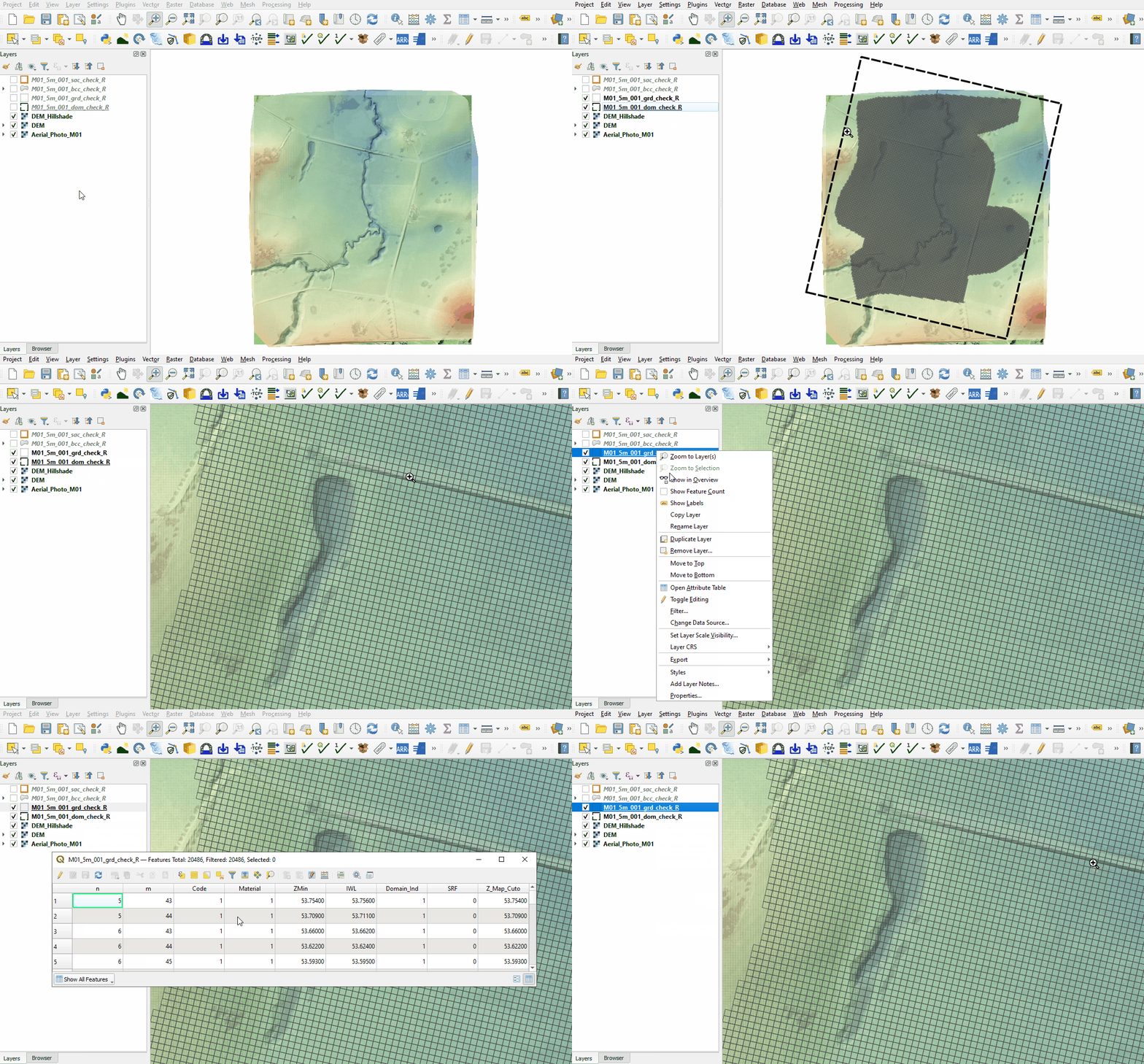
- The dom_check contains a rectangle of the 2D domain showing the location, orientation and size of the domain. Within this domain, cells can be turned on and off, outside of this domain no 2D calculations are performed. This domain is created using the Origin, Orientation, and Grid Size (X,Y) commands in the TGC.
- The grd_check is the 2D grid defined by the 2d_code layer and contains a region object for each cell. It is useful to understand how the model is orientated, the cell size in relation to the hydraulic features and where certain calculations occur in the model. In this tutorial, the grid is orientated to align with the downstream road.
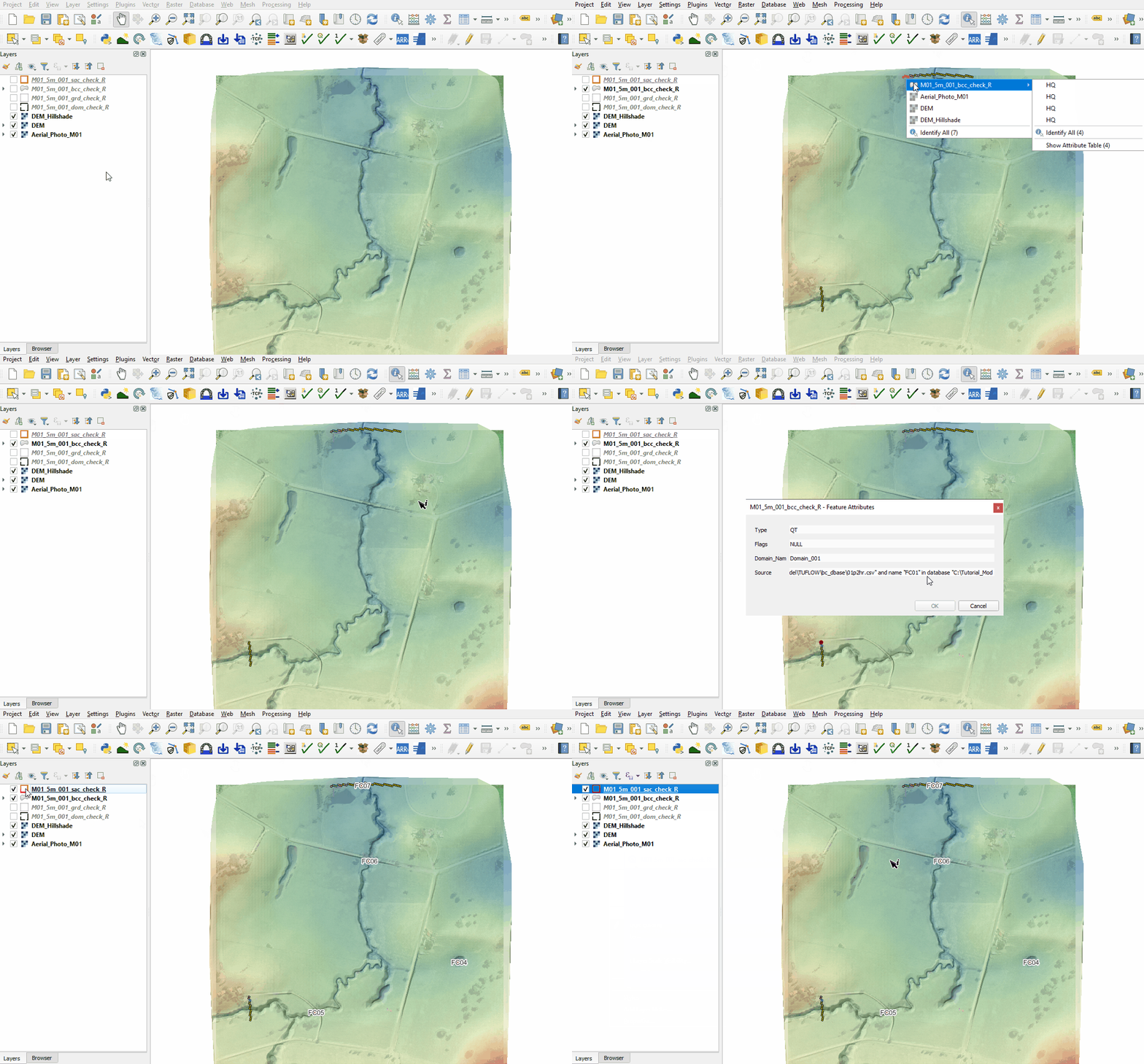
- The bcc_check contains information on the 2D boundaries used in the 2d_bc layer. It this tutorial, it includes an upstream and downstream boundary.
- The sac_check is related to the 2d_sa boundary layer and, by default, shows the lowest cell in every polygon where the hydrograph is applied to.


Review raster check files:
- Open the following files from the Module_01\TUFLOW\check folder (hold Ctrl to select multiple):
- M01_5m_001_DEM_Z.tif
- M01_5m_001_DEM_M.tif
- Right click on the original DEM and select Styles > Copy Style. Right click on the DEM_Z and select Styles > Paste Style.
- The DEM_Z grid shows the final elevations used for the model calculations. The default size of the grid cells is half the smallest 2D cell size. In this tutorial it is 2.5m.
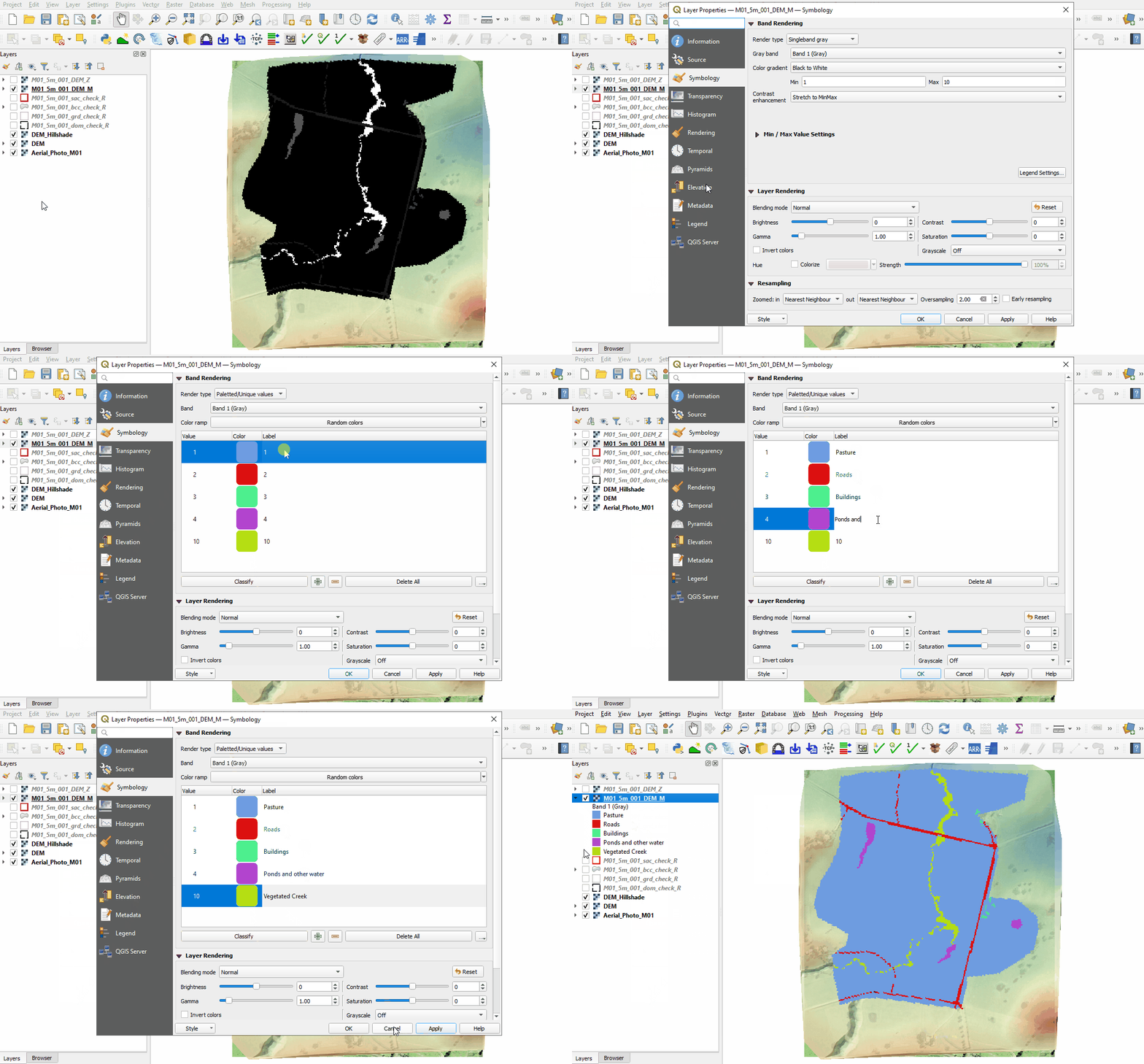
- Right click on the DEM_M file and select 'Properties'.
- From 'Render Type', select 'Paletted/Unique Values'.
- Click 'Classify', five unique values appear referring to the materials specified in the 2d_mat and materials.csv files. Click 'OK'
- The DEM_M shows the final material ID values. Change the labels to match the material class as shown below.


Conclusion
- The dom_check and grd_check confirmed the location of the model, the active cell extent and orientation of the cells.
- The bcc_check and sac_check revealed the spatial application of the external and internal boundaries.
- The DEM_Z and DEM_M rasters were used to review the model elevation and land use.
| Up |
|---|
 Back to Module 1 Main Page Back to Module 1 Main Page
|