TUFLOW SWMM Tutorial M01 Check QGIS: Difference between revisions
Jump to navigation
Jump to search
Content deleted Content added
Chris Huxley (talk | contribs) |
Chris Huxley (talk | contribs) No edit summary |
||
| Line 7: | Line 7: | ||
<ol> |
<ol> |
||
<li>Open the files, either: |
<li>Open the files, either: |
||
:*Within the QGIS Browser Panel, navigate to '''TUFLOW_SWMM_Module_01\TUFLOW\check\TS01_5m_001_Check.gpkg''' and double click the following layers, or |
:*Within the QGIS Browser Panel, navigate to '''TUFLOW_SWMM_Module_01\TUFLOW\check\TS01_5m_001_Check.gpkg''' and double click the following layers, or |
||
::*'''TS01_5m_001_grd_check_R''' |
::*'''TS01_5m_001_grd_check_R''' |
||
::*'''TS01_5m_001_nwk_C_check_L''' <font color="red">'''<< review check files after model has run to see if these refereences are valid... >>'''</font> |
::*'''TS01_5m_001_nwk_C_check_L''' <font color="red">'''<< review check files after model has run to see if these refereences are valid... >>'''</font> |
||
::*'''TS01_5m_001_1d_to_2d_check_R''' |
::*'''TS01_5m_001_1d_to_2d_check_R''' |
||
:*In |
:*In Windows Explorer, navigate to the '''TUFLOW_SWMM_Module_01\TUFLOW\check''' folder, drag and drop the '''TS01_5m_001_Check.gpkg''' into the QGIS workspace and select the layers above (hold Ctrl to select multiple). |
||
<li>Use the 'Apply TUFLOW Styles to Open Layers'. |
<li>Use the 'Apply TUFLOW Styles to Open Layers'. |
||
<li>Use the 'Apply GPKG Layer Names'. |
<li>Use the 'Apply GPKG Layer Names'. |
||
Revision as of 08:21, 28 November 2023
This tutorial introduces:
Review the check files:
- Open the files, either:
- Within the QGIS Browser Panel, navigate to TUFLOW_SWMM_Module_01\TUFLOW\check\TS01_5m_001_Check.gpkg and double click the following layers, or
- TS01_5m_001_grd_check_R
- TS01_5m_001_nwk_C_check_L << review check files after model has run to see if these refereences are valid... >>
- TS01_5m_001_1d_to_2d_check_R
- In Windows Explorer, navigate to the TUFLOW_SWMM_Module_01\TUFLOW\check folder, drag and drop the TS01_5m_001_Check.gpkg into the QGIS workspace and select the layers above (hold Ctrl to select multiple).
- Use the 'Apply TUFLOW Styles to Open Layers'.
- Use the 'Apply GPKG Layer Names'.
- The grd_check is the 2D grid defined by the 2d_code layer and contains a region object for each cell. It is useful to understand how the model is orientated, the cell size in relation to the hydraulic features and where certain calculations occur in the model. In this tutorial, the grid is orientated to align with the downstream road.
- The nwk_C_check_L file shows all attributes applied to the network elements. Some fields should be inspected as they have changes from the input 1d_nwk_M03_culverts layer:
- Len_or_ANA: contains the length used by TUFLOW (determined by the digitised line).
- pSlope: the slope of the 1D element.
<< Add video >> - The 1d_to_2d_check_R file shows the cells selected by the SX boundary links. It is recommended the same number of linking cells is selected at both the upstream and downstream of the culverts and that the number of selected cells is proportional to the structure size. Zoom to each structure to inspect the SX links:
- The point SX selects a single cell in which the point falls.
- The region SX selects all cells where the cell centers fall within the region.
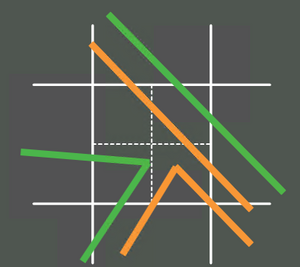
- The line SX selects cells which are intercepted by the line using the crosshair approach. For example, the dashed lines below are the hidden crosshairs within a cell. An SX line must intersect at least one of these crosshairs to be selected:
- The point SX selects a single cell in which the point falls.
<< Add video >>
