New User Guide Local Software Licences
This page of the Wiki is relevant to people with a TUFLOW Local Software Lock licence.
- Download the latest executable and manual from the Downloads page of the TUFLOW website.
- Install Licencing Dongle Drivers (CodeMeter RunTime Kit) on your computer.
- Obtain your software lock licence request file for sales@tuflow.com by following these steps: Request Licence File.
- Sales will email you an updated licence file. Follow these instructions to import the update: Import the licence.
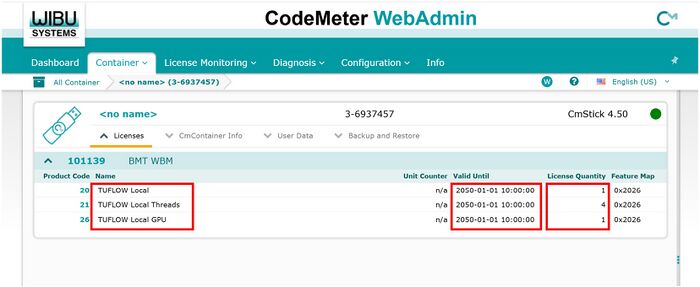
- After importing the licence update, use Codemeter WebAdmin to review your licence type and count are as expected.
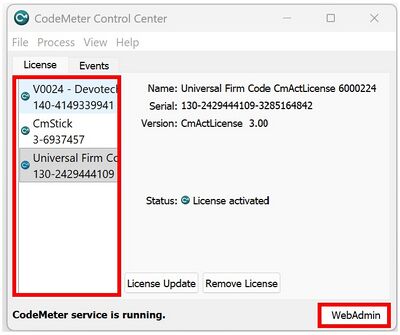
- Open Codemeter Control Center via the Windows Start Menu.
- Select the relevant licence container from the lefthand panel, then click WebAdmin.
- Navigate to the Container section of WebAdmin via the drop menu options. Your licence summary will be displayed. Review the details (the licence types and numbers will be different to the example shown below).
Note:- All computers running TUFLOW must have Licensing Dongle Drivers (CodeMeter RunTime Kit) installed and a software licence assigned to the computer for a simulation to initialise. The Licence Update Request and Import steps listed above should only be required once annually to renew the software licence and provide access to new major releases of the software (unless licence configuration changes are requested).
- The TUFLOW exe is not an installer. TUFLOW is a standalone console application. As such, with exception of the Codemeter licencing software, no installation is technically required. If you are new to TUFLOW and need advice how to run a TUFLOW simulation, please complete the eLearning training referenced in the following bullet point.
- You are now ready to start TUFLOW modelling. There are multiple options available to help you learn TUFLOW:
- Free TUFLOW eLearning courses.
These courses are hosted online 24/7. They includes step by step lessons comprising of a combination of written notes, background content videos, demonstration videos and hands-on exercises:
Other paid eLearning courses are also available via the TUFLOW Training Course Catalogue
- TUFLOW Wiki Self-teach Tutorials
- Example Models
This database includes over 60 example models demonstrating the most commonly used TUFLOW features. Use these models to learn how to implement features not explicitly covered in the TUFLOW eLearning or Wiki Tutorials.
- Free TUFLOW eLearning courses.
- Run TUFLOW using the options listed in the Running TUFLOW section of the Wiki:
- Other resources that may be useful include:
- Other useful information in the Wiki. In particular new users often find the Tips and Tricks section of the homepage and the Modelling Guidance sections useful.
- If you're interested in becoming a part of the TUFLOW User Community please join the TUFLOW LinkedIn User Group.
- Please email support@tuflow.com if you have any technical questions or sales@tuflow.com if you would like to rent additional licences temporarily, purchase additional licences or add-on modules. Price information is available from the Pricing page of the TUFLOW website

